Welcome to the Lost Crew Rescue Company. A shipful of children is stranded, and the Company has taken The Big Contract to bring every last one home.
Wendy Darling, the operations lead — who assigns every task in “thimbles” of responsibility and refuses to explain the unit — has the same problem Scrooge had last notebook, only worse. A rescue isn’t a straight line. Some children need a medic; some need an escort; some are ready to go. The plan has to make decisions and repeat itself for every child, and it’s far too big to write as one block — it has to be broken into reusable pieces.
That’s this entire notebook: programs that choose, programs that repeat, and programs broken into named, reusable parts.
The Roadmap
The parts of this notebook and what each one covers.
Part
What you’ll learn
Making decisions
if / elif / else, nested decisions, and / or / not
Everything builds on Notebook 3: a loop’s condition is just a boolean expression, and the workflow is still problem → pseudocode → flowchart → Python → verify.
Notebook 3 left one shape greyed-out in the flowchart legend: the decision diamond. Every program so far ran straight down, top to bottom. That ends now — the diamond comes alive in the very next section.
Same habit as last notebook: most code cells open with a # ⬇️ CHANGE THESE block. Edit the values, press Shift + Enter, watch the behaviour change. Loops and conditionals are best understood by poking them until they surprise you.
Making Decisions: if
Tinker Bell handles signals. She can hold exactly one feeling at a time — she is, functionally, a single bool. The gate either opens or it doesn’t.
An if statement runs a block of code only when a condition is True. The condition is exactly the kind of boolean expression you built in Notebook 3.
if <condition>:
    <do this, only if the condition is True>
Two things Python is strict about: the colon after the condition, and the indentation of the block. The example below opens a gate only for the right password — change it and re-run.
# ⬇️ CHANGE THIS, THEN RE-RUNpassword ="pixie"# ----------------------------------if password =="pixie":print("Tinker Bell flares green.")print("The gate opens.")print("(the check is over)")
Tinker Bell flares green.
The gate opens.
(the check is over)
Understanding the Code
password == "pixie" is a boolean expression — True or False (note ==tests, =assigns; the NB 3 trap).
Both indented lines run together, only when the condition is True. They are the block.
print("(the check is over)") is not indented, so it runs every time. Change password to anything else: the green-flare lines vanish, the last line stays.
elif and else: Choosing One of Many
Captain Hook runs the rival outfit by rigid Articles: a table of rules where exactly one applies. That’s if / elif / else:
if — checked first
elif (“else if”) — checked only if the ones above were False; you can have many
else — the catch-all when nothing above matched
Python checks them top to bottom and stops at the first True. The next cell sets a crew member’s share by rank — try each rank.
# ⬇️ CHANGE THIS, THEN RE-RUNrank ="bosun"# ----------------------------------if rank =="captain": share =50elif rank =="bosun": share =20elif rank =="deckhand": share =10else: share =0print(f"Hook's Articles grant a {share}% share.")
Hook's Articles grant a 20% share.
Understanding the Code
With rank = "bosun": the if is False, the first elif is True → share = 20, and Python skips the rest entirely. deckhand and else are never even looked at.
Order matters. If two conditions could both be true, the first one wins.
else has no condition — it’s whatever’s left. Try rank = "stowaway": nothing matches, so else gives share = 0.
✏️ Your Turn — Sort the Arrivals
A child arrives at the rescue ship. Set status to "medical", "escort", or anything else, then use if / elif / else to print where they go: medical → To the sick bay, escort → Assign an escort, anything else → Cleared to board.
# ⬇️ CHANGE THIS, THEN RE-RUNstatus ="escort"# ----------------------------------# TODO: print a different message for medical / escort / anything else.
The Same Logic, as a Flowchart
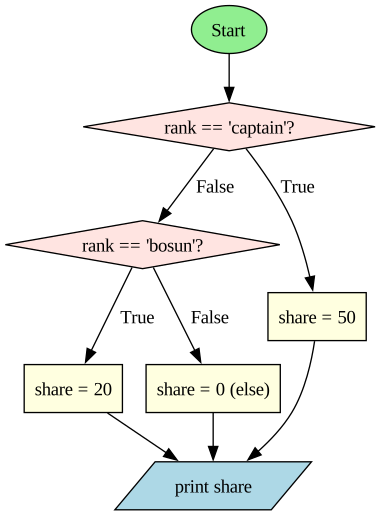
Here is the if/elif/else above, drawn as a flowchart — the decision diamond Notebook 3 promised. Trace it like the code: enter at Start, follow a True or False arrow out of each diamond, and notice every path ends at the same print.
Reading it: each diamond is one condition; the True arrow runs that branch, the False arrow falls through to the next test. Exactly one yellow box is ever reached. That single-path-through is the visual definition of if/elif/else.
Decisions Inside Decisions
A decision can live inside another. The Sentry, Doran Holt — who won’t let his own mother in without the password — needs two things true, in order: first a valid password, then a place on the list. The next cell nests one if inside another.
# ⬇️ CHANGE THESE, THEN RE-RUNhas_password =Trueon_the_list =False# ----------------------------------if has_password:if on_the_list:print("Welcome aboard.")else:print("Password ok — but you're not on the list.")else:print("No password, no entry.")
Password ok — but you're not on the list.
Understanding the Code
The indentation level shows the nesting: the inner if/else is two levels deep, so it only runs when the outer if is True.
This same logic could be written with and from Notebook 3: if has_password and on_the_list:. Nesting is clearer when the two checks need different messages; and is shorter when they don’t. Both are valid — choose the readable one.
Combining Conditions: and, or, not
One test often isn’t enough. Hook won’t pay out unless a crew member is both signed to the Articles and present at muster. Python joins tests with three words:
and — True only when both sides are true
or — True when at least one side is true
not — flips a value: not True is False
The next cell decides whether a crew member gets paid.
# ⬇️ CHANGE THESE, THEN RE-RUNsigned =Truepresent =Truedeserted =False# ----------------------------------if signed and present andnot deserted:print("Pay this crew member.")elif signed or present:print("Hold for review.")else:print("No claim.")
Pay this crew member.
✏️ Your Turn — Clear for Takeoff
The ship may launch only if it has fuel and the crew is aboard and it is not storming. Set the three boxes below, then print a single True/False for whether it can launch.
# ⬇️ CHANGE THESE, THEN RE-RUNhas_fuel =Truecrew_aboard =Truestorming =False# ----------------------------------# TODO: print one True/False value: can the ship launch?
Understanding the Code
signed and present and not deserted is True only when all three parts hold: signed is True, present is True, and deserted is False (so not deserted is True).
Python reads not first, then and, then or — like × before + in maths. When in doubt, add brackets: (signed and present) or captain makes the grouping plain.
Short-circuit: with and, if the first part is False, Python doesn’t bother checking the rest — the answer can’t change. or stops at the first True. Put the cheapest or most likely test first.
Repeating Until Done: while
Peter Pan is the field agent who never quits. A while loop is his whole personality: repeat a block as long as a condition stays True.
while <condition>:
    <repeat this block>
The condition is re-checked before every pass. Use while when you don’t know in advance how many repetitions you’ll need — only the condition that means “stop.” The next cell counts a clock down to zero.
The crocodile clock ticks: 5 left
The crocodile clock ticks: 4 left
The crocodile clock ticks: 3 left
The crocodile clock ticks: 2 left
The crocodile clock ticks: 1 left
Time's up. Tick tock.
Understanding the Code — the Three-Part Loop
Every safe while loop has three parts. Lose one and it breaks:
Initialise — minutes = 5 before the loop.
Test — while minutes > 0: re-checked each pass.
Progress — minutes = minutes - 1moves the variable toward the stop condition.
The line that matters most is the progress line. Delete it and minutes is always 5, the condition is always True, and the loop runs forever.
⚠️ The Infinite Loop
Peter Pan refuses to grow up. As code, he is a loop with no progress toward its exit:
age =10while age <18:print("Peter refuses to grow up.")# age never changes -> the condition is always True -> forever
(Deliberately not a runnable cell.) If you ever start one by accident, stop it in Colab with the ⏹ button or Runtime → Interrupt execution. The cure is always the same: make sure something inside the loop moves the test toward False.
Will It Always Stop?
Peter’s loop never ends because nothing moves it toward the exit. That points at a quiet promise every loop makes: something inside it must change so the condition will eventually become False. Break that promise and the loop runs forever.
Now a question that sounds easy and isn’t: could you write one program that reads any loop and decides whether it will ever stop? For a small loop, sure — you trace it by hand. But in general, no program can answer that question for every possible loop. That isn’t a gap in our cleverness; it was proven impossible. The result is called the halting problem, and we meet it properly in Notebook 7. For now, notice where you are: you bumped into one of the deepest limits in all of computer science just by writing a while loop.
💭 Think About It — Will It Always Stop?
You saw that a loop with the wrong condition can run forever. Sometimes it’s obvious a loop will end; sometimes it really isn’t.
For an everyday process (boiling pasta, waiting for a bus, searching your room for your keys), how do you know it will eventually finish? Is that guarantee built into the steps, or do you just trust it?
Can you describe a set of instructions that might run forever for some starting inputs but stop for others?
Why might it matter — for software running a plane or a hospital monitor — to be certain a program will always finish what it started?
There are no single right answers here — share a sentence or two on each.
The while Loop, as a Flowchart
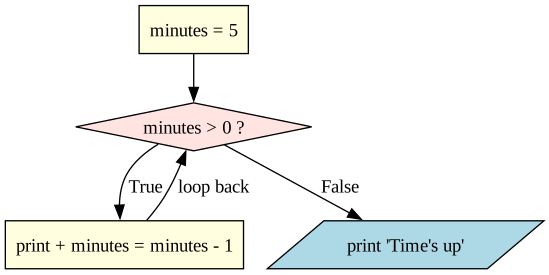
A while loop is the first flowchart with an arrow that goes backwards. Watch the “loop back” edge: the diamond is tested, the body runs, and control returns to the diamond — over and over, until the test is finally False.
Reading it: the loop back arrow is the repetition. The only way out is the False edge — which only happens because the body changes minutes. No backward arrow that can ever turn False = infinite loop.
✏️ Your Turn — Count the Pixie Dust
The ship burns one measure of pixie dust each minute. Start with some dust and use a while loop to print how much is left each minute until it runs out, then print Out of dust!. Make sure something changes each pass — otherwise you’ll loop forever.
# ⬇️ CHANGE THIS, THEN RE-RUNdust =5# ----------------------------------# TODO: while dust > 0, print how much is left, then reduce dust by 1.# After the loop, print "Out of dust!".
Repeating a Known Number of Times: for
Nana, head of safety, patrols the whole nursery every night, in order, and counts every child twice because once is not rigorous. When you know exactly what to step through, use a for loop.
range(1, n + 1) produces 1, 2, ..., n (the + 1 because range stops before its second number — the rule from Notebook 1’s loops). The next cell patrols a fixed number of children.
# ⬇️ CHANGE THIS, THEN RE-RUNchildren =4# ----------------------------------for child inrange(1, children +1):print(f"Nana checks child #{child}")print("Nursery secure.")
child is the loop variable. Each pass it automatically takes the next value from range — you never update it yourself (the difference from while).
The loop runs a known number of times: exactly children. No infinite-loop risk — range is finite.
Use for when you can say “do this once for each ”; use while when you can only say ”keep going until ”.
Looping Directly Over a List
A for loop doesn’t need range at all — it can step straight through a list, handing you each item in turn. This is the cleanest loop in Python, and the next cell walks a roster of names.
# ⬇️ CHANGE THIS LIST, THEN RE-RUNroster = ["Wendy", "John", "Michael"]# ----------------------------------for name in roster:print(f"Accounted for: {name}")print(f"{len(roster)} children on the roster.")
Accounted for: Wendy
Accounted for: John
Accounted for: Michael
3 children on the roster.
Understanding the Code
for name in roster: walks the list element by element; name is each child in turn. No range, no indexing.
len(roster) is the list’s length (the same len from Notebook 3). Lists get a full notebook of their own next — here they’re just something to loop over.
Totalling With an Accumulator
Looping is most useful when each pass adds to a running total. You’ve seen this exact pattern before — Notebook 1’s Lovelace factorial used running_product. The next cell uses the same idea to total supplies across a roster.
# ⬇️ CHANGE THESE, THEN RE-RUNsupplies_per_child =3roster = ["Wendy", "John", "Michael", "Tootles"]# ----------------------------------total =0# the accumulator — start emptyfor name in roster: total = total + supplies_per_childprint(f"Pack {total} supply units for {len(roster)} children.")
Pack 12 supply units for 4 children.
✏️ Your Turn — Total the Supplies
Each child needs a different number of supplies. Use a for loop and an accumulator to add up the list below and print the total. (Try an empty list too — what should it print?)
# ⬇️ CHANGE THIS LIST, THEN RE-RUNneeds = [3, 1, 5, 1, 3]# ----------------------------------# TODO: start total = 0, add each value in needs with a for loop,# then print the total.
Understanding the Code
This is the accumulator pattern, now inside a real loop:
Initialise before the loop:total = 0.
Update inside the loop:total = total + supplies_per_child, once per child.
Use after the loop: print it.
Initialise / update / use. Almost every “add up / count / collect” task is this pattern — the same shape as Lovelace’s running_product.
Steering Loops: break and continue
Two keywords change a loop’s flow, and both are almost always guarded by an if:
break — leave the loop immediately, skip whatever’s left.
continue — skip the rest of this pass and jump to the next one.
The next cell searches a roster: it skips one name and stops entirely at another.
# ⬇️ CHANGE THESE, THEN RE-RUNroster = ["Wendy", "John", "Slightly", "Michael", "Nibs"]looking_for ="Slightly"# ----------------------------------for name in roster:if name =="John":continue# skip John, keep searchingif name == looking_for:print(f"Found {name}! Stop the search.")break# leave the loop entirelyprint(f"Checked {name}")print("Search ended.")
Checked Wendy
Found Slightly! Stop the search.
Search ended.
✏️ Your Turn — Find the Stowaway
Loop through roster, printing each name you check. The moment you reach "stowaway", print Caught! and break out of the loop.
# ⬇️ CHANGE THESE, THEN RE-RUNroster = ["Wendy", "John", "stowaway", "Michael"]# ----------------------------------# TODO: loop the roster; print each name; when you hit "stowaway",# print "Caught!" and break.
Understanding the Code
continue at John: the print(f"Checked ...") line is skipped for John only; the loop moves straight to Slightly.
break at Slightly: the loop stops dead. Michael and Nibs are never checked.
This is nested logic: an if inside a for. Most real loops look like this — repetition wrapped around decisions.
Loops Inside Loops
A loop can contain another loop. Nana’s rounds aren’t one night — they’re every child, every night. The next cell puts a child-loop inside a night-loop.
# ⬇️ CHANGE THESE, THEN RE-RUNnights =2children =3# ----------------------------------for night inrange(1, nights +1):for child inrange(1, children +1):print(f"Night {night}: Nana checks child #{child}")
Night 1: Nana checks child #1
Night 1: Nana checks child #2
Night 1: Nana checks child #3
Night 2: Nana checks child #1
Night 2: Nana checks child #2
Night 2: Nana checks child #3
Understanding the Code
The inner loop runs fully for each single pass of the outer loop. Outer at night 1 → inner counts all 3 children → then outer moves to night 2.
Total lines printed = nights × children = 2 × 3 = 6. Nested loops multiply; that matters a lot for speed later in the course.
Indentation depth shows the nesting — read it like an outline.
The Three Building Blocks: Why This Is All You Need
Stop and notice something big. You have now seen every kind of control flow there is — not “the ones we had time for,” but every kind. Any algorithm, however huge, is built from just three structures:
Sequence — do one step, then the next, in order. (Notebook 3’s straight-line code.)
Selection — choose between paths. (if / elif / else.)
Iteration — repeat a block. (while and for.)
That is the whole toolkit. A flight controller, a search engine, a video game — all of it is sequence, selection, and iteration, nested and combined. There is no secret fourth kind of control flow waiting in a later chapter.
This isn’t just a tidy observation — it’s a proven theorem. In 1966, Corrado Böhm and Giuseppe Jacopini showed that those three structures are enough to express any computation at all. It’s called the structured program theorem, and it settled a real fight.
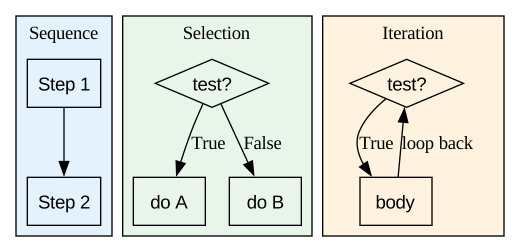
Early programmers leaned on a command called goto, which could jump to anywhere else in the code. Programs became “spaghetti” — tangled jumps no human could follow. Böhm and Jacopini proved goto was never necessary: sequence, selection, and iteration can do everything it could, in an orderly way. Modern languages quietly retired goto, and Wendy’s rescue plans stay readable because of it. The diagram below shows the three shapes — the entire grammar of control flow.
💭 Think About It — Is That Really All There Is?
You just learned that sequence, selection (if), and repetition (loops) are enough to express any algorithm at all.
Does it surprise you that everything a computer does reduces to just these three? Can you think of something a computer does that feels like it must need more — and guess how it might actually be built from the three?
Human instructions from a coach, teacher, or parent rarely sound like pure sequence/selection/repetition. What do humans add that these three building blocks leave out?
If these three are all you truly need, why do programming languages bother having so many other features? What might they be for?
There are no single right answers here — share a sentence or two on each.
Reading it: Three shapes, left to right — a straight line (sequence), a fork (selection), and a loop-back arrow (iteration). Every program you ever write or read is some arrangement of just these three. That’s a genuinely surprising fact, and it’s the theoretical heart of this notebook.
Decomposing Problems into Functions
Wendy Darling never tackles The Big Contract as one job. She splits it into named sub-tasks, solves each once, and reuses them. That is decomposition, and the tool is the function.
You met def informally in Notebook 1. Here it is, precisely:
def name(parameters):
    <body>
    return <a value>
Parameters are named inputs the caller fills in.
return hands exactly one value back.
Calling it — name(arguments) — is itself an expression that becomes the returned value. The next cell defines and calls one.
def supply_units(children, per_child):return children * per_child# ⬇️ CHANGE THESE CALLS, THEN RE-RUNneeded = supply_units(4, 3)print(f"Pack {needed} units.")print(supply_units(10, 2))
Pack 12 units.
20
Understanding the Code
def supply_units(children, per_child): defines the function but does not run it. Nothing happens until it’s called.
supply_units(4, 3) calls it: children becomes 4, per_child becomes 3, the body runs, return hands back 12.
needed = supply_units(4, 3) stores that returned value; print(supply_units(10, 2)) uses it directly. The call behaves exactly like the value it returns.
A Function Is a Black Box
Here’s the deeper idea hiding inside def. Once Wendy has supply_units, she can use it without remembering how it works inside. The function’s name and its inputs and output are its interface — the promise. The code in the body is the implementation. The caller is free to ignore the implementation entirely.
That separation is abstraction, and it is arguably the single most important idea in computer science: hide the details behind a simple surface so you can think about one thing at a time. You already trust it constantly — print() and int() are black boxes you use every day without ever reading their source code. Every function you write becomes one more black box that future-you, or a teammate, can build on without reopening it.
This is also why we decompose. A big problem split into well-named functions is a stack of black boxes, each small enough to understand and test on its own. Solving a problem by breaking it down until each piece is easy, then building back up, is called top-down design — the core problem-solving move in computer science.
Decomposition has a second payoff: it kills repetition. Write a rule once, in one function, and call it everywhere instead of copying the logic. Programmers have a name for this principle — DRY: Don’t Repeat Yourself. Repeated code is repeated bugs; a single function is a single place to fix.
return vs print
This is the single most common point of confusion with functions, so it gets its own example. return and print look similar but do completely different things. The next cell defines one function that returns and one that only prints, then inspects what the caller actually gets back.
def adds(a, b):return a + b # hands the value backdef shows(a, b):print(a + b) # only displays it; returns nothingr = adds(2, 3) # r holds 5s = shows(2, 3) # prints 5, but s holds Noneprint("r =", r, " s =", s)
5
r = 5   s = None
✏️ Your Turn — Write a Function
Write a function supplies_for(children, per_child) that returns the total supplies needed (children × per_child). Then call it and print the result. Return the value — don’t print inside the function.
# TODO: define supplies_for(children, per_child) that RETURNS children * per_child,# then call it and print the result.# def supplies_for(children, per_child):# ...
Understanding the Code
return gives a value back to the program — you can store it, do maths with it, pass it on.
print only puts text on the screen — the program gets nothing back.
A function with no return automatically returns None. That’s why s is None: shows printed 5 but handed nothing back. If a function’s result “disappears,” you almost certainly printed where you meant to return.
Scope: A Box That Stays Inside
Remember the “named box” from Notebook 3? Inside a function, a variable lives in a box that only exists while that function runs. The next cell makes a local variable, returns it, and then tries to peek at it from outside.
def brew(): secret ="pixie dust"# a LOCAL box — exists only inside brew()return secretprint(brew()) # works: 'pixie dust'# Uncomment the next line to see the error scope protects you from:# print(secret) # NameError: 'secret' is not defined out here
pixie dust
Understanding the Code
secret is local to brew(). When the function returns, the box is thrown away.
Using secret outside is a NameError — out there, the name was never defined.
Parameters are local too. This is why functions are safe building blocks: their internals can’t collide with names elsewhere. Decomposition works because each piece is sealed.
Picture It: Arguments In, Value Out
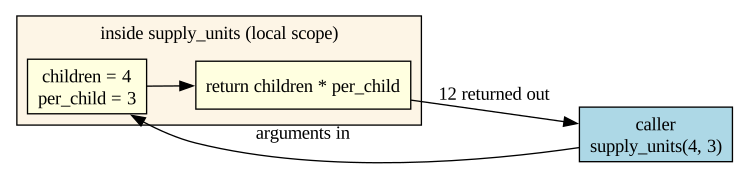
A function call is a small round trip. The diagram below shows it: the caller passes arguments in, the function works in its own sealed local scope, and a single value comes back out.
Reading it: the shaded box is the local scope — children and per_child exist only in there. The caller never sees inside; it only sends arguments in and receives one value out. That sealed boundary is exactly what makes functions reusable.
Default Values and Keyword Arguments
A parameter can carry a default value, used only when the caller leaves it out. And when a function takes several parameters, you can name them at the call so you don’t have to remember the order. The next cell gives per_child a default and shows both ways to call.
def supply_units(children, per_child=3):return children * per_childprint(supply_units(4)) # per_child defaults to 3 → 12print(supply_units(4, 5)) # override by position → 20print(supply_units(children=10, per_child=2)) # named arguments → 20print(supply_units(per_child=2, children=10)) # named → order doesn't matter → 20
12
20
20
20
Understanding the Code
per_child=3 is a default. supply_units(4) leaves it out, so per_child is 3. Defaults let one function handle both the common case and the special case.
Arguments by position (supply_units(4, 5)) match left to right. Arguments by keyword (children=10, per_child=2) name each one, so order stops mattering and the call reads like a sentence.
Rule of thumb: parameters with a default come after those without. def f(a, b=1) is fine; def f(a=1, b) is an error.
Docstrings: Saying What a Function Does
A function that works but nobody understands is a liability. A docstring is a short string written as the first line inside the function. It’s the standard place to say, in one sentence, what the function does — and Python reads it back through help(). The next cell adds one.
def supply_units(children, per_child=3):"""Return the total supply units needed for a group of children."""return children * per_childhelp(supply_units) # Python prints the docstringprint(supply_units.__doc__) # ...or read it directly
Help on function supply_units in module __main__:

supply_units(children, per_child=3)
    Return the total supply units needed for a group of children.

Return the total supply units needed for a group of children.
✏️ Your Turn — Document It
Take your supplies_for function from above. Give per_child a default of 3, add a one-line docstring saying what it does, then call it once using a keyword argument.
# TODO: add a default (per_child=3) and a docstring, then call with a keyword arg.# def supplies_for(children, per_child=3):# """..."""# ...
Understanding the Code
The triple-quoted line right under def is the docstring. It doesn’t change what the function does — it documents it.
help(supply_units) and supply_units.__doc__ both read it back, and Colab shows it as a tooltip when you call the function.
A good docstring says what the function returns and what the inputs mean — not how every line works. One clear sentence beats a paragraph.
The Workflow, With Functions: the Lost Crew Supply Run
Now decomposition pays off on a real problem, through the full workflow. Wendy’s problem, stated plainly:
Given a roster where each child has a status ("medical", "escort", or anything else meaning "ready"), compute the total supply units the rescue needs. Medical children need 5, escort children need 3, ready children need 1.
Inputs:roster (a list of status strings)
Output: total supply units (an integer)
Decomposition: one function decides one child (assess); another loops the whole roster and accumulates (mission_total).
Step 2 — Pseudocode
FUNCTION assess(status):
  1. IF status = "medical":  RETURN 5
  2. IF status = "escort":   RETURN 3
  3. OTHERWISE:              RETURN 1

FUNCTION mission_total(roster):
  1. SET total = 0
  2. FOR each status in roster:
       2a. SET total = total + assess(status)
  3. RETURN total
Two small algorithms. mission_totalcallsassess — a function using a function. That’s decomposition in one picture.
Step 3 — The Flowchart
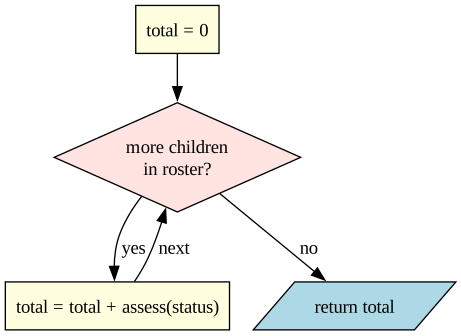
Here is mission_total as a flowchart. Notice it’s a for loop over the roster with the accumulator inside — and each pass calls assess to decide that one child.
Reading it: the diamond is the for loop’s “any more items?” test; the yes arrow loops back through the accumulator; the no arrow leaves with the finished total. The assess(status) call hides a whole second flowchart inside one box — that’s the power of decomposition.
Step 4 — The Python
Now translate both pseudocode functions line for line. Editable roster at the top so you can test it; the verification comes right after.
# ⬇️ CHANGE THIS ROSTER, THEN RE-RUNroster = ["medical", "ready", "escort", "ready", "medical"]# ----------------------------------def assess(status):if status =="medical":return5elif status =="escort":return3else:return1def mission_total(children): total =0for status in children: total = total + assess(status)return totalprint(f"Supplies needed: {mission_total(roster)} units")
Supplies needed: 15 units
Understanding the Code
assess is pure decision logic — one if/elif/else, one return per branch. It handles one child and nothing else.
mission_total is the accumulator pattern (initialise / update / use) looping the roster and callingassess each pass.
The last line is the whole program: call one function, print the result. Each piece is small enough to check on its own — the entire point of decomposition.
Expected assessment value for each status, for checking the function by hand.
status
assess
medical
5
ready
1
escort
3
ready
1
medical
5
Total = 5 + 1 + 3 + 1 + 5 = 15. Run the cell — it should print 15. Predicting the answer before running is the habit; the next section makes it a discipline.
Testing With Edge Cases
Mr. Smee reads the fine print nobody else will. His idea of a threat is “but what if there are zero children?” — and he is always right to ask.
Code that works on the normal input often shatters on the extreme one. Before trusting any function, run Smee’s checklist:
Zero / empty — an empty list, the number 0
Negative — can a count go below zero?
The boundary — exactly the value where behaviour changes
The unexpected — a status nobody planned for
Off-by-one — first and last items of a loop
The next cell looks correct — until Smee asks his question.
def average_supplies(roster):return mission_total(roster) /len(roster)print(average_supplies(["medical", "ready"])) # fine: 6 / 2 = 3.0# Smee asks: what about an empty roster?# Uncomment to see it shatter:# print(average_supplies([])) # ZeroDivisionError
3.0
Understanding the Code
On a normal roster, average_supplies is correct. On an empty roster, len(roster) is 0, and dividing by zero crashes — the exact input Smee warned about.
Nothing in the function is “wrong” on the happy path. The bug only exists at the edge. That’s why you test edges deliberately — the normal case hides them.
The habit: before running, write down what should happen for the weird inputs. Then run and compare. Surprises are bugs.
✏️ Your Turn — Break It (Smee’s Checklist)
The scaffold below re-creates assess, mission_total, and average_supplies. Your job is to break them on purpose.
Find two inputs that break or mislead them — at least an empty roster and an unexpected status (does "VIP" silently count as ready? Is that intended?).
For each, jot down the input, what you expected, and what actually happened.
Fix one — for example, make average_supplies return 0 for an empty roster instead of crashing.
Finding the breaking input is the skill. Smee is delighted when something breaks — that’s a bug caught before the contract failed.
# ✏️ Exercise 3 workspace.def assess(status):if status =="medical":return5elif status =="escort":return3else:return1def mission_total(children): total =0for status in children: total = total + assess(status)return totaldef average_supplies(roster):return mission_total(roster) /len(roster)# ⬇️ TRY BREAKING INPUTS HEREprint(mission_total(["medical", "ready"]))# print(average_supplies([])) # <- start here
6
Practice: PyQuiz
More practice — same drill as Notebook 3. PyQuiz hands you a problem, you fill in the function body, click Run Tests. The bank below is heavier on if/elif/else and loops, since that’s what this notebook taught you.
A reminder on the two accumulator patterns you’ll use a lot:
# sum: start at 0, then +=total =0for i inrange(1, n +1): total += i# product: start at 1, then *=product =1for i inrange(1, n +1): product *= i
Run the cell below to load the practice tool.
# PyQuiz bootstrap — works in Colab or any local Jupyter.import os, urllib.requestREPO ="https://raw.githubusercontent.com/brendanpshea/computing_concepts_python/main"ifnot os.path.exists("pyquiz.py"): urllib.request.urlretrieve(f"{REPO}/tools/python_code_quiz/pyquiz.py", "pyquiz.py")from pyquiz import PracticeToolpractice_tool = PracticeTool( json_url=f"{REPO}/tools/python_code_quiz/banks/nb04_control_flow.json")
✏️ Capstone — Build a Turn-Based Survival Game (AI-Assisted)
This is where the whole notebook comes together. You’ll build a small turn-based game: the player takes one action per turn, the game loops through the turns, each turn decides what happens, and the rules live in functions you write. Decisions, loops, functions — the three things this notebook is about, in one program.
The default theme is the Lost Crew flying home — but pick your own: a dungeon crawl, a spaceship limping to port, a zombie night, a bakery rush before closing. Whatever it is, your game must:
repeat over several turns (a loop),
branch on what the player chooses or what randomly happens (if / elif / else),
be broken into at least one function you wrote (for example, one that resolves a single turn), and
track a resource that rises and falls — pixie dust, health, fuel, money — with a win or lose ending.
Step 1 — Design it first (before the AI). In a markdown cell, jot down: your theme, the resource you track and its starting amount, the 2–3 actions a player can take each turn, what makes each one good or risky, and how the game is won or lost.
Step 2 — Turn your design into a prompt. Fill the blanks and send it to Gemini (or Claude / ChatGPT):
Write a small turn-based text game as a Python program for Google Colab. Theme: [your theme]. The player starts with [N] [resource] and plays up to [number] turns. Each turn they choose one of: [your actions]. Use if/elif/else to resolve the choice and change the resource. Put the per-turn logic in its own function. The game ends when [win condition] or [lose condition]. Show the resource each turn. Keep it short and beginner-readable.
Step 3 — Get the bones working, then test. Paste it into the cell below and run it now. Get the simplest version working first — one action, the resource changes, the loop ends — and check it by hand before adding more.
Step 4 — Add the bells and whistles. Once the core runs, add one or two extras, testing after each: a random event each turn, a second resource, a high score, or a risky action with a big payoff.
Step 5 — Test it like Smee. Try to break it: a turn count of 0, an action that isn’t on the menu, a resource that goes negative. Fix one thing it gets wrong.
Step 6 — Reflect. In a markdown cell, write 2–3 sentences: what did the AI get wrong or what did you improve, and how did you fix it?
Remember the course rule: AI is a fast first draft. You verify.
# ✏️ Paste your AI-built turn-based game here, then run it and fix what's broken.
Key Terms
Conditional — Code that runs only when a condition is True.
if / elif / else — Choose exactly one branch; checked top-down, first True wins.
Nested decision — An if inside another if.
and / or / not — Combine or flip conditions; evaluated not, then and, then or.
Short-circuit — and / or stop checking once the result is already settled.
while loop — Repeats a block while a condition stays True.
for loop — Repeats once for each item in a range or list.
Loop variable — The variable a for loop assigns each pass.
range(a, b) — The integers from a up to but not including b.
Iteration — Repeating a block of code; one of the three control structures. (Also: one pass through a loop body.)
Infinite loop — A loop whose condition never becomes False; nothing makes progress toward the exit.
break / continue — Leave the loop entirely / skip to the next iteration.
Accumulator — A variable that builds a result across loop passes (initialise / update / use).
Function — A named, reusable block: def name(parameters): ... return value.
Parameter / argument — The named input in the definition / the actual value passed in a call.
Default value — A fallback for a parameter, used when the caller omits that argument.
Keyword argument — An argument passed by name (per_child=2), so the call order stops mattering.
Docstring — A one-line string just inside a function that says what it does; read back by help().
return — Hands one value back to the caller; absent return yields None.
None — Python’s “no value” value.
Scope — Where a name is visible; variables made inside a function are local to it.
Decomposition — Breaking a problem into small, separately-testable functions.
Edge case — An extreme or unusual input (empty, zero, negative, boundary) that often exposes bugs.
Nested loop — A loop inside a loop; total passes multiply.
Sequence — The simplest control structure: run steps one after another, in order.
Selection — Choosing between paths (if / elif / else); one of the three control structures.
Structured program theorem — The proven result (Böhm & Jacopini, 1966) that any algorithm can be built from just sequence, selection, and iteration.
goto — An old command that could jump anywhere in the code; shown to be unnecessary and now avoided.
Halting problem — The proven impossibility of writing one program that decides whether any given program will stop; introduced fully in Notebook 7.
Abstraction — Hiding details behind a simple surface (a name, inputs, an output) so you can use something without knowing how it works inside.
Black box — Something you use through its interface without seeing its implementation; a function is one.
Top-down design — Solving a problem by breaking it into smaller sub-problems until each is easy, then building back up.
DRY (Don’t Repeat Yourself) — Write a rule once in a function and reuse it, rather than copying code.
Summary
if / elif / else make a program choose; the condition is a boolean expression; exactly one branch runs.
and / or / not combine conditions into one test, and short-circuit once the answer is settled.
while repeats until a condition turns False — and needs initialise / test / progress, or it loops forever.
for repeats a known number of times — over a range or a list; pair it with an accumulator to total things up.
The three building blocks are everything. Sequence, selection, and iteration are a complete set — the structured program theorem proves no fourth kind of control flow is needed.
Functions are abstraction. Each is a black box with an interface and a hidden implementation; decomposing a problem into black boxes is top-down design, and reusing one function instead of copying code is the DRY principle.
“Does it stop?” is a deeper question than it looks — the halting problem is waiting in Notebook 7.
Edge cases are how you find bugs the normal input hides. Predict, then run, then compare.
Choose, repeat, decompose, test. That’s most of programming.
What’s Next
We’ve been looping over lists and pretending they’re simple. They aren’t — and they’re not the only way to organise data. Notebook 5 is Collections & Abstract Data Types: lists, dictionaries, sets, and tuples, and how choosing the right container makes a problem easy or impossible. Wendy’s roster is about to get a serious upgrade.
COMP 1150 — Computer Science Concepts · Brendan Shea, PhD Content licensed under CC BY 4.0.