Choose the right Python collection — list, tuple, dict, or set — for a given task and justify the choice.
Use indexing, slicing, key lookup, sorting, and set operations to read, update, and re-shape data.
Diagnose an aliasing bug, where two names point at the same list.
Read and build nested data — a list of dictionaries — the shape that almost every real dataset takes.
Rewrite small loops as list and dictionary comprehensions.
Explain the difference between an abstract data type (the promise) and its implementation (the storage), and implement a small ADT yourself.
Maps to course LOs: 6, 8
The Big Contract
Welcome to The Midnight Masquerade, a delightfully creaky costume emporium where six rather famous monsters share one shop floor and a single, much-abused cash register. The lighting flickers on purpose, the cobwebs are decorative, and — to everyone’s eternal frustration — absolutely nothing runs on paper any more.
The three departments of the Big Contract, their proprietors, and the problem each one faces.
Department
Proprietor
Today’s headache
Rentals Desk
Count Dracula
the order list is a heap of bat-shaped sticky notes
Fittings & Deposits
Dr. Victoria Frankenstein
every client has the same four fields, in the same order, forever
Masks & Millinery
The Phantom
nobody can remember the price of a half-mask
Masquerade Balls
Camilla
two guest lists overlap and she needs to know by whom
Fitting Rooms
Mr. Hyde
customers form a line and no one knows whose turn it is
Alterations
Cthulhu
every costume needs the same small adjustment
Each problem is really the same question in different (rather gothic) clothing: what shape of data fits the job?
The Roadmap
The parts of this notebook, the department each one uses as its example, and what you’ll learn.
Part
Department
What you’ll learn
Lists
Dracula’s Rentals Desk
ordered, changeable sequences
Aliasing
Dracula (again)
the most common list bug in Python
Tuples
Frankenstein’s Fittings
fixed records you don’t mean to edit
Dictionaries
The Phantom’s Masks
look up a value by its label; sort by it
Sets
Camilla’s Masquerade Balls
membership, overlap, uniqueness
Nested collections
Camilla’s guest list
lists of dicts — real-data shape
ADTs
Hyde’s Fitting Rooms
the promise of a collection vs. its storage
Most code cells open with a # ⬇️ CHANGE THIS, THEN RE-RUN block. Edit the values, press Run, watch the output move. That is the study method.
Lists: Ordered Things You Can Still Change
Count Dracula works the Rentals Desk at The Midnight Masquerade. Customers shamble up all evening asking for costumes, and Dracula wants them recorded in the order they arrived — first come, first served, no exceptions (he is, after all, a stickler for proper queueing etiquette dating back several centuries). He also reserves the right to cross items off, add a forgotten one, or revise a misheard request.
That is a list: a row of items kept in order, with a position (an index) for each one, and free permission to change the contents later.
Writing a list, reading an item. You write a list as comma-separated values between square brackets, and you reach an item by its index (its position) in another pair of square brackets:
my_list = [item0, item1, item2] # the [ ] make it a list; commas separate itemsmy_list[0] # read the item at position 0 — the first onelen(my_list) # how many items the list holds
Python numbers positions from 0, so the first item is my_list[0] and the third is my_list[2]. Keep that in mind as you read the example below.
# ⬇️ CHANGE THIS, THEN RE-RUNtonights_orders = ["vampire cape", "fake fangs, deluxe", "two bat masks", "coffin (rental)"]# ----------------------------------print(tonights_orders)print("How many orders tonight?", len(tonights_orders))
['vampire cape', 'fake fangs, deluxe', 'two bat masks', 'coffin (rental)']
How many orders tonight? 4
Understanding the Code
tonights_orders is a list — the square brackets [ ] are how Python recognises one.
The items keep the order they were written in. The first entry is at index 0, not 1. Dracula reads top-down; Python counts from zero. (Dracula, who counts everything, finds this deeply satisfying.)
len(tonights_orders) reports the length. It is the single most-used function on a list.
🔮 Predict Before You Run
The next cell prints three things: the item at a chosen index, the last item, and the first two items as a slice. Before pressing Run, write down what each line will print with position = 0. Then run and check. Disagreement is good — that’s where the learning happens.
Reading and Slicing
Dracula wants the very first order (the urgent one) and the last (the most recent). He can ask Python by index.
Indexes and slices. One number in square brackets reads a single item; two numbers split by a colon read a slice (a run of items):
my_list[2] # the single item at position 2my_list[-1] # the LAST item — a negative index counts back from the endmy_list[0:2] # a slice: positions 0 and 1 — the stop number is NOT includedmy_list[:2] # the same slice; a missing start means "from the beginning"
A slice always hands you back a new list; it never disturbs the original.
# ⬇️ CHANGE THIS INDEX, THEN RE-RUNposition =0# ----------------------------------print("Item at position", position, "→", tonights_orders[position])print("Last item →", tonights_orders[-1])print("First two →", tonights_orders[:2])
Item at position 0 → vampire cape
Last item       → coffin (rental)
First two       → ['vampire cape', 'fake fangs, deluxe']
Understanding the Code
todays_orders[0] is the first item. todays_orders[-1] is the last — negative indices count back from the end.
todays_orders[:2] is a slice: a sub-list from the start up to (but not including) position 2. Slices give you a new list; the original is untouched.
Changing the List
Lists are mutable: you can rewrite a slot, append to the end, or remove an item by value. Dracula does all three before midnight.
Three ways to change a list. Three different jobs, three different forms:
my_list.append(x) # add x to the END of the listmy_list[i] = x # overwrite whatever is already at position imy_list.remove(x) # delete the first item equal to x
The .append(...) and .remove(...) forms are methods — actions a list knows how to perform on itself. You write the list, a dot, then the action.
orders = ["vampire cape", "fake fangs, deluxe", "two bat masks", "coffin (rental)"]orders.append("garlic-proof gloves") # add to the endorders[1] ="fake fangs, glow-in-dark"# correct a misheard orderorders.remove("coffin (rental)") # the customer changed her mindprint(orders)
['vampire cape', 'fake fangs, glow-in-dark', 'two bat masks', 'garlic-proof gloves']
Understanding the Code
append(x) adds x to the end of the list. The list grows by one.
orders[1] = ... overwrites position 1. Nothing is added; one entry is replaced.
remove(x) deletes the first matching value. If the item isn’t there, Python raises an error — Dracula would prefer to be told than to lose a sale silently.
Takeaway: reach for a list when the order matters and the contents will change.
✏️ Your Turn — Dracula’s Order Cleanup
Dracula hands you tonight’s list with a couple of mistakes:
In the cell below: (1) replace the second"fangs" with "fangs, glow-in-dark", (2) append"garlic-proof gloves", (3) print the last three orders with a slice, and (4) print how many entries the list now has.
# ⬇️ EDIT / EXTEND THIS, THEN RE-RUNorders = ["cape", "fangs", "masks", "coffin", "fangs", "cane", "masks"]# ----------------------------------# TODO 1: replace the SECOND "fangs" (index 4) with "fangs, glow-in-dark"# TODO 2: append "garlic-proof gloves"# TODO 3: print the last three orders with a slice# TODO 4: print how many entries orders now has
A Trap: Two Names for the Same List
Dracula writes his early-evening list, then makes a “copy” before tweaking it for the after-midnight rush. Or so he thinks.
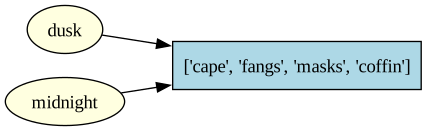
evening = morning does not make a new list. It makes a second name that points at the same list in memory. Editing through one name shows up through the other. Python calls this aliasing, and it catches every beginner.
The diagram below is the picture of what just happened — two arrows, one list.
Reading it: the two yellow ellipses are names; the blue box is the list. Both names point at the same list, so a change made through either name shows up through both.
The Fix: Make a Real Copy
When Dracula genuinely wants an independent second list, he uses .copy() (or the full slice dusk[:], or list(dusk) — all three do the same job).
dusk = ["cape", "fangs", "masks"]midnight = dusk.copy() # NEW list with the same contentsmidnight.append("coffin")print("midnight :", midnight)print("dusk :", dusk) # untouched
dusk.copy() returns a fresh list with the same items inside. Now dusk and midnight are two different lists; editing one leaves the other alone.
Takeaway: mutability is power, but it is also danger. The tuples in the next section avoid this whole family of bugs by refusing to be edited — which is exactly why Dr. Frankenstein prefers them for permanent records.
📋 List Methods Cheatsheet
The list operations from this section, plus a few close cousins worth knowing exist. You don’t need to memorise the right-hand column — just remember this table is here.
Common list methods and what each one does.
Method
What it does
lst.append(x)
Add x to the end
lst.remove(x)
Remove first matching value (errors if absent)
lst.pop(i)
Remove and return item at index i (default: the last)
lst.insert(i, x)
Insert x at position i
lst.extend(other)
Add every item of other to the end
lst.copy()
Return a new, independent list (the fix for aliasing)
lst.sort(key=..., reverse=...)
Sort in place — returns nothing
sorted(lst, reverse=...)
Return a new sorted list — leaves lst alone
len(lst) • x in lst
Length • membership (scans)
Tuples: Fixed Records
Dr. Victoria Frankenstein runs Fittings & Deposits at the back of the shop (she is very good with measurements, having assembled at least one client from scratch). Every fitting arrives as the same four pieces of information, in the same order, every single time: name, height in centimetres, costume, and (most importantly) the deposit paid. She does not invite editing.
A tuple is a list’s stricter cousin: ordered, indexable, and immutable — once built, it cannot be changed. That is not a limitation; it is a promise. When you see a tuple, you know the shape is fixed.
Writing and unpacking a tuple. A tuple looks like a list but uses round brackets, and you can unpack it into several variables in one line:
my_tuple = (value0, value1, value2) # round brackets make a tuplea, b, c = my_tuple # unpacking: a=value0, b=value1, c=value2my_tuple[0] # you can still read by index, like a list
The one thing you cannot do is my_tuple[0] = ... — a tuple flatly refuses to change.
🔮 Predict Before You Run
In the next cell, client is a tuple of four items in the order (name, height_cm, costume, deposit). After unpacking, what will the two print lines show? Predict, then run.
Jonathan Harker is 178 cm tall.
Costume: Dashing Vampire Hunter — deposit: 50 pounds.
Understanding the Code
Round brackets ( ) and commas make a tuple. The four fields are positional: position 0 is the name, position 3 is the deposit — always, no exceptions.
name, height_cm, costume, deposit = client is tuple unpacking: Python hands the four positions to four variables in one line. This is the cleanest way to read a fixed-shape record.
Try client[2] = "Werewolf". Python will refuse. That refusal is the whole point — Dr. Frankenstein does not want her fitting records mutating on their own (she has had quite enough of that).
Returning Two Things at Once
A function can only return one value — but that one value can be a tuple, which is how Python returns “two things” without fuss. Dr. Frankenstein asks her deposit-checking function for both the verdict and a reason.
Returning a tuple, unpacking the result. Build the tuple on the return line, then unpack it where you call the function:
return (first_thing, second_thing) # one tuple, two pieces insidex, y = some_function() # unpack the returned tuple into two names
Verdict: approved
Reason : deposit meets the threshold
Understanding the Code
The function returns one tuple containing two strings. Python lets us pretend it returned two things by unpacking on the receiving line.
This pattern — verdict + reason, value + error, x + y — is how nearly all multi-return Python is written. You will see it again in every later notebook.
Takeaway: use a tuple when the record has a fixed shape and shouldn’t be edited after it’s built. Use a list when the contents will grow, shrink, or be rewritten.
✏️ Your Turn — Frankenstein’s Records
Dr. Frankenstein keeps each client as a tuple (name, height_cm, costume, deposit). A client is approved when their deposit is ≥ 25.
Loop over the clients list below. For each one, unpack the tuple into four variables, then print the client’s name and whether they are "approved" or "declined". Keep a running count of how many were approved, and print that total at the end.
clients = [ ("Jonathan Harker", 178, "Vampire Hunter", 50), ("Lucy Westenra", 165, "Sleepwalking Bride", 20), ("Van Helsing", 170, "Mad Professor", 80), ("Renfield", 160, "Very Large Moth", 15),]approved_count =0# TODO: loop over clients; unpack each tuple into name, height_cm, costume, deposit# TODO: print the name and "approved" (deposit >= 25) or "declined"# TODO: add 1 to approved_count each time someone is approved# TODO: after the loop, print how many were approved
Dictionaries: Look It Up by Name
The Phantom runs Masks & Millinery (she keeps half her own face theatrically hidden, purely for the brand). Her counter carries a dozen mask styles, and at any moment a customer may ask the price of one. The Phantom used to scan a printed list by candlelight. Now she asks Python.
A dictionary stores key–value pairs. Give it the key, and it hands back the value in a single step — no scanning, no counting positions, no order to remember.
Writing a dictionary, looking one up. A dictionary uses curly braces holding key: value pairs, and you look a value up by putting its key in square brackets:
my_dict = {key1: value1, key2: value2} # braces, with a colon between key and valuemy_dict[key1] # hand it a key, get that key's value back
The key goes in square brackets the way an index does — but it’s a label you chose, not a numbered position.
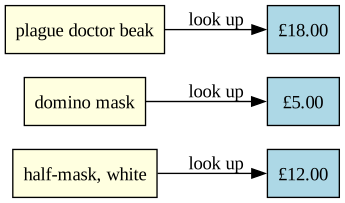
# ⬇️ CHANGE THESE PRICES, THEN RE-RUNmasks = {"half-mask, white": 12.00,"domino mask": 5.00,"plague doctor beak": 18.00,"golden opera mask": 30.00,}# ----------------------------------print("A domino mask costs:", masks["domino mask"])
A domino mask costs: 5.0
Understanding the Code
The curly braces { } and the colons mark a dictionary.
The string on the left of each colon is a key; the number on the right is its value.
masks["domino mask"] is a key lookup. Python goes straight to that entry. It does not walk through the others first.
Adding, Updating, and Checking First
The Phantom adds a new style and corrects a price using the same key = value syntax. She also checks whether something is on the counter before trying to read it — looking up a key that isn’t there is an error.
Assigning and testing membership. One form both adds and updates; in asks whether a key is present:
my_dict[key] = value # adds the key if it's new, overwrites it if it already existsif key in my_dict: # a True/False test — is this key present? ...
masks["cat mask, sequined"] =9.00# add a new keymasks["domino mask"] =6.00# update an existing oneif"half-mask, white"in masks:print("Half-mask, white:", masks["half-mask, white"])if"plain paper mask"notin masks:print("No plain paper masks — the Phantom would never.")
Half-mask, white: 12.0
No plain paper masks — the Phantom would never.
Understanding the Code
Assigning to a new key adds it. Assigning to an existing key overwrites it. Same syntax, two outcomes — Python picks based on whether the key already exists.
key in some_dict returns True or False. Use it whenever you aren’t certain the key is there.
Safer Lookup: .get()
masks["unicorn horn"] crashes when no unicorn horn is on the counter. Often that is what the Phantom wants — but sometimes “missing” should quietly mean zero or not available. The .get() method gives her that option.
print(masks.get("domino mask")) # found → returns 6.00print(masks.get("unicorn horn")) # missing → returns Noneprint(masks.get("unicorn horn", 0.00)) # missing → returns the default we supply
6.0
None
0.0
Understanding the Code
d.get(key) returns the value if the key exists, and None if it doesn’t — without crashing. (None is Python’s “nothing here” value.)
d.get(key, default) returns your chosen default instead of None. The Phantom uses 0.00 when missing means “not for sale tonight.”
Rule of thumb: use .get() when missing is a normal possibility. Use d[key] when missing should be a loud bug.
Walking the Whole Counter
Sometimes the Phantom does want every item — for example, to print the whole price list. The .items() view yields each key and its value together.
Looping over key–value pairs. Use .items() with two loop variables — one for the key, one for the value:
for key, value in my_dict.items():   # one pair handed over per pass of the loop
    ...
for item, price in masks.items():print(f"{item:<22} £{price:.2f}")
half-mask, white       £12.00
domino mask            £6.00
plague doctor beak     £18.00
golden opera mask      £30.00
cat mask, sequined     £9.00
Understanding the Code
masks.items() yields one (key, value) tuple per entry — note the tuples from the last section, quietly working underneath.
The two variables item, price are tuple-unpacked on every pass of the loop. This is the standard way to iterate a dictionary.
Sorting the Counter
The Phantom likes to print her price list in a tidy order — the mask names alphabetically, or the prices from low to high. The built-in sorted() does this. It hands back a brand-new sorted list and leaves the original untouched.
How sorted() reads. Give it a sequence; add reverse=True to flip the direction:
sorted(sequence) # smallest → largest (A → Z for words)sorted(sequence, reverse=True) # largest → smallest (Z → A)
A dictionary plugs straight in: sorted(masks) sorts the keys, and sorted(masks.values()) sorts the values.
print("Names A→Z :", sorted(masks)) # sort the keysprint("Prices low→high:", sorted(masks.values())) # sort the valuesprint("Prices high→low:", sorted(masks.values(), reverse=True))
sorted(some_sequence) returns a new sorted list. The original dictionary is untouched. (There is also list.sort(), which sorts a list in place and returns nothing.)
sorted(masks) sorts the keys (the mask names); sorted(masks.values()) sorts the values (the prices).
reverse=True flips the order, so the most expensive mask comes first.
Takeaway: reach for a dictionary when you want to look something up by name — by a product, a person, an ID. Lists are for positions; dictionaries are for labels.
🔭 Going Further (optional): sorting by value, with names attached
sorted(masks.values()) gives you the prices but loses track of which mask each belongs to. To sort the whole name → price pairs by price, Python programmers reach for a tiny helper called a lambda — a one-line, throwaway function:
Read key=lambda pair: pair[1] as: “for each (name, price) pair, sort using pair[1] — the price.”
This is genuinely a step beyond where we are now, so you will not be asked to write lambdas in this notebook. It’s here only so the syntax isn’t a total stranger when you meet it later. If it looks cryptic, that’s fine — move on.
📋 Dictionary Methods Cheatsheet
Common dictionary methods and what each one does.
Method
What it does
d[key]
Look up (errors if missing)
d.get(key, default)
Look up with a fallback — never crashes
d[key] = v
Add a new key or overwrite an existing one
d.pop(key)
Remove and return the value
d.items() • d.keys() • d.values()
The three views you can iterate
key in d
Membership test (fast)
sorted(d) • sorted(d.values())
A new sorted list of the keys • of the values
✏️ Your Turn — The Phantom’s Price List
Start from the Phantom’s mask prices below. (1) Add a new mask of your own with a price. (2) Update"domino mask" to 6.50. (3) Use .get() on a mask that isn’t there and print the result (it should be None, not a crash). (4) Loop .items() and print each name: price.
# ⬇️ CHANGE THESE, THEN RE-RUNmasks = {"half-mask, white": 12.00,"domino mask": 5.00,"plague doctor beak": 18.00,}# ----------------------------------# TODO 1: add a new mask of your own with a price# TODO 2: update "domino mask" to 6.50# TODO 3: print masks.get(...) for a mask that is NOT there# TODO 4: loop masks.items() and print each "name: price"
Sets: Membership, Overlap, Uniqueness
Camilla organises the shop’s famous masquerade balls (she is charming, a little clingy, and never photographs well). Tonight she has two guest lists — the Friday ball and the Saturday ball — and one urgent question from the caterer: which guests are coming to both?
A set is a collection with two strict rules: no duplicates, and no order. What sets are extraordinarily good at is comparing memberships — who’s in A, who’s in B, who’s in both, who’s only in one.
Writing a set, and the four comparison operators. A set uses curly braces like a dictionary, but with no colons — just values. Four operators compare two sets:
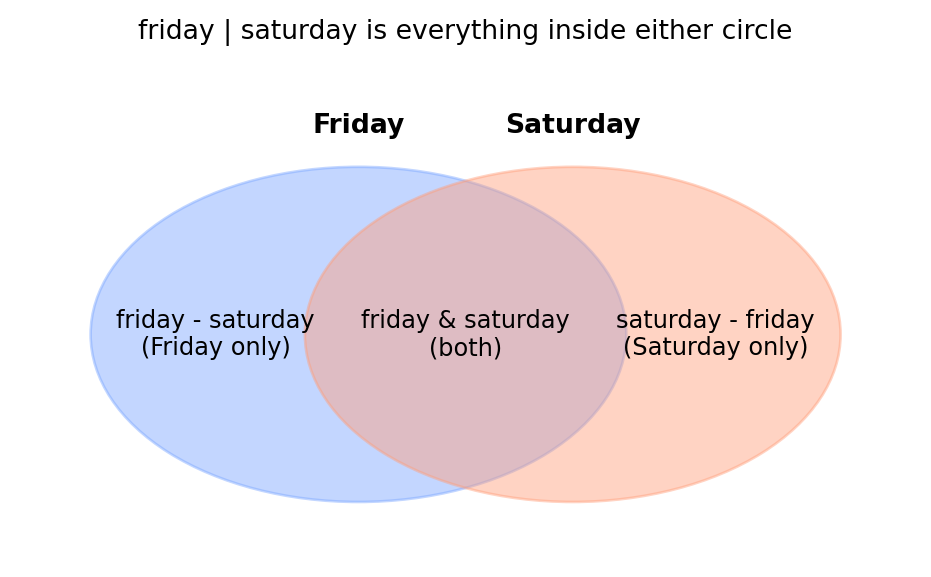
my_set = {a, b, c} # braces, no colons; any repeats are silently droppedA & B # intersection — items in BOTHA | B # union — items in EITHERA - B # difference — items in A but not BA ^ B # symmetric difference — items in exactly ONE
# ⬇️ CHANGE THESE GUEST LISTS, THEN RE-RUNfriday = {"Dracula", "Hyde", "Cthulhu", "Mina", "Renfield"}saturday = {"Hyde", "Cthulhu", "Frankenstein", "The Phantom"}# ----------------------------------print("At both balls :", friday & saturday) # intersectionprint("At either ball :", friday | saturday) # unionprint("Friday only :", friday - saturday) # differenceprint("Exactly one :", friday ^ saturday) # symmetric difference
At both balls   : {'Hyde', 'Cthulhu'}
At either ball  : {'Mina', 'The Phantom', 'Dracula', 'Hyde', 'Frankenstein', 'Renfield', 'Cthulhu'}
Friday only     : {'Mina', 'Renfield', 'Dracula'}
Exactly one     : {'Mina', 'Dracula', 'Frankenstein', 'Renfield', 'The Phantom'}
Understanding the Code
Curly braces with no colons make a set, not a dictionary. (An empty set is set(); {} is an empty dict — Python’s one truly awkward corner.)
& is intersection (in both), | is union (in either), - is difference (in the first but not the second), ^ is symmetric difference (in exactly one).
Camilla’s answer to the caterer is one line: friday & saturday.
🔮 Predict Before You Run
The next cell builds a set from a messy guest list with six entries — but only four distinct names. Predict two things before you run it: (1) what will len(guests_unique) print? (2) Will the unique guests print in the same order as the original list, or not?
Using set operators only (no loops), print: (1) guests at both balls, (2) guests at exactly one ball, (3) the number of distinct guests across both.
friday = {"Dracula", "Mina", "Hyde", "Cthulhu", "Renfield", "Van Helsing"}saturday = {"Mina", "Van Helsing", "The Phantom", "Lucy", "Dracula"}# TODO 1: guests at BOTH balls (intersection)# TODO 2: guests at EXACTLY ONE ball (symmetric difference)# TODO 3: number of DISTINCT guests (union, then len)
Choosing Your Collection — A Quick Guide
Four collections, four jobs. If you remember nothing else from this notebook, remember this table.
Which collection type to reach for in a given situation, with an example of each.
If you find yourself writing a for loop just to check whether something is in a list, that’s a set screaming. If you keep using if to find a price, that’s a dict.
💭 Think About It — The Right Tool for the Job
You’ve now met lists, tuples, dictionaries, and sets — each good at different things.
Picking the wrong collection still “works,” but it can make a program slow or clumsy. Where in everyday life does using the wrong-but-workable tool cause similar friction?
A dictionary trades extra memory for fast lookup by name. Why is “use more of one resource to save another” such a common bargain — and where else do you make that trade?
Without using any code, how would you explain to a friend the difference between a list and a set, using only an everyday example?
There are no single right answers here — share a sentence or two on each.
Nested Collections: Real Data Has Shape
So far each example has been flat — one list, or one dictionary, or one set. Real data is almost never that simple. Camilla finalises tonight’s ball, and every guest has a name, an age, and a costume. That is three facts per guest — one row, three columns.
The standard Python answer is a list of dictionaries: a list (one entry per guest) where each entry is a dict (one key per fact). This is exactly the shape of nearly every API response, every spreadsheet row, every database query you will meet in NB09 and NB10.
The shape, and reading into it. Square brackets hold several { } records, and you read into it in two steps — list index first, then dict key:
data = [ {"key1": value, "key2": value}, # one record (a dict) {"key1": value, "key2": value}, # another record]data[0] # step one: the whole first record (a dict)data[0]["key1"] # step two: one field inside that record
ball = [ {"name": "Dracula", "age": 587, "costume": "himself, ironically"}, {"name": "Mina", "age": 24, "costume": "Victorian ghost"}, {"name": "Hyde", "age": 40, "costume": "respectable gentleman"}, {"name": "Renfield", "age": 51, "costume": "very large moth"},]print(ball[0]) # a whole guest recordprint(ball[0]["name"]) # one field of one guest
ball is a list. Each item in that list is a dictionary.
ball[0] returns the whole first guest — a dictionary. To drill into one field, you index again: ball[0]["name"].
This double-step — list index, then dict key — is the rhythm of working with nested data. Get used to it; it is everywhere.
Walking and Filtering the Ball
A for loop over the list gives Camilla one full guest record at a time. Inside the loop, each guest is a dictionary — so guest fields use the dict syntax guest["name"].
for guest in ball:print(f"{guest['name']:<10} (age {guest['age']:>3}) — {guest['costume']}")# Filter: who came as a ghost? Build a new list with a loop.ghosts = []for guest in ball:if"ghost"in guest["costume"]: ghosts.append(guest["name"])print()print("Ghosts:", ghosts)
Dracula    (age 587) — himself, ironically
Mina       (age  24) — Victorian ghost
Hyde       (age  40) — respectable gentleman
Renfield   (age  51) — very large moth

Ghosts: ['Mina']
Understanding the Code
Inside the loop, guest is one whole dictionary. We pull each field with guest["age"], guest["costume"], etc.
The filter is just a for loop with an if inside: walk every guest, and append the name only when the costume mentions a ghost. That “start an empty list, loop, append when a test passes” pattern is worth memorising — it shows up constantly.
Later in this notebook you’ll meet comprehensions, a one-line shorthand for exactly this pattern.
Takeaway: flat collections are the stepping stones. Lists of dicts are the workhorse shape for real data. When NB09 returns rows from a database and NB10 returns JSON from an API, this is what they will look like.
✏️ Your Turn — Filter the Ball
Using the ball guest list from above (a list of dicts), collect the names of every guest older than 100 and print them. A for loop with append, or a comprehension — your choice.
# Uses the `ball` list of guest dicts from the section above.# TODO: collect the names of guests older than 100, then print them.# elders = []# for g in ball:# ...
Abstract Data Types: The Promise vs. the Storage
Mr. Hyde manages the Fitting Rooms (he is dreadfully impatient, so he is very invested in fairness). Customers form a line; he serves them in the order they arrived. His staff don’t care how the line is stored — paper ledger, whiteboard, app — they only care that the system answers three questions consistently:
add a customer to the back of the line
next customer — remove and return the one at the front
size — how many are waiting
That trio is the interface: the promise the line makes. Hyde could store the line as a Python list, or as a dictionary keyed by ticket number — the interface stays the same. That separation is what we call an abstract data type, or ADT.
An ADT is what the collection does (its promised operations). Its implementation is how it stores the data.
The big idea: the rest of your program should only ever rely on the promise. Swap the storage out later and nothing else has to change. A line waited in order — first in, first out — is so common it has a name: a queue.
The Three Operations, in Pseudocode First
Before any Python, Hyde writes the three operations of his queue in pseudocode — exactly the workflow from Notebook 3. The storage is just a list; each operation is one tiny action on it.
line ← empty list

TO add(name):
    APPEND name to the end of line

TO next_customer():
    REMOVE and RETURN the first item of line

TO size():
    RETURN the length of line
Notice none of this says how the line has to be a list — that’s just the choice Hyde made today. The three promises are what matter. The Python below is the same pseudocode in working code, using the list methods you already know.
# The queue's storage is just a list. The three promised operations# are the three list actions shown in the comments.line = [] # ON CREATE: an empty listline.append("Dracula") # add(name): append to the backline.append("Cthulhu")line.append("Mina")print("Waiting:", len(line)) # size(): how many are waitingserved = line.pop(0) # next_customer(): remove + return the FRONTprint("Now fitting:", served)print("Still waiting:", len(line))print("The line now:", line)
Waiting: 3
Now fitting: Dracula
Still waiting: 2
The line now: ['Cthulhu', 'Mina']
Understanding the Code
The list line is the implementation — Hyde’s choice of storage.
append, pop(0), and len are the three operations that fulfil the promise: add to the back, take from the front, count. line.pop(0) does two things at once — it removes the first item and hands it back to you.
Because customers join at the back and leave from the front, the first one in is the first one served. That “first in, first out” rule is what makes this a queue.
If next week Hyde decided to store the line as a dictionary keyed by ticket number instead, he’d only have to rewrite these three operations — any code that just calls add, next customer, and size would carry on unchanged. That is the payoff of separating the promise from the storage.
Picture It: One Promise, Two Storages
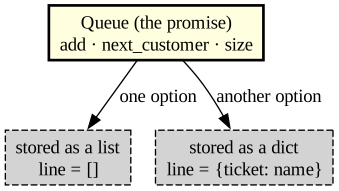
The diagram below shows the same queue promise — add, next_customer, size — sitting above two different storage choices. The point isn’t the diagram — it’s that the box on top doesn’t care which box on the bottom you pick.
💭 Think About It — You Don’t Need to Know How It Works
An abstract data type promises what you can do (push, pop, look something up) while hiding how it’s stored underneath.
You use dozens of things daily without knowing how they work inside — a car, a phone, a card payment. Is that a good thing, a risky thing, or both?
If two different storage methods keep the exact same promise to the user, does it matter which one is used underneath? When would you suddenly start to care?
Hiding complexity behind a simple interface is one of the biggest ideas in computing. Where have you seen a simple “front” hide messy complexity in the non-computing world?
There are no single right answers here — share a sentence or two on each.
Reading it: the yellow box is the public promise — the three operation names. The grey boxes are two different ways to keep the data. Code that uses the queue only relies on the yellow box, so changing the grey box is free.
✏️ Your Turn — Hyde’s Fitting-Room Queue
Hyde’s queue is a plain list. Start one, then practise all of its operations — plus two new ones the busy evening demands:
peek — look at the name at the front without removing it (that’s just line[0]).
cancel — a customer leaves the line early (that’s line.remove(name)).
In the cell below: (1) start with an empty line, (2) add Dracula, Cthulhu, and Mina, (3) peek at the front and print it, (4) cancel Cthulhu, (5) serve the next customer with pop(0) and print who it was, (6) print how many are still waiting.
Think about it (the interface question): if Hyde swapped the list for a dictionary keyed by ticket number, which of these operations — add, next customer, size, peek, cancel — would he have to rewrite, and which would still “just work” for the people calling them? That gap between the promise and the storage is the whole idea of an ADT.
# ⬇️ EDIT / EXTEND THIS, THEN RE-RUNline = []# ----------------------------------# TODO 1: add Dracula, Cthulhu, and Mina to the line (line.append(...))# TODO 2: peek at the front WITHOUT removing it, and print it (line[0])# TODO 3: cancel Cthulhu (line.remove("Cthulhu"))# TODO 4: serve the next customer and print who it was (line.pop(0))# TODO 5: print how many are still waiting (len(line))
A Cleaner Way to Build a Collection: Comprehensions
Cthulhu handles Alterations from the damp room in the basement (the extra tentacles make hemming remarkably quick). He has a list of sleeve measurements and one rule from the master cutter: add 2 cm to every measurement for the seam allowance. He could write a loop. He prefers a list comprehension — one line that builds a new list from an old one.
The comprehension shape. A comprehension builds a whole list (or dict) in one line. Read it left to right:
[expression for item in source] # list comprehension[expression for item in source if condition] # ...the same, but keep only some items{key: value for item in source} # dict comprehension (note the colon)
The expression is what you want each output item to be — here, “the measurement plus 2.”
sleeves = [62, 65, 60, 68, 63]# Old way: loop + appendadjusted_loop = []for m in sleeves: adjusted_loop.append(m +2)# Comprehension way: one line, same resultadjusted = [m +2for m in sleeves]print("loop way :", adjusted_loop)print("comprehension :", adjusted)# A dict comprehension — same idea, but builds key: value pairs.# Every client gets the same 2 cm seam allowance.clients = ["Dracula", "Mina", "Hyde"]allowance = {name: 2for name in clients}print("allowance :", allowance)
A list comprehension has the shape [expression for item in source]. Read it left-to-right: “build a list of expression, for each item in source.” Here the expression is m + 2.
A dict comprehension is the same idea with key: value on the left and curly braces around the whole thing: {name: 2 for name in clients} pairs each client name with 2.
Both are exactly equivalent to a loop with append/assignment — Cthulhu writes them this way because they read closer to what he means: “two more centimetres on everything.”
Takeaway: a comprehension is a one-line shorthand for the build-a-collection loop. Reach for it once the loop version feels obvious; until then, the loop is perfectly good.
✏️ Your Turn — Adjust Every Sleeve
Cthulhu’s Alterations department adds 2 cm to every sleeve. Given sleeves = [62, 65, 60, 68, 63], use a list comprehension to build a new list with each value + 2, and print it.
Bonus: given clients = ["Dracula", "Mina", "Hyde"], use a dict comprehension to build {name: 2 for ...} — every client mapped to their 2 cm allowance — and print it.
sleeves = [62, 65, 60, 68, 63]# TODO: adjusted = [ ... ] # each sleeve + 2, via a list comprehension# print(adjusted)# Bonus dict comprehension:# clients = ["Dracula", "Mina", "Hyde"]# allowance = { ... } # each name mapped to 2# print(allowance)
Why Dictionaries and Sets Look Things Up So Fast
The Phantom’s mask catalogue might run to hundreds of styles on a busy night. When she asks “what’s the price of the plague doctor beak?”, how does Python find it?
If the catalogue were a list, Python would have no choice but to walk it — check the first entry, then the next, then the next, until it hits a match. The bigger the list, the longer that walk. A list with ten times the items takes (roughly) ten times as long to search. Think of looking for a friend’s name on an unsorted sign-up sheet: you read top to bottom until you spot it.
A dictionary (and a set) does something cleverer. It doesn’t walk at all — it jumps straight to the right spot, and it takes about the same tiny amount of time whether the catalogue holds ten masks or ten thousand. Think of a coat-check: you hand over ticket #47 and the attendant walks directly to slot 47, never glancing at the other coats.
The trick is called hashing. When you store a key like "plague doctor beak", Python runs it through a hash function — a small recipe that turns the key into a number. That number tells Python which shelf to put the value on. Later, when you look the same key up, Python runs the same recipe, gets the same number, and goes straight to that shelf. No scanning. The key itself tells Python where to look.
How lists compare with dictionaries and sets when looking up an item.
Find an item
As the collection grows…
list (x in lst)
walk it, entry by entry
gets steadily slower
dict / set (x in d)
hash the key, jump to its shelf
stays about as fast
This is exactly why the Phantom keeps her catalogue in a dict, not a list — and why you reach for a set when all you need is “have I seen this before?” It’s also a first taste of a question Notebook 7 makes central, under the name Big O: not just “does this work?” but “how does its cost grow as the data gets bigger?”
One catch (the price of the trick): hashing only works on immutable keys — strings, numbers, tuples. That’s why a list can’t be a dictionary key or a set member: if it could change after being filed, Python could no longer find the shelf it filed it on.
Methods Cheatsheets — Where to Find Them
Each collection’s method table now lives right beside the section that teaches it, so you can grab it in context:
📋 List Methods — at the end of the Lists / aliasing section.
📋 Dictionary Methods — at the end of the Dictionaries section.
📋 Set Methods — at the end of the Sets section.
(Tuples have almost no methods of their own — that’s rather the point of them.)
Practice: PyQuiz
More practice — collections edition. This bank exercises every collection from the notebook: lists, tuples, dicts, and sets. Two patterns worth keeping in mind:
# look something up in a dict, defaulting to 0 when the key is missingprice = menu.get(item, 0)# count distinct values in a list — convert to set, then take lendistinct =len(set(items))
Run the cell to load the tool.
# PyQuiz bootstrap — works in Colab or any local Jupyter.import os, urllib.requestREPO ="https://raw.githubusercontent.com/brendanpshea/computing_concepts_python/main"ifnot os.path.exists("pyquiz.py"): urllib.request.urlretrieve(f"{REPO}/tools/python_code_quiz/pyquiz.py", "pyquiz.py")from pyquiz import PracticeToolpractice_tool = PracticeTool( json_url=f"{REPO}/tools/python_code_quiz/banks/nb05_collections.json")
✏️ Capstone — Build a Collection Manager (AI-Assisted)
This is where every collection in the notebook earns its keep. You’ll build a small collection-manager program — something that grows, gets searched, and reports on itself. The default fits the shop (a catalog of the Midnight Masquerade’s costumes), but pick your own: a monster-dex, a trading-card binder, a music library, a bookshelf, a Pokédex of your own invention.
Whatever it is, your program must hold its data in the right collections:
a dict to look something up by name (its stats, price, or details),
a list to keep things in order (the order added, your top picks), and
a set to track what’s unique — what you’ve already collected, or which tags appear.
It also needs a menu loop (the player chooses add / find / list / quit each round — that’s Notebook 4) and at least one function you wrote (for example, one that adds an item or looks one up).
Step 1 — Design it first (before the AI). In a markdown cell, jot down: your theme, what one item is (its name and 2–3 fields), what the menu lets the player do, and what ‘done’ looks like (collected them all? hit a target?).
Step 2 — Turn your design into a prompt. Fill the blanks and send it to Gemini (or Claude / ChatGPT):
Write a small collection-manager program in Python for Google Colab. Theme: [your theme]. Each item has a name and these fields: [your fields]. Keep the catalog in a dictionary keyed by name, the order added in a list, and the set of names collected in a set. Show a menu loop with options to add an item, look one up by name, list everything, and quit. Put at least the ‘add’ and ‘look up’ logic in their own functions. Keep it short and beginner-readable.
Step 3 — Get the bones working, then test. Paste it into the cell below and run it now. Get the simplest version working first — add one item, look it up, list the catalog — and check it by hand before adding more.
Step 4 — Add the bells and whistles. Once the core runs, add one or two, testing after each: sort the list (most expensive first, like the Phantom’s masks), report how many distinct items you have (that’s your set), or a ‘find every item with tag X’ filter.
Step 5 — Test it like Smee. Try to break it: look up a name that isn’t there (does .get() save you?), add the same item twice, list an empty catalog. Fix one thing it gets wrong.
Step 6 — Reflect. In a markdown cell, write 2–3 sentences: what did the AI get wrong or what did you improve, and how did you fix it?
Remember the course rule: AI is a fast first draft. You verify.
# ✏️ Paste your AI-built collection manager here, then run it and fix what's broken.
Key Terms
Abstract Data Type (ADT) — A description of what a collection does (its operations and their behaviour) separate from how it stores the data.
Aliasing — When two variables point at the same underlying object, so a change made through one is visible through the other.
Comprehension — A compact one-line way to build a new list or dictionary from an existing sequence.
Copy — A new, independent object with the same contents. For a list, lst.copy(), list(lst), or lst[:].
Default value — The value returned by d.get(key, default) when the key is missing.
Dictionary — A collection of key–value pairs that supports fast lookup by key. Written with {key: value, ...}.
Difference (sets) — The elements in one set but not another. Written a - b.
Hashing — Turning a key into a number that tells Python which “shelf” to store or find a value on. It is what lets dictionaries and sets look things up without scanning, and why their keys must be immutable.
Immutable — Cannot be changed after it is created. Tuples are immutable; lists are not.
Implementation — The actual storage and code that fulfils an ADT’s promise.
Index — The position of an item in an ordered collection. The first index in Python is 0.
Interface — The operations an ADT promises to support. Other code relies only on the interface.
Intersection (sets) — The elements common to two sets. Written a & b.
Key — The label used to look up a value in a dictionary. Must be unique within that dictionary.
List — An ordered, changeable collection of items. Written with [ ].
List of dictionaries — The standard shape for tabular real-world data: one dict per row, one key per column.
Mutable — Can be changed after it is created. Lists, dicts, and sets are mutable.
None — Python’s built-in “nothing here” value. Returned by d.get(key) when the key is missing.
Queue — A collection where items are added at the back and removed from the front: first in, first out.
Set — An unordered collection with no duplicates. Written with { } (no colons).
Slice — A sub-range of a list, written list[start:stop], producing a new list.
Tuple — An ordered, immutable collection. Written with ( ).
Union (sets) — All elements that appear in either set. Written a | b.
Unpacking — Assigning the contents of a tuple (or list) to several variables in one statement.
Value — The data stored under a key in a dictionary. Any type is allowed.
Summary
Pick by promise. Lists are ordered + changeable. Tuples are ordered + fixed. Dictionaries are labelled lookup. Sets are membership + uniqueness. The decision table is the cheatsheet.
Watch for aliasing.b = a makes a second name for the same list, not a copy. a.copy() (or a full slice) is the fix.
Real data is nested. A list of dictionaries is the everyday shape — one dict per row, one key per field.
Lookup style matters. Walking a list grows slower as the list grows; a dictionary lookup stays fast. The seed of next-up Big O.
ADTs separate promise from storage. Hide your storage behind methods and the rest of your program survives a redesign.
Comprehensions turn a build-a-collection loop into one readable line.
What’s Next
Functions packaged behaviour. Collections packaged data. Notebook 6 packages them together — methods and the data they work on, bundled into objects called classes. You’ve already met the idea in spirit: Hyde’s queue was a promise (add, next_customer, size) sitting on top of a list. Next time we’ll wrap exactly that kind of promise and its storage into a single object, on purpose.
COMP 1150 — Computer Science Concepts · Brendan Shea, PhDContent licensed under CC BY 4.0.