import math
risk_score = math.sqrt(144)
print("Risk score:", risk_score)
print("Pi, for good measure:", math.pi)Risk score: 12.0
Pi, for good measure: 3.141592653589793COMP 1150 — Computer Science Concepts

Download .ipynb · View on GitHub
By the end of this notebook, you will be able to:
__init__, create objects from it, and explain the difference between a class (the blueprint) and an object (a thing built from it).self to act on an object’s own data, and explain what self refers to.super() to build a specialized class on top of a general one, and override a method.self., and a mutable class attribute shared across every object.Maps to course LOs: 6, 8
Merlin runs Merlin Advisory, a small consulting shop just off the main square in Camelot. His team has a habit: every time they start a new client report, somebody copies the last report’s code, pastes it into a fresh file, and changes the numbers. By the third month there are nine slightly different copies of the same “calculate the fee” code, and three of them have different bugs.
Down the street, Guinevere at Camelot Civic Systems has the opposite problem. She isn’t repeating code — she’s drowning in loose variables. Every citizen in her system is tracked by a tangle of separate lists: names, ages, wards, balances. To update one person she has to touch four lists and pray the positions still line up.
Two problems, two fixes — and they’re the two halves of this notebook.
Object-oriented design (OOP) is the second idea taken seriously: programs built out of objects that each know their own data and their own behavior. By the end you’ll build classes for a security firm, a research lab, and a delivery service — and you’ll see why Guinevere sleeps better at night.
self — giving objects something to do.A quick reminder before we start: in Notebook 4 you learned to write functions — reusable blocks of behavior. Everything here builds on that. A method is just a function that lives inside an object.
A module is just a file of Python code that you can pull into another file. Python ships with hundreds of them — together they’re called the standard library — covering math, dates, randomness, files, and more. You don’t install anything; you just import what you need.
Think of it as Merlin borrowing a colleague’s finished work instead of redoing it. The import statement is how you say “I’d like to use the tools in that file, please.”
Merlin needs a square root for a risk calculation. Square roots aren’t built into plain Python — they live in the math module.
Importing a whole module. You name the module, then reach inside it with a dot:
import module_name        # bring the whole module into reach
module_name.tool(...)     # use something from inside it — the dot means "look inside"
The next cell imports math and uses it.
import math

risk_score = math.sqrt(144)
print("Risk score:", risk_score)
print("Pi, for good measure:", math.pi)
Risk score: 12.0
Pi, for good measure: 3.141592653589793import math brings the whole math module into reach.math.sqrt(144) reads as “the sqrt tool that lives inside math.” The dot means “look inside.”math.pi isn’t a function — it’s a value the module hands you. Modules can offer both.Writing math. in front of everything gets tiring. The from ... import ... form lets you pull specific names out of a module and use them bare.
Importing specific names. Reach into a module and pull out just the names you want:
from module_name import tool   # grab only `tool` out of the module
tool(...)                      # now call it directly — no module_name. prefix
Merlin’s assistant wants a random client to spot-check and today’s date for the report header.
from random import choice
from datetime import date

clients = ["Pellinore Estates", "Astolat Mills", "Lyonesse Foods"]
print("Audit this one today:", choice(clients))
print("Report date:", date.today())
Audit this one today: Astolat Mills
Report date: 2026-06-02from random import choice reaches into random and pulls out just choice. Now you call choice(...) directly — no random. prefix.choice(clients) picks one item from the list at random.from datetime import date does the same for the date tool; date.today() returns today’s date.from imports are shorter to type, but import math keeps it obvious where a name came from.The real payoff is writing your own module. The cell below uses Jupyter’s %%writefile to save a small file, camelot_tools.py, holding one function. In a normal project you’d just create that file in your editor.
%%writefile camelot_tools.py

def advisory_fee(hours, rate=150):
    """Merlin's fee: hours x rate, plus a 10% surcharge over 40 hours."""
    base = hours * rate
    if hours > 40:
        base = base * 1.10
    return round(base, 2)
Writing camelot_tools.pyNow any file — including this notebook — can import that function. Merlin writes the fee rule once; every report shares the same copy. Fix it here, and it’s fixed for the whole firm.
from camelot_tools import advisory_fee

print("Small job:", advisory_fee(10))
print("Big job:", advisory_fee(50))
Small job: 1500
Big job: 8250.0%%writefile camelot_tools.py saved everything below it as a real file named camelot_tools.py.from camelot_tools import advisory_fee imports your function exactly like importing from the standard library — Python doesn’t care that you wrote it.Python’s standard library is full of ready-made tools. Import one you haven’t used yet and try it — for example import statistics then statistics.mean([...]), or from datetime import date then date.today(). Print the result.
# TODO: import a tool from the standard library and use it.
# import statistics
# print(statistics.mean([10, 20, 30]))Before we build a single class, step back. The code you wrote in Notebooks 1–5 all followed one style — what computer scientists call a paradigm, a basic way of organizing a program. That style was procedural: data sits in variables, and functions reach out, grab the data, do something to it, and put it back. The data is passive. The functions are in charge.
Object-oriented programming (OOP) turns that around. Instead of passive data and bossy functions, you build objects that own their data and the behavior that goes with it. A Citizen object won’t wait for some far-away function to change its balance — it has its own pay method and changes its own balance. Data and behavior travel together.
Why care? In Guinevere’s old setup, the rule “how do I update a citizen?” lived somewhere far from the citizen’s data, easy to get out of sync. In OOP, that rule lives with the citizen. Big programs stay sane because each object minds its own business.
This idea isn’t new. It runs back to the Simula language in the 1960s and Smalltalk in the 1970s, where Alan Kay pictured objects as little machines sending each other messages. (Whether OOP was a good idea is a real debate — that’s the subject of this notebook’s case study. Here we focus on learning to think and design in objects.)
The contrast is below: procedural code keeps data and functions in separate piles; object-oriented code bundles each thing’s data and behavior into one object.
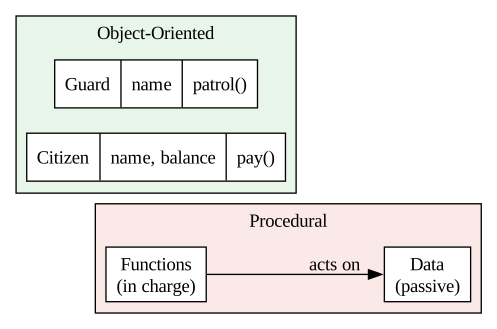
OOP is a way of thinking: model a problem as objects that bundle data together with the things they can do.
There are no single right answers here — share a sentence or two on each.
Reading it: On the left, data and functions are separate boxes — the functions reach over to act on the data. On the right, each object carries its own data and its own methods in one bundle. That bundling is the whole idea of OOP.
Modules organize code. Now we organize data. Back to Guinevere’s tangle of parallel lists — let’s first see exactly how bad it gets, so the fix feels earned.
The cell below tracks two citizens the “loose variables” way: separate lists, lined up by position.
names    = ["Elaine Astolat", "Percival Wales"]
ages     = [34, 41]
wards    = ["North", "Harbor"]
balances = [120.00, 0.00]

# To raise Elaine's balance, you must remember she's at index 0 in EVERY list:
balances[0] = balances[0] + 25
print(names[0], "owes", balances[0], "in", wards[0], "ward")
Elaine Astolat owes 145.0 in North wardSee the problem? Elaine’s facts are scattered across four lists, held together only by the fragile promise that index 0 means “Elaine” in all of them. Sort one list, or insert a citizen in the middle, and everything silently misaligns. There has to be a better way — and there is.
A class is a blueprint. It describes what every citizen has. From one blueprint you stamp out as many objects as you like, and each object keeps all of its own facts together in one place.
Defining a class and building an object. Use the class keyword and a special __init__ setup method; self stands for the object being built:
class ClassName:
    def __init__(self, value):    # runs automatically when you build one
        self.attribute = value    # store a fact ON the object itself

thing = ClassName("some value")   # build an object — __init__ runs right now
thing.attribute                   # read a fact back with a dot
Guinevere defines a Citizen class once.
class Citizen:
    def __init__(self, name, ward, balance):
        self.name = name
        self.ward = ward
        self.balance = balance

elaine = Citizen("Elaine Astolat", "North", 120.00)
print(elaine.name, "is in", elaine.ward, "ward")
Elaine Astolat is in North wardclass Citizen: starts the blueprint. By convention class names use CapWords.__init__ is a special method that runs automatically every time you create a Citizen — it’s the setup routine. You never call it by name.self.name = name stores the value on the object itself, so it travels with that citizen forever.elaine = Citizen("Elaine Astolat", "North", 120.00) builds one object. Those three arguments line up with __init__’s parameters (after self).elaine.name reads a fact back. One object, all its facts in one bundle — no parallel lists.A class earns its keep when you make many objects from it. Each call to Citizen(...) produces a brand-new, independent object with its own data.
percival = Citizen("Percival Wales", "Harbor", 0.00)
roster = [elaine, percival]

for person in roster:
    print(person.name, "—", person.ward, "ward, balance", person.balance)
Elaine Astolat — North ward, balance 120.0
Percival Wales — Harbor ward, balance 0.0percival is a second object built from the same blueprint, with its own values.roster) replaces Guinevere’s four parallel lists with one list where each entry carries everything about one person.person.name, person.ward is far safer than juggling matched indexes.elaine and percival were built from the same class. Before running the next cell, predict: if we change elaine’s balance, does percival’s balance change too?
elaine.balance = elaine.balance + 50
print("Elaine:", elaine.balance)
print("Percival:", percival.balance)
Elaine: 170.0
Percival: 0.0elaine.balance touched only elaine. Percival is untouched.__init__. The class is the shared blueprint; the objects are independent.So far our objects just hold data. The real power of OOP is bundling data with the behavior that acts on it. A function that lives inside a class is called a method.
Here’s the idea everyone trips over first, so we’ll go slow: every method’s first parameter is self, and self means “the particular object this method was called on.”
Guinevere adds a pay method to Citizen so a citizen can reduce their own balance.
Defining a method. A method is a function written inside the class, and its first parameter is always self:
class ClassName:
    def method_name(self, argument):   # self first, then the real arguments
        self.attribute = argument      # act on THIS object's own data

thing.method_name(value)               # you pass `value`; Python fills in `self`
Watch the self in the cell below.
class Citizen:
    def __init__(self, name, ward, balance):
        self.name = name
        self.ward = ward
        self.balance = balance

    def pay(self, amount):
        self.balance = self.balance - amount
        return self.balance

elaine = Citizen("Elaine Astolat", "North", 120.00)
print("After paying 20:", elaine.pay(20))
After paying 20: 100.0def pay(self, amount): — self is first, amount is the real argument.elaine.pay(20), Python quietly fills self with elaine and amount with 20. You don’t pass self yourself — that’s why the call has one argument but the definition lists two.self.balance means “this object’s balance.” For this call, that’s elaine’s balance.Why does self matter so much? Because the same method does different things depending on which object you call it on. self is how the method knows whose data to touch.
percival = Citizen("Percival Wales", "Harbor", 300.00)

elaine.pay(20)      # self = elaine
percival.pay(75)    # self = percival
print("Elaine:", elaine.balance)
print("Percival:", percival.balance)
Elaine: 80.0
Percival: 225.0self is elaine; in the second, self is percival. The code is identical — the object differs.self.self.Inside a method, you must write self.balance, not bare balance, to touch the object’s data. A bare name just makes a throwaway local variable that vanishes when the method ends. The next cell shows the bug.
class BrokenCitizen:
    def __init__(self, name, balance):
        self.name = name
        self.balance = balance

    def pay(self, amount):
        balance = self.balance - amount   # BUG: missing self. (writes a local)
        return "done"

p = BrokenCitizen("Test", 100)
p.pay(40)
print("Balance after paying 40:", p.balance)   # still 100 — the payment vanished
Balance after paying 40: 100balance = self.balance - amount created a local variable called balance and threw it away when pay returned.self.balance was never touched — so it’s still 100.self.balance = self.balance - amount. Missing self. is the single most common beginner OOP bug. When an update “doesn’t stick,” check for it first.Write a class Athlete with an __init__ that stores name and wins (default 0), plus a method record_win(self) that adds one to wins. Make two athletes, record a few wins for each, print both — and confirm that recording a win for one does not change the other’s total.
# TODO: define class Athlete with __init__(self, name, wins=0)
#       and a method record_win(self) that does self.wins += 1.

# class Athlete:
#     ...

# Make two athletes, record some wins, then print both totals.
Some data isn’t meant to be poked at from outside. Python has no hard “private” lock, but there’s a strong convention: a leading underscore (_pin) means “internal — please don’t touch directly.” This is encapsulation: the object guards its own data and exposes safe methods instead. We’ll also add __str__, a special method that controls how the object prints.
The underscore convention and a __str__ method.
class ClassName:
    def __init__(self, value):
        self._hidden = value         # leading _ : "internal — don't touch from outside"

    def __str__(self):               # special method: controls what print() shows
        return f"ClassName(...)"     # return the text you want printed
class Account:
def __init__(self, owner, pin):
self.owner = owner
self._pin = pin # leading _ : internal, don't touch from outside
def check_pin(self, guess):
return guess == self._pin
def __str__(self):
return f"Account({self.owner})" # note: no PIN leaked
a = Account("Guinevere", 4821)
print(a) # uses __str__
print(a.check_pin(4821)) # the safe, public way to test the PINAccount(Guinevere)
Trueself._pin still works exactly like any attribute — the underscore is a message to humans, not a lock. It says “this is internal.”check_pin(...) rather than read _pin directly. The object controls access — that’s encapsulation.__str__ runs whenever the object is printed, giving a clean, readable result instead of <__main__.Account object at 0x...> — and notice it deliberately doesn’t print the PIN.__str__Guinevere wants her Citizen objects to print nicely instead of as <...object at 0x...>. Add a __str__ method to Citizen that returns something like "Elaine Astolat (North ward): owes 120.0". Then create a citizen and print it to confirm your __str__ runs.
class Citizen:
    def __init__(self, name, ward, balance):
        self.name = name
        self.ward = ward
        self.balance = balance

    # TODO: add __str__(self) returning e.g.
    #       "Elaine Astolat (North ward): owes 120.0"

# c = Citizen("Elaine Astolat", "North", 120.0)
# print(c)Arthur Pendragon runs Pendragon Security. He has plain guards and elite knights. Both have a name and clock in for patrol — but knights also carry a rank and lead a squad. He could write two totally separate classes and duplicate the shared parts… but duplication is exactly what we’re trying to kill.
Inheritance lets a class build on top of another. The general class is the parent (or base); the specialized one is the child (or subclass). The child gets everything the parent has, for free, plus its own extras.
First the parent. A Guard has a name and can report for patrol.
class Guard:
    def __init__(self, name):
        self.name = name

    def patrol(self):
        return f"{self.name} is on patrol."

gareth = Guard("Gareth")
print(gareth.patrol())
Gareth is on patrol.Guard is an ordinary class with one attribute and one method.Now the child. class Knight(Guard): means “a Knight is a Guard, with more.” Even with an empty body, a Knight already has name and patrol — inherited from Guard.
Inheriting from a parent. Put the parent class in parentheses after the child’s name:
class Child(Parent):   # Child gets all of Parent's attributes and methods for free
    ...
class Knight(Guard):
pass # empty body — but Knight already inherits everything from Guard
lancelot = Knight("Lancelot")
print(lancelot.patrol()) # works, even though we never defined patrol in KnightLancelot is on patrol.Knight(Guard) puts Guard in parentheses — that’s the inheritance link.pass means “no extra code,” yet lancelot.patrol() still works. Knight inherited __init__ and patrol.Knights need more than guards: a rank. So Knight gets its own __init__. But we don’t want to retype the name-setup — we ask the parent to do its part with super().__init__(), then add the new piece.
Reusing the parent’s setup. super() refers to the parent class; call its __init__ first, then add what’s new:
class Child(Parent):
    def __init__(self, a, b):
        super().__init__(a)   # let Parent run its own setup for the shared part
        self.b = b            # then add the data unique to Child
class Knight(Guard):
def __init__(self, name, rank):
super().__init__(name) # let Guard set up self.name
self.rank = rank # then add what's new to Knight
lancelot = Knight("Lancelot", "First Knight")
print(lancelot.patrol())
print("Rank:", lancelot.rank)Lancelot is on patrol.
Rank: First Knightsuper() means “the parent class, Guard.” super().__init__(name) runs Guard’s setup, so self.name is handled by the code that already exists.self.rank = rank adds the part that’s unique to knights.super() lets you reuse the parent’s setup instead of copying it.A child can also override a method — define one with the same name as the parent’s, and the child’s version wins for child objects. Knights announce their rank on patrol; guards don’t.
class Knight(Guard):
    def __init__(self, name, rank):
        super().__init__(name)
        self.rank = rank

    def patrol(self):   # same name as Guard.patrol — this version wins for Knights
        return f"{self.rank} {self.name} leads the patrol."

print(Guard("Gareth").patrol())
print(Knight("Lancelot", "First Knight").patrol())
Gareth is on patrol.
First Knight Lancelot leads the patrol.patrol method. Python uses the one belonging to the object’s own class — Guard’s for guards, Knight’s for knights.x.patrol()) adapts to whatever object x is.Write a base class Researcher that stores name and has a method describe() returning "<name> runs experiments.". Then write a subclass LeadResearcher(Researcher) that adds a team_size (using super().__init__()) and overrides describe() to also mention the team size. Make one of each and print both descriptions.
# TODO: class Researcher with __init__(self, name) and describe(self).
# TODO: class LeadResearcher(Researcher) that adds team_size via super().__init__()
#       and overrides describe().

# r    = Researcher("Morgan")
# lead = LeadResearcher("Nimue", team_size=4)
# print(r.describe())
# print(lead.describe())Look again at what just happened. We called .patrol() on a guard and on a knight, and each did the right thing for its own type — and we never checked which was which. That ability has a name: polymorphism (Greek for “many shapes”). One method name, many behaviors, chosen automatically by the object.
It pays off when you have a mix of objects. Arthur’s roster holds guards and knights together. He loops once and calls .patrol() on each — Python runs the correct version every time. The next cell builds a mixed roster and patrols it.
roster = [Guard("Gareth"), Knight("Lancelot", "First Knight"), Guard("Kay")]

for officer in roster:
    print(officer.patrol())   # each object runs its OWN patrol()
Gareth is on patrol.
First Knight Lancelot leads the patrol.
Kay is on patrol.officer.patrol() runs the version belonging to that object’s class — Guard’s for guards, Knight’s for knights.if to check the type. That’s the power of polymorphism: add a brand-new kind of officer tomorrow, and this loop keeps working untouched.The diagram below shows the relationship: Knight inherits from Guard, adding rank and its own patrol. The next cell draws it.
<>:8: SyntaxWarning: invalid escape sequence '\l'
<>:8: SyntaxWarning: invalid escape sequence '\l'
C:\Users\brend\AppData\Local\Temp\claude\ipykernel_75116\1007185676.py:8: SyntaxWarning: invalid escape sequence '\l'
  g.node("Knight", "{Knight|name (inherited)\lrank (new)|patrol() (overridden)\l}")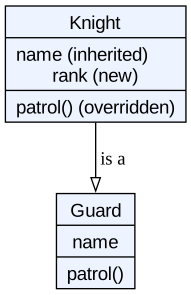
Reading it: The hollow arrow points from child to parent and reads “Knight is a Guard.” Knight keeps name from Guard, adds rank, and replaces patrol with its own version.
members = [] sits in the class body, so there is exactly one list, owned by the class and shared by every object.red.members changed the one shared list, so blue.members shows it too.__init__ (self.members = []). Anything that should differ between objects belongs in __init__, not the class body. This is the OOP cousin of Notebook 5’s aliasing trap.Inheritance is powerful, and beginners reach for it too often. There’s a simple test. Ask: is this a kind of that, or does this contain that?
Knight(Guard) is right.That second pattern — building an object out of other objects — is called composition. Arthur’s Squad below has a list of guards and delegates the work to them.
class Squad:
    def __init__(self, name):
        self.name = name
        self.members = []          # a Squad HAS guards (composition)

    def recruit(self, guard):
        self.members.append(guard)

    def patrol_all(self):
        return [g.patrol() for g in self.members]

watch = Squad("Night Watch")
watch.recruit(Guard("Gareth"))
watch.recruit(Knight("Lancelot", "First Knight"))
print(watch.patrol_all())
['Gareth is on patrol.', 'First Knight Lancelot leads the patrol.']Squad does not inherit from Guard — a squad isn’t a guard. It holds guards in self.members. That’s composition.patrol_all does its job by asking each member to patrol() — the Squad delegates to the objects it contains.Inheritance models an “is-a” relationship (a dog is an animal); composition models “has-a” (a car has an engine). Choosing wrong leads to awkward designs.
There are no single right answers here — share a sentence or two on each.
Knowing the syntax is not the same as knowing what classes to build. Deciding that is design — and it’s the part that makes OOP a computer-science skill, not just a Python trick. So where do classes come from?
A reliable way to start is the noun/verb heuristic. Write the problem in plain English, then:
It won’t hand you a perfect design, but it gets you off the blank page.
Here is Nimue describing Lake Logistics in plain words:
“A dispatch desk holds packages waiting to go out. Each package has a destination and a weight. A courier picks up the next package and delivers it.”
Underline the nouns and verbs and the design almost writes itself:
DispatchDesk, Package, Courier. Attributes: a package’s destination and weight.pick_up, deliver.One more pair of ideas tells you whether you carved the classes well.
Designers judge a set of classes with two ideas worth knowing by name:
Package that only knows package things has high cohesion. A class that tracks packages and couriers and billing and the weather is doing too much — low cohesion. Each class should have one clear responsibility.Package forces you to rewrite Courier, they are tightly coupled, and fragile. Good designs keep coupling low, so you can change one class without breaking the others.The goal in one line: high cohesion, low coupling. Each object minds one job and talks to the others only through clean methods — exactly the interfaces you have been building.
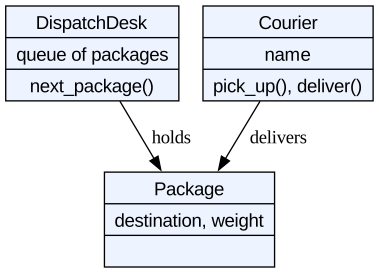
Reading it: Each box is one class with high cohesion — it owns just its own data and jobs. The arrows are the only links between them (low coupling): a Courier touches a Package only by delivering it, never by reaching inside the DispatchDesk. Change one box and the others barely notice.
No code for this one — design first. Morgan le Fay describes Avalon Health Sciences:
“A study has a title and a list of participants. Each participant has an ID and an age. A researcher can enroll a participant and count how many are signed up.”
Using the noun/verb heuristic, in a markdown cell list (a) the classes you’d create, (b) the attributes each holds, and (c) the methods. Then write one sentence on which class should own the enroll method, and why. (Hint: think about cohesion — which class is responsible for the participant list?)
In Notebook 5 we met abstract data types (ADTs): the idea that a collection’s promise (what it does) is separate from its storage (how it does it). We even used a CustomerQueue without caring how it stored things. Now we build one on purpose — that’s what classes are for.
Nimue runs Lake Logistics. Her dispatch desk needs a queue: packages are handled first-come, first-served. The promise is simple: add a package to the back; take the next one from the front. How it’s stored is her business, not her users’ business.
Abstraction sounds like a fancy word, but you have leaned on it all semester. Abstraction means hiding complicated details behind a simple surface, so you can use a thing without knowing how it works inside.
Trace it through the whole course. The transistors from Notebook 2 hide under logic gates. Logic gates hide under the CPU’s machine code. Machine code hides under Python. And now your classes hide their own details under a few method names. Each layer lets the layer above it ignore the mess below.
That is not a minor convenience — it is the reason software can grow large at all. No human can hold a whole system in mind at the transistor level. Abstraction is how a small mind builds a large machine, one layer resting on the next. A well-designed class is just one more layer in that tower — which is exactly what Nimue’s delivery queue, below, will be.
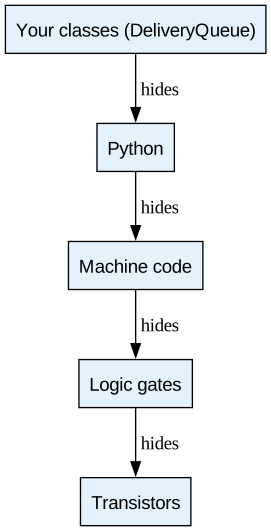
Reading it: Read top to bottom. Each layer rests on the one beneath it and hides that layer’s detail. You write DeliveryQueue without ever thinking about transistors — every layer below is abstracted away.
The DeliveryQueue class below stores packages in a list, but hides that behind two methods: enqueue and dequeue. Code that uses the queue never touches the list directly.
class DeliveryQueue:
    def __init__(self):
        self._items = []           # storage — hidden behind the methods

    def enqueue(self, package):    # add to the back
        self._items.append(package)

    def dequeue(self):             # take from the front
        return self._items.pop(0)

    def is_empty(self):
        return len(self._items) == 0
Nimue’s dispatcher uses the queue through its interface only — enqueue, dequeue, is_empty. They never see the list inside.
dispatch = DeliveryQueue()
dispatch.enqueue("Camelot #1")
dispatch.enqueue("Astolat #2")
dispatch.enqueue("Lyonesse #3")

while not dispatch.is_empty():
    print("Now delivering:", dispatch.dequeue())
Now delivering: Camelot #1
Now delivering: Astolat #2
Now delivering: Lyonesse #3enqueue adds to the back; dequeue removes from the front — first in, first out.The diagram makes the point: two completely different storage choices can sit behind the same promise. Callers only ever see the top box.
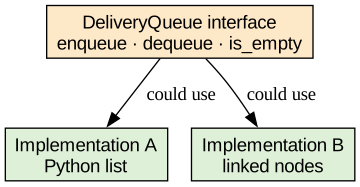
Reading it: Callers depend only on the top box (the promise). Either storage box below can fulfill it, and swapping them never reaches the caller. Promise on top, storage on the bottom — that’s the ADT idea from Notebook 5, now built by hand.
Add a method peek(self) to the DeliveryQueue class that returns the next package without removing it (the front item is self._items[0]). Build a queue, add three packages, call peek(), then dequeue() once, and show that peek reported the right one without consuming it.
class DeliveryQueue:
    def __init__(self):
        self._items = []

    def enqueue(self, package):
        self._items.append(package)

    def dequeue(self):
        return self._items.pop(0)

    def is_empty(self):
        return len(self._items) == 0

    # TODO: add peek(self) -> return the front item WITHOUT removing it

# Build a queue, enqueue three packages, peek, dequeue once, peek again.People often boil object-oriented design down to four ideas. You have now met all four in action — here they are by name, so you recognize them on a test, in a textbook, or in a job interview.
Account kept its _pin private and exposed check_pin.)DeliveryQueue hid its list behind enqueue/dequeue.)Knight extended a Guard.)If you can name these four and give an example of each, you understand what object-oriented design is. Everything after this is practice and judgment — knowing not just how to use each one, but when.
You’ve now seen the four pillars — encapsulation, inheritance, polymorphism, abstraction — working together.
There are no single right answers here — share a sentence or two on each.
This is where object-oriented design proves its worth. You’ll build a small turn-based battle game: a hero faces a band of monsters, they trade blows in a loop, and the last one standing wins. The default is a Camelot knight against a horde, but pick your own: a space marine versus aliens, a wizard versus slimes, a robot versus viruses.
To earn its keep, your game must be built the OOP way:
Combatant (or Character) — that holds shared data like name and hp and has methods such as attack(self, other), take_damage(self, amount), and is_alive(self);Goblin and Dragon extending a Monster base), where each monster overrides a method so it fights differently — that’s polymorphism;Step 1 — Design it first (before the AI). In a markdown cell, sketch your classes the noun/verb way: what is the base Combatant (its attributes and methods), what two monster types extend it, and how does each one fight differently? Decide the starting hp and attack power for the hero and the monsters.
Step 2 — Turn your design into a prompt. Fill the blanks and send it to Gemini (or Claude / ChatGPT):
Write a small turn-based battle game in Python for Google Colab. Theme: [your theme]. Define a base class
Combatantwithnameandhpand methodsattack(other),take_damage(amount), andis_alive(). Make a hero and at least two monster subclasses ([your two monsters]) that inherit from aMonsterbase and override how they attack. Put the monsters in a list and loop through a battle, turn by turn, printing what happens, until the hero dies or all monsters are defeated. Keep it short and beginner-readable.
Step 3 — Get the bones working, then test. Paste it into the cell below and run it now. Get the simplest fight working first — one hero, one monster, hp going down, someone wins — and check it by hand before adding more.
Step 4 — Add the bells and whistles. Once a basic fight runs, add one or two, testing after each: a third monster type with a special attack, a healing potion the hero can use, a Boss that overrides take_damage to be tougher, or a Party class that has a list of heroes (composition).
Step 5 — Test it like Smee. Try to break it: hp driven below zero, an empty monster list, a monster attacking after it’s already been defeated. Fix one thing it gets wrong.
Step 6 — Reflect. In a markdown cell, write 2–3 sentences: where did inheritance save you repetition, and what did the AI get wrong that you had to fix?
Remember the course rule: AI is a fast first draft. You verify.
# ✏️ Paste your AI-built battle game here, then run it and fix what's broken.Abstraction — Hiding complicated details behind a simple surface, so you can use something without knowing how it works inside.
Abstraction layer — One level in a stack where each layer hides the details of the layer below it (transistors → gates → machine code → Python → your classes).
Attribute — A piece of data stored on an object, e.g. self.name. Read with object.name.
Class — A blueprint that describes the data and methods every object of that type will have.
Cohesion — How focused a class is on a single responsibility. High cohesion is the goal.
Composition — Building an object out of other objects (a “has-a” relationship), as an alternative to inheritance.
Coupling — How dependent classes are on one another. Low coupling is the goal.
Encapsulation — Bundling data with the methods that act on it, and guarding the data so it is changed only through those methods.
__init__ — The setup method that runs automatically when an object is created. You never call it by name.
Inheritance — Building a class (child) on top of another (parent) so the child gets the parent’s attributes and methods for free.
Instance — Another word for an object: one specific thing built from a class.
Method — A function defined inside a class; it acts on an object’s data and takes self as its first parameter.
Module — A file of Python code you can import into another file. The standard library is a big collection of them.
Namespace — The “where a name lives” idea: math.pi says pi lives inside the math namespace.
Noun/verb heuristic — A design starter: nouns in a problem become candidate classes and attributes; verbs become candidate methods.
Object — A thing built from a class, holding its own data. Also called an instance.
Object-oriented programming (OOP) — A paradigm built from objects that own their data and their behavior.
Override — Defining a method in a child class with the same name as the parent’s; the child’s version wins for child objects.
Paradigm — A basic style of organizing a program, such as procedural or object-oriented.
Polymorphism — One method name producing different behavior depending on the object it is called on.
Procedural programming — A paradigm where functions act on passive data, rather than objects owning their own behavior.
Responsibility — The one job a well-designed class is meant to handle.
self — The first parameter of every method; refers to the particular object the method was called on.
Standard library — The modules that ship with Python (math, random, datetime, …) — no install needed.
super() — A reference to the parent class, used (e.g. super().__init__(...)) to reuse the parent’s code instead of retyping it.
import it everywhere, fix it in one place.__init__ runs automatically to set an object up; methods act on the object’s data and always take self first. self is this object — that’s how one method serves many objects.self. (your update vanishes) and a mutable class attribute (one list shared by every object).You can now organize code into modules and data + behavior into objects. Notebook 7 asks a harder question: once you’ve built something, how good is it? We’ll measure algorithms with Big O, compare searching and sorting strategies, and then step to the edge of the map — the problems that no program, however cleverly written, can ever solve.
COMP 1150 — Computer Science Concepts · Brendan Shea, PhD Content licensed under CC BY 4.0.