

Chapter 2: Basic Retrieval with SELECT (The Sci-Fi Classics Catalog)#
Database and SQL Through Pop Culture | Brendan Shea, PhD
This chapter introduces the most-used parts of SQL. You will learn to retrieve data with SELECT and FROM, sort it with ORDER BY, filter it with WHERE, deal with NULL values, match patterns with LIKE, and summarize many rows at once using aggregate functions. The examples come from a real dataset of science-fiction books drawn from Goodreads.
Learning Outcomes#
By the end of this chapter, you will be able to:
Explain how relational databases use sets and logical conditions, and distinguish CRUD operations from the major categories of SQL statements.
Retrieve data with SELECT and FROM, including selecting all columns, specific columns, and DISTINCT values.
Sort and filter results with ORDER BY and WHERE.
Handle NULL values and pattern matching in query conditions.
Use aggregate functions, aliases with AS, and basic arithmetic or functions to summarize and label results.
Recognize core SQL syntax rules and explain why SQL dialects vary across database systems.
Brendan’s Lecture#
from IPython.display import YouTubeVideo
YouTubeVideo('dcjw-klyEYA', width=800, height=500)
Background: Why Databases Changed#
Before computers, organizations stored information in paper files. Finding one record could require searching cabinets by hand, and updating or summarizing information was slow, repetitive, and error-prone.
That older approach created several recurring problems:
Records could be misfiled or lost
Only one person could use a file at a time
Copying and updating information was tedious
Reporting required manual review across many records
Early electronic models#
The first computer database systems largely copied those paper-era assumptions. Hierarchical databases organized information like a tree, while network databases allowed more flexible record-to-record links.
Both models were important steps forward, but they still made programmers think about storage paths and navigation details instead of focusing on the questions they wanted to ask.
Why the relational model mattered#
In 1970, Edgar F. Codd proposed the relational model, which reorganized data into tables and focused on describing what data to retrieve rather than how to walk through storage structures.
Key ideas behind the relational model:
Store data in tables of rows and columns
Use keys and relationships to connect tables
Query data declaratively with a high-level language
Separate logical design from physical storage details
This shift made databases more flexible, easier to query, and easier to maintain. It also set the stage for SQL and the database systems most people still use today.
Graphic: Physical Independence#
Interactive activity: Open this standalone page to use the activity in the Jupyter Book or from Colab.
Sets and Logic: How SQL Thinks About Data#
Imagine a large box of baseball cards. Each card contains the same fields of information, such as the player’s name, team, and batting average. In SQL terms, this collection acts like a table where each individual card represents a row, and each field of information represents a column.
Unlike traditional programming languages that read records one by one, SQL thinks about data as a set. A set is simply a collection of distinct objects treated as a single group.
When you write a SQL query, you do not tell the database how to loop through the cards to find a player. Instead, you describe what set of cards you want to retrieve. The database engine automatically determines the most efficient way to fetch them.
What is a set?#
To understand how SQL filters these sets, we use mathematical set operations:
A set is an unordered collection of unique elements, meaning the database does not guarantee a specific order unless you explicitly ask it to sort the results.
We use predicates as logical conditions to test whether a row belongs in our result set, such as filtering for cards where the team is “Mets” or the batting average is above
.300.We use boolean logic to combine these filters using three core logical operators: AND requires both conditions to be true, OR requires at least one condition to be true, and NOT excludes records that match a condition.
For example, if you ask for cards where the team is “Mets” AND the position is “Pitcher”, SQL looks at the entire set of baseball cards and returns only the subset that meets both criteria. By thinking in sets and using logical conditions, SQL allows you to filter millions of rows of data instantly.
The Four Basic Database Operations: CRUD#
Almost everything you do with a database falls into one of four basic operations, known as CRUD, which stands for Create, Read, Update, and Delete.
Operation |
What It Does |
Basic SQL Command |
|---|---|---|
Create |
Adds new records to the database. |
|
Read |
Retrieves existing data from the database. |
|
Update |
Modifies existing data inside the database. |
|
Delete |
Permanently removes records from the database. |
|
Understanding CRUD operations#
We use the Create operation to write new records into a table. For instance, when a new user registers on a website, the application runs a SQL
INSERTstatement to add their profile details to the users table.We use the Read operation to fetch existing records. Whenever you search for products or load a webpage, the application runs a SQL
SELECTstatement to query and display the relevant records.We use the Update operation to change existing values. If you update your profile picture or change your password, the application runs a SQL
UPDATEstatement to modify only those specific fields in your existing record.We use the Delete operation to permanently remove records. If you close your account, the application runs a SQL
DELETEstatement to erase your profile row from the database.
These four basic operations form the foundation of almost all software applications, from simple mobile apps to massive enterprise database systems.
SQL Standards and Varieties: How One Language Became Many#
SQL was originally created at IBM in the 1970s under the name SEQUEL. As other companies began building their own database systems, they realized that everyone needed to speak a common language to make it easy to move applications between different database engines.
To solve this, organizations like the American National Standards Institute (ANSI) established official SQL standards. Today, almost every relational database engine supports the core ANSI SQL standard.
However, because database vendors wanted to add their own specialized features and optimizations, they created unique variations called SQL dialects:
The ANSI SQL standard defines the core syntax and commands (like
SELECT,INSERT, andJOIN) that work identically across almost all relational databases.A SQL dialect is a vendor-specific extension that adds unique functions, data types, and optimizations to the core language, such as Microsoft’s T-SQL, Oracle’s PL/SQL, or PostgreSQL’s PL/pgSQL.
The SQLite database uses a highly lightweight dialect that is optimized for embedded local storage, implementing most of the standard SQL syntax but omitting complex user-management or network-networking commands.
When writing SQL, it is best to stick to standard ANSI syntax whenever possible to ensure your queries remain compatible across different database engines.
Getting Started With SQLite in Google Colab#
Google Colab is a free, browser-based Jupyter notebook environment for running Python (and a lot more) in the cloud. It’s a convenient place to write and test SQL because everything lives in one page.
For SQL we use the SQL magic extension. It lets you write SQL directly in notebook cells by starting the cell with %%sql. The next code cell installs the extension and loads it.
Now that we have the SQL magic extension loaded, we can connect to our SQLite database. In this case, we’ll be using a pre-populated database file called books.db, which contains data about a collection of sci-fi books.
To load the books.db file into our Colab notebook, we can use the wget command to download it from a web link:
Once the file is downloaded, we can connect to it using the SQL magic extension:
This command establishes a connection to the sci_fi_books.db SQLite database file in our current working directory.
With the connection established, we can now run SQL queries on our database directly in our Colab notebook cells. For example, to see a list of all the tables in our database, we can use the following command.
%%sql
SELECT name FROM sqlite_master WHERE type='table';
| name | |
|---|---|
| 0 | books |
Getting to Know the Books Table#
The data for this chapter comes from Goodreads, a popular social cataloging website where book lovers register books, share reviews, and organize reading lists.
We will work with a slice of Goodreads data focused entirely on science fiction books. The dataset has been loaded into a local SQLite database so we can explore it using SQL. Our database consists of a single primary table called books, which stores key information about individual science fiction titles:
The title column stores the name of the book as a text string.
The author column records the name of the writer who wrote the book.
The ratings_count column stores the total number of reviews user profiles have submitted for that book.
The average_rating column records the book’s overall score on a scale from 1 to 5.
The publication_year column stores the year the book was officially printed.
By writing SQL queries against this table, we can filter by specific authors, sort by publication dates, and find the highest-rated science fiction novels in the database.
SELECT and FROM#
Now that we know the structure of the database, let’s start writing queries. The two building blocks are SELECT and FROM.
The basic syntax of a SELECT query is:
SELECT column1, column2, ...
FROM table_name;
What each part means:
SELECT— start of the query; lists the columns to return.column1, column2, …— the columns you want, separated by commas. Use*to get every column.FROM— names the table to read from.table_name— the table itself.
In plain English: “Give me these columns from this table.”
Selecting all columns#
To return every column from the books table, use the * shorthand:
%%sql
SELECT * -- Select all columns
FROM Books -- From the Books table
| firstPublishDate | publishDate | title | series | author | rating | language | pages | publisher | numRatings | id | |
|---|---|---|---|---|---|---|---|---|---|---|---|
| 0 | NaN | 2008-09-14 | The Hunger Games | The Hunger Games #1 | Suzanne Collins | 4.33 | English | 374.0 | Scholastic Press | 6376780 | 1 |
| 1 | 2003-06-21 | 2004-09-28 | Harry Potter and the Order of the Phoenix | Harry Potter #5 | J.K. Rowling | 4.50 | English | 870.0 | Scholastic Inc. | 2507623 | 2 |
| 2 | 1945-08-17 | 1996-04-28 | Animal Farm | NaN | George Orwell | 3.95 | English | 141.0 | Signet Classics | 2740713 | 3 |
| 3 | 1956-10-28 | 2002-09-16 | The Chronicles of Narnia | The Chronicles of Narnia (Publication Order) #... | C.S. Lewis | 4.26 | English | 767.0 | HarperCollins | 517740 | 4 |
| 4 | 1955-10-20 | 2012-09-25 | J.R.R. Tolkien 4-Book Boxed Set: The Hobbit an... | The Lord of the Rings #0-3 | J.R.R. Tolkien | 4.60 | English | 1728.0 | Ballantine Books | 110146 | 5 |
| ... | ... | ... | ... | ... | ... | ... | ... | ... | ... | ... | ... |
| 6586 | NaN | 1998-04-02 | To Hold Infinity | NaN | John Meaney | 3.73 | English | 560.0 | Bantam | 141 | 6599 |
| 6587 | NaN | 2015-10-01 | The Natural Way of Things | NaN | Charlotte Wood | 3.53 | English | 320.0 | Allen & Unwin | 10894 | 6600 |
| 6588 | NaN | 1983-01-01 | Arafel's Saga | Arafel #1-2 | C.J. Cherryh | 3.69 | English | 408.0 | Nelson Doubleday, Inc. | 1070 | 6601 |
| 6589 | NaN | 2017-01-12 | Nameless Fate | Fated Mate #1 | Stephanie West | 3.93 | English | 445.0 | NaN | 508 | 6602 |
| 6590 | 2011-08-01 | 2011-08-21 | Elemental | Soul Guardians #2 | Kim Richardson | 4.07 | English | 151.0 | Kim Richardson | 1947 | 6603 |
6591 rows × 11 columns
Selecting specific columns#
If we only want to retrieve certain columns, we can list them explicitly after the SELECT keyword:
%%sql
SELECT
  title, -- Select the title column
  author, -- Select the author column
  publishDate-- Select the publishDate column
FROM Books -- From the Books table
LIMIT 10; -- Limit the result to the first 10 rows
| title | author | publishDate | |
|---|---|---|---|
| 0 | The Hunger Games | Suzanne Collins | 2008-09-14 |
| 1 | Harry Potter and the Order of the Phoenix | J.K. Rowling | 2004-09-28 |
| 2 | Animal Farm | George Orwell | 1996-04-28 |
| 3 | The Chronicles of Narnia | C.S. Lewis | 2002-09-16 |
| 4 | J.R.R. Tolkien 4-Book Boxed Set: The Hobbit an... | J.R.R. Tolkien | 2012-09-25 |
| 5 | The Hitchhiker's Guide to the Galaxy | Douglas Adams | 2007-06-23 |
| 6 | Fahrenheit 451 | Ray Bradbury | 2011-11-29 |
| 7 | Divergent | Veronica Roth | 2012-02-28 |
| 8 | Ender's Game | Orson Scott Card | 2004-09-30 |
| 9 | Harry Potter and the Sorcerer's Stone | J.K. Rowling | 2003-11-01 |
Selecting DISTINCT values#
Sometimes, you might want to retrieve only the unique values from a column. You can do this using the DISTINCT keyword:
%%sql
SELECT DISTINCT author -- Select distinct values from the author column
FROM Books -- From the Books table
LIMIT 10; -- Limit the result to the first 10 distinct authors
| author | |
|---|---|
| 0 | Suzanne Collins |
| 1 | J.K. Rowling |
| 2 | George Orwell |
| 3 | C.S. Lewis |
| 4 | J.R.R. Tolkien |
| 5 | Douglas Adams |
| 6 | Ray Bradbury |
| 7 | Veronica Roth |
| 8 | Orson Scott Card |
| 9 | Audrey Niffenegger |
You can see the difference this makes if you try the same query WITHOUT using distinct.
%%sql
SELECT author -- Select all values from the author column
FROM Books -- From the Books table
LIMIT 15; -- Limit the result to the first 15 rows
| author | |
|---|---|
| 0 | Suzanne Collins |
| 1 | J.K. Rowling |
| 2 | George Orwell |
| 3 | C.S. Lewis |
| 4 | J.R.R. Tolkien |
| 5 | Douglas Adams |
| 6 | Ray Bradbury |
| 7 | Veronica Roth |
| 8 | Orson Scott Card |
| 9 | J.K. Rowling |
| 10 | Audrey Niffenegger |
| 11 | Aldous Huxley |
| 12 | William Goldman |
| 13 | Madeleine L'Engle |
| 14 | George R.R. Martin |
You’ll notice that some names (such as JK Rowling) appear twice. Sometimes, you’ll want this (for example, if you are trying to count the number of books she wrote). Other times, though, you’ll want to use DISTINCT to get rid of these “duplicates.”
ORDER BY#
The ORDER BY clause sorts the rows of a result. The basic syntax:
SELECT column1, column2, ...
FROM table_name
ORDER BY column1 [ASC|DESC],
         column2 [ASC|DESC],
         ...;
How it works:
ORDER BYis followed by the column(s) used for sorting.After each column you can add
ASC(ascending — smallest to largest, A to Z) orDESC(descending — largest to smallest, Z to A). If you don’t specify,ASCis the default.When you list more than one column, SQL sorts by the first column, then breaks ties using the second, and so on.
A simple example:
%%sql
SELECT
  title, -- Select the title column
  author, -- Select the author column
  rating -- Select the rating column
FROM Books -- From the Books table
ORDER BY rating -- Sort the results by rating in ascending order
LIMIT 10;
| title | author | rating | |
|---|---|---|---|
| 0 | Revealing Eden | Victoria Foyt | 1.99 |
| 1 | Skull Flowers | Jazon Dion Fletcher | 2.48 |
| 2 | موسم صيد الغزلان | Ø£Øمد مراد | 2.74 |
| 3 | Blueprint: Blaupause | Charlotte Kerner | 2.78 |
| 4 | Lost | Gregory Maguire | 2.82 |
| 5 | Redemption Prep | Samuel Miller | 2.82 |
| 6 | Alpha Centauri | William Barton | 2.87 |
| 7 | Corvus | L. Lee Lowe | 2.90 |
| 8 | Buck Rogers in the 25th Century: The Western P... | Paul S. Newman | 2.91 |
| 9 | L'an 2440 | Louis-Sébastien Mercier | 2.92 |
We can also do this in descending order (with the highest ratings first)
%%sql
SELECT
  title, -- Select the title column
  author, -- Select the author column
  rating -- Select the rating column
FROM Books -- From the Books table
ORDER BY rating DESC -- Sort the results by rating in descending order
LIMIT 10;
| title | author | rating | |
|---|---|---|---|
| 0 | Kiss Me, I'm Irish | John Blandly | 5.00 |
| 1 | The Present | Kenneth Thomas | 4.92 |
| 2 | Maya of the Inbetween | Sita Bennett | 4.86 |
| 3 | Predestination: The Future is History | S. W. Cotton | 4.85 |
| 4 | The Beachhead | David Anderson | 4.84 |
| 5 | Assault On Utopia: Part 1 | Steven P Sharp | 4.80 |
| 6 | Insectland | Neil D. Ostroff | 4.80 |
| 7 | The Way of Kings, Part 2 | Brandon Sanderson | 4.79 |
| 8 | Harry Potter Boxed Set, Books 1-5 (Harry Potte... | J.K. Rowling | 4.78 |
| 9 | Words of Radiance | Brandon Sanderson | 4.75 |
Finally, we can order by multiple columns (for example, by author and rating).
WHERE#
The WHERE clause filters rows. It lets you keep only the rows that match a condition.
The basic syntax:
SELECT column1, column2, ...
FROM table_name
WHERE condition;
How it works:
WHEREis followed by a condition that each row must satisfy.The condition usually compares a column value against a constant, or compares two column values to each other.
Example: find all books with a rating higher than 4.5:
%%sql
SELECT
  title, -- Select the title column
  author, -- Select the author column
  rating -- Select the rating column
FROM Books -- From the Books table
WHERE rating > 4.5 -- Filter the results to only include books with a rating higher than 4.5
LIMIT 10;
| title | author | rating | |
|---|---|---|---|
| 0 | J.R.R. Tolkien 4-Book Boxed Set: The Hobbit an... | J.R.R. Tolkien | 4.60 |
| 1 | Harry Potter and the Deathly Hallows | J.K. Rowling | 4.62 |
| 2 | Harry Potter and the Prisoner of Azkaban | J.K. Rowling | 4.57 |
| 3 | Harry Potter and the Goblet of Fire | J.K. Rowling | 4.56 |
| 4 | Harry Potter and the Half-Blood Prince | J.K. Rowling | 4.57 |
| 5 | The Name of the Wind | Patrick Rothfuss | 4.53 |
| 6 | A Storm of Swords | George R.R. Martin | 4.53 |
| 7 | The Wise Man's Fear | Patrick Rothfuss | 4.56 |
| 8 | The Way of Kings | Brandon Sanderson | 4.63 |
| 9 | Harry Potter Series Box Set | J.K. Rowling | 4.73 |
The condition can use these comparison operators:
=— equal to<>or!=— not equal to<— less than>— greater than<=— less than or equal to>=— greater than or equal to
You can combine conditions with logical operators:
AND— both conditions must be true.OR— at least one condition must be true.NOT— the condition must be false.
Example: find all books with more than 500 pages and more than 10,000 ratings:
%%sql
SELECT
  title,
  author,
  pages,
  numRatings
FROM
  Books
WHERE
  -- Long books that have many ratings
  pages > 500 AND numRatings > 10000
LIMIT 10;
| title | author | pages | numRatings | |
|---|---|---|---|---|
| 0 | Harry Potter and the Order of the Phoenix | J.K. Rowling | 870 | 2507623 |
| 1 | The Chronicles of Narnia | C.S. Lewis | 767 | 517740 |
| 2 | J.R.R. Tolkien 4-Book Boxed Set: The Hobbit an... | J.R.R. Tolkien | 1728 | 110146 |
| 3 | A Game of Thrones | George R.R. Martin | 835 | 2003043 |
| 4 | Dune | Frank Herbert | 661 | 765785 |
| 5 | The Stand | Stephen King | 1153 | 616021 |
| 6 | Harry Potter and the Deathly Hallows | J.K. Rowling | 759 | 2811637 |
| 7 | The Fellowship of the Ring | J.R.R. Tolkien | 527 | 2355237 |
| 8 | Atlas Shrugged | Ayn Rand | 1168 | 353814 |
| 9 | Harry Potter and the Goblet of Fire | J.K. Rowling | 734 | 2594622 |
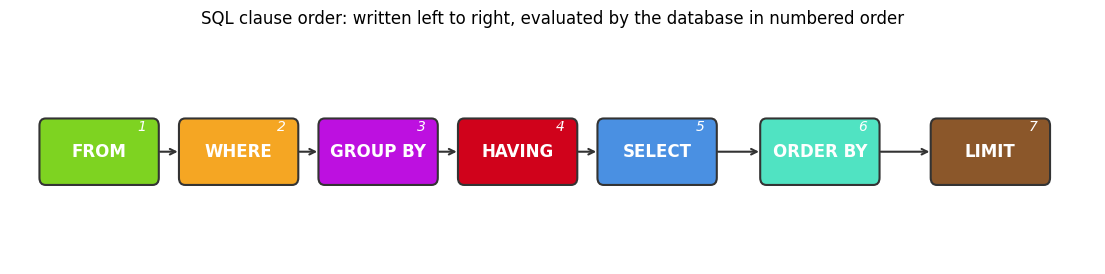
SQLite Syntax Rules#
Before writing your first queries, let us review the basic formatting rules for writing SQL in SQLite. A typical query looks like this:
SELECT title, author
FROM books
WHERE publication_year > 1950
ORDER BY average_rating DESC;
To ensure your queries execute correctly, follow these core syntax rules:
Every SQL query should end with a semicolon to signal to the database engine that the statement is complete.
SQL keywords (like
SELECTandFROM) are case-insensitive, meaningselectandSELECTwork identically, though capitalized keywords are preferred for readability.Unlike keywords, text values stored inside database columns are case-sensitive in many database systems when running comparisons in a
WHEREclause.We wrap text values in single quotes inside our filters, while columns and table names are written without quotes.
By following these simple formatting rules, you can write clean, readable SQL queries that execute reliably across database engines.
Handling NULL Values#
In SQL, NULL is a special value that means missing or unknown. Working with NULL takes some care because it can lead to surprising results.
In our books table, both series and firstPublishDate have NULL values. For some books, the series is unknown or the book isn’t in a series at all, and for others the original publication date is missing.
To check for NULL values in a WHERE clause, you use special operators:
IS NULL— true when a value is missing.IS NOT NULL— true when a value is present.
Example: find all books that are part of a series (the series column is not NULL):
%%sql
SELECT
  title,
  author,
  series
FROM
  Books
WHERE
  -- books that ARE part of a series
  series IS NOT NULL
LIMIT 10;
| title | author | series | |
|---|---|---|---|
| 0 | The Hunger Games | Suzanne Collins | The Hunger Games #1 |
| 1 | Harry Potter and the Order of the Phoenix | J.K. Rowling | Harry Potter #5 |
| 2 | The Chronicles of Narnia | C.S. Lewis | The Chronicles of Narnia (Publication Order) #... |
| 3 | J.R.R. Tolkien 4-Book Boxed Set: The Hobbit an... | J.R.R. Tolkien | The Lord of the Rings #0-3 |
| 4 | The Hitchhiker's Guide to the Galaxy | Douglas Adams | The Hitchhiker's Guide to the Galaxy #1 |
| 5 | Divergent | Veronica Roth | Divergent #1 |
| 6 | Ender's Game | Orson Scott Card | Ender's Saga #1 |
| 7 | Harry Potter and the Sorcerer's Stone | J.K. Rowling | Harry Potter #1 |
| 8 | A Wrinkle in Time | Madeleine L'Engle | Time Quintet #1 |
| 9 | A Game of Thrones | George R.R. Martin | A Song of Ice and Fire #1 |
Similarly, to find all books where the original publication date is unknown:
%%sql
SELECT
  title,
  author,
  firstPublishDate
FROM
  Books
WHERE
  -- books where the original publication date is unknown
  firstPublishDate IS NULL
LIMIT 10;
| title | author | firstPublishDate | |
|---|---|---|---|
| 0 | The Hunger Games | Suzanne Collins | None |
| 1 | Harry Potter and the Deathly Hallows | J.K. Rowling | None |
| 2 | Insurgent | Veronica Roth | None |
| 3 | The Maze Runner | James Dashner | None |
| 4 | The Selection | Kiera Cass | None |
| 5 | Catching Fire | Suzanne Collins | None |
| 6 | Uglies | Scott Westerfeld | None |
| 7 | Cinder | Marissa Meyer | None |
| 8 | The Wise Man's Fear | Patrick Rothfuss | None |
| 9 | Ready Player One | Ernest Cline | None |
It’s important to note that you cannot use the equality operator (=) to check for NULLs. For example, the following query will not return any results:
%%sql
SELECT
  title,
  author,
  firstPublishDate
FROM
  Books
WHERE
  firstPublishDate = NULL; -- This will not work as expected!
| title | author | firstPublishDate |
|---|
This is because in SQL, any comparison with NULL (even NULL = NULL) evaluates to NULL, which is treated as false in the context of a WHERE clause.
LIKE#
The LIKE operator searches for a pattern inside a text column. It is usually paired with WHERE to filter on partial matches rather than exact equality.
The basic syntax:
SELECT column1, column2, ...
FROM table_name
WHERE column LIKE pattern;
The pattern can include two wildcards:
%— matches any sequence of zero or more characters._— matches exactly one character.
A few examples:
title LIKE 'a%'— any title starting witha.title LIKE '%a'— any title ending witha.title LIKE '%a%'— any title containingaanywhere.title LIKE '_a%'— any title withaas the second character.
In SQLite, LIKE is case-insensitive for ASCII characters by default.
Example: Book titles starting with ‘The’#
To find all books whose title starts with “The”:
%%sql
SELECT
  title,
  author
FROM
  Books
WHERE
  -- books whose title starts with "The"
  title LIKE 'The%'
LIMIT 10;
| title | author | |
|---|---|---|
| 0 | The Hunger Games | Suzanne Collins |
| 1 | The Chronicles of Narnia | C.S. Lewis |
| 2 | The Hitchhiker's Guide to the Galaxy | Douglas Adams |
| 3 | The Time Traveler's Wife | Audrey Niffenegger |
| 4 | The Princess Bride | William Goldman |
| 5 | The Handmaid's Tale | Margaret Atwood |
| 6 | The Giver | Lois Lowry |
| 7 | The Stand | Stephen King |
| 8 | The Fellowship of the Ring | J.R.R. Tolkien |
| 9 | The Road | Cormac McCarthy |
Aggregate Functions and Aliasing with AS#
Aggregate functions take a set of rows and return a single value. The most common ones:
COUNT()— counts the number of rows.SUM()— adds up the values in a column.AVG()— calculates the average of a column.MAX()— returns the largest value.MIN()— returns the smallest value.
Examples of aggregate functions#
Let’s look at a few examples using the books table.
%%sql
--Find total number of books
SELECT
  COUNT(*) AS total_books
FROM
  Books;
| total_books | |
|---|---|
| 0 | 6591 |
%%sql
--Average ratings of books
SELECT
  AVG(rating) AS avg_rating
FROM
  Books;
| avg_rating | |
|---|---|
| 0 | 3.988885 |
%%sql
--Total number of pages across all books
SELECT
  SUM(pages) AS total_pages
FROM
  Books;
| total_pages | |
|---|---|
| 0 | 2495231 |
%%sql
--Find maximum and minimum rating
SELECT
  MAX(rating) AS max_rating,
  MIN(rating) AS min_rating
FROM
  Books;
| max_rating | min_rating | |
|---|---|---|
| 0 | 5.0 | 1.99 |
Combining Aggregate Functions with WHERE Clauses#
We can also combine aggregate functions with WHERE clauses to calculate values based on certain conditions.
%%sql
--Find the average rating of books after 2000
SELECT
  AVG(rating) AS avg_rating_after_2000
FROM
  Books
WHERE
  publishDate > 2000;
| avg_rating_after_2000 | |
|---|---|
| 0 | 3.994752 |
%%sql
--Find the number of books with more than 500 pages
SELECT
  COUNT(*) AS books_over_500_pages
FROM
  Books
WHERE
  pages > 500;
| books_over_500_pages | |
|---|---|
| 0 | 1108 |
%%sql
--Find the maximum rating of books with more than 10,000 ratings
SELECT
  MAX(rating) AS max_rating_over_10000
FROM
  Books
WHERE
  numRatings >= 10000;
| max_rating_over_10000 | |
|---|---|
| 0 | 4.79 |
Aliasing with AS#
The AS keyword gives a column or an expression a temporary name — an alias — in the result. Aliases make output easier to read.
In the previous examples we used AS to label aggregate results: total_books, avg_rating, max_rating, and so on. Without those aliases, the column headers would show the full function expression instead, which is harder to read.
Aggregate functions paired with AS give you a fast way to summarize data. You can count rows, average values, find maximums and minimums, and label the results clearly — all in a single query.
Basic Math Operations and Functions in SQL#
SQL supports arithmetic directly inside a query. You can use it in SELECT, in WHERE, or alongside aggregate functions.
The arithmetic operators are:
+— addition-— subtraction*— multiplication/— division%— modulo (remainder)
For example, suppose we want the price of a $20 book after a 10% discount:
%%sql
SELECT
  20 - (20 * 0.1) AS discounted_price;
| discounted_price | |
|---|---|
| 0 | 18.0 |
SQL also provides built-in math functions. Some of the most common:
ROUND(number, decimal_places)— rounds a number to a given number of decimal places.FLOOR(number)— returns the largest whole number less than or equal to the value.CEIL(number)orCEILING(number)— returns the smallest whole number greater than or equal to the value.ABS(number)— returns the absolute value.SQRT(number)— returns the square root.POWER(number, power)— raises the number to the given power.
For example, to see the average rating of each book rounded to one decimal place:
%%sql
--Get rounded rating
SELECT
  title,
  ROUND(rating, 1) AS rounded_rating
FROM
  Books
LIMIT 10;
| title | rounded_rating | |
|---|---|---|
| 0 | The Hunger Games | 4.3 |
| 1 | Harry Potter and the Order of the Phoenix | 4.5 |
| 2 | Animal Farm | 4.0 |
| 3 | The Chronicles of Narnia | 4.3 |
| 4 | J.R.R. Tolkien 4-Book Boxed Set: The Hobbit an... | 4.6 |
| 5 | The Hitchhiker's Guide to the Galaxy | 4.2 |
| 6 | Fahrenheit 451 | 4.0 |
| 7 | Divergent | 4.2 |
| 8 | Ender's Game | 4.3 |
| 9 | Harry Potter and the Sorcerer's Stone | 4.5 |
Mathematical operations and functions can be particularly useful when combined with aggregate functions.
For example, let’s calculate the average number of pages across all books:
%%sql
--Calculate average number of pages, round to 0 decimal places
SELECT
  ROUND(AVG(pages), 0) AS avg_pages
FROM
  Books;
| avg_pages | |
|---|---|
| 0 | 391.0 |
Chapter Summary#
Use this list as a self-check. After working through the chapter, you should be able to do each of the following:
You can retrieve data with
SELECTandFROM.You can sort results with
ORDER BY.You can filter rows with
WHERE.You can reason about
NULLvalues in your queries.You can match patterns with
LIKE.You can compute aggregates across sets of rows.
You can rename columns and expressions with
ASto improve readability.
Lab Activity: Practice Your SQL (Highly Recommended!)#
Really learning SQL requires hands on practice. You can “run” the following cell to launch a SQL practice app. Please let me (Brendan) know if you notice any issues with it, as it is still under development.
Practice with the Loop of the Recursive Dragon#
Sharpen what you just learned with a chapter-matched review set in the Loop of the Recursive Dragon — an adaptive review game with multiple question types and RPG-style mechanics, built for this book.
Glossary#
Use this reference sheet to quickly review key Structured Query Language terms.
Relational and SQL basics#
A table is a structured collection of related data organized in vertical columns and horizontal rows.
A column represents a specific field of information that describes an attribute of our data.
A row represents a single, complete record containing data values for each column in the table.
A set is an unordered collection of distinct objects treated as a single, indivisible group.
A predicate is a logical condition used to filter rows by testing whether a statement is true or false.
The boolean logic is a system of logic that uses operators like AND, OR, and NOT to combine filters.
The CRUD acronym represents the four basic operations of database applications, which are Create, Read, Update, and Delete.
The SQL is the standard Structured Query Language used to query, update, and manage relational databases.
The ANSI SQL standard defines the core syntax and commands that work identically across almost all database systems.
A SQL dialect is a vendor-specific extension that adds unique functions and features to the core SQL language.
The SQLite database is a lightweight, serverless relational database engine optimized for embedded local storage.
A relational database is a database system that organizes data into tables linked together by unique keys.
Query keywords#
The
SELECTstatement is the primary SQL command used to retrieve specific columns of data from a table.The
FROMclause specifies the name of the database table you want to query.The
DISTINCTkeyword is used to filter out duplicate rows and return only unique values in your query results.The
ORDER BYclause is used to sort query results in ascending or descending order based on one or more columns.The
WHEREclause is used to filter query results by returning only the rows that meet specific logical conditions.The
LIKEoperator is used in aWHEREclause to search for matching text patterns using wildcards.The
ASkeyword is used to create an alias, which temporarily renames a column or table in the query output.The
LIMITclause is used to restrict the total number of rows returned by a query.
Data and types#
The null value is a special database marker used to represent missing, unknown, or empty data.
An aggregate function is a mathematical function (like SUM, AVG, or COUNT) that performs a calculation on a set of values.
A wildcard is a special character (such as
%or_) used in pattern matching to represent one or more unknown characters in a text search.