

Chapter 8: Indexes, Performance & Transactions (Gotham National Bank)#
Database and SQL Through Pop Culture | Brendan Shea, PhD#
In this chapter, we will explore the inner workings of SQLite using a dataset from the fictional Gotham National Bank. Our focus will be on understanding how indexes, transactions, and database monitoring can optimize SQLite database performance and ensure smooth operations. We will cover the fundamentals of indexes, demonstrate their impact on query speed and database size, and discuss best practices for implementing them effectively.
Additionally, we will delve into the concept of transactions and the crucial role they play in ensuring data integrity and reliability. We will examine the ACID properties that transactions must adhere to and showcase how to work with transactions in SQLite using commands like BEGIN, COMMIT, and ROLLBACK.
Furthermore, we will emphasize the importance of database monitoring, reporting, and logging in maintaining the health and performance of SQLite databases. We will explore various monitoring techniques, discuss the types of logs generated, and highlight the tools and practices used by database administrators like ORACLE to keep databases running optimally.
Throughout the chapter, we will use practical examples and step-by-step explanations to illustrate how indexes, transactions, and monitoring can be leveraged to build robust and efficient databases. By the end, you should have a solid foundation in these key concepts and be well-equipped to apply them in your own SQLite projects.
Learning Outcomes#
By the end of this chapter, you will be able to:
Explain how database indexes improve query performance and evaluate their storage and maintenance trade-offs.
Create indexes and use EXPLAIN QUERY PLAN to compare indexed and non-indexed query paths.
Describe how database engines use B-trees for physical tables, indexes, and sorting.
Explain transactions and the ACID properties that protect database integrity.
Use BEGIN, COMMIT, ROLLBACK, and SAVEPOINT to control transaction boundaries and recover from errors.
Describe locking, concurrency, and deadlock detection in multi-user systems.
Choose and configure an appropriate transaction isolation level for a specific database workload.
Compare ACID relational systems with BASE NoSQL databases and identify where hybrid architectures fit.
Monitor query statistics, database logs, and daily metrics to keep systems healthy.
Establish performance baselines and design database alerts, notifications, and integrity checks.
Apply schema migration, version control, change approvals, and CI/CD pipelines to database deployments.
Keywords: SQLite, indexes, EXPLAIN QUERY PLAN, B-tree, transactions, ACID, SAVEPOINT, locking, concurrency, monitoring, logs, NoSQL, BASE
Brendan’s Lecture#
# play youtube video
from IPython.display import YouTubeVideo
YouTubeVideo('DtqP72S_keA', width=800, height=450)
Gotham National Bank Database#
In this chapter, we’ll be exploring the inner workings of SQLite using a dataset from the fictional Gotham National Bank. Our database, gotham.db, contains two tables:
Customers: Stores customer information like name, address, and contact details.
Accounts: Holds account-related data such as account type, balance, and creation date, with a foreign key linking to the Customers table.
Throughout this chapter, we’ll use these tables to understand how indexes and transactions can optimize our SQLite database performance. We’ll cover the fundamentals of indexes, demonstrate their impact on query speed and database size, and discuss best practices for implementing them effectively.
Database Schema for Gotham City Bank#
Here is the database schema.
%%sql
-- we are going to turn on "profiling" this lesson
PRAGMA profile = 1;
-- get table schema using sqlite master
SELECT sql FROM sqlite_master WHERE type='table';
| sql |
|---|
| CREATE TABLE Customers ( CustomerID INTEGER PRIMARY KEY AUTOINCREMENT, FirstName VARCHAR(50) NOT NULL, LastName VARCHAR(50) NOT NULL, MiddleInitial CHAR(1), Address VARCHAR(255), City VARCHAR(50), State VARCHAR(50), ZipCode VARCHAR(10), PhoneNumber VARCHAR(15), Email VARCHAR(100) ) |
| CREATE TABLE sqlite_sequence(name,seq) |
| CREATE TABLE Accounts ( AccountID INTEGER PRIMARY KEY AUTOINCREMENT, CustomerID INT, AccountType VARCHAR(20), Balance DECIMAL(15, 2) DEFAULT 0.00, CreatedDate DATE, FOREIGN KEY (CustomerID) REFERENCES Customers(CustomerID) ) |
A Closer Look at Customers and Accounts#
Now, let’s take a quick look at the head of our table.
%%sql
SELECT * FROM Customers LIMIT 5;
| CustomerID | FirstName | LastName | MiddleInitial | Address | City | State | ZipCode | PhoneNumber | |
|---|---|---|---|---|---|---|---|---|---|
| 1 | Bruce | Wayne | None | 1007 Mountain Drive | Gotham | NY | 10001 | 123-456-7890 | bruce.wayne@gothambank.com |
| 2 | Selina | Kyle | None | 123 Cat St | Blüdhaven | NY | 20002 | 234-567-8901 | selina.kyle@gothambank.com |
| 3 | James | Gordon | None | 789 Police Plaza | Gotham | NY | 10003 | 345-678-9012 | james.gordon@gothambank.com |
| 4 | Harvey | Dent | None | 456 Lawyer Ave | Metropolis | NY | 30004 | 456-789-0123 | harvey.dent@gothambank.com |
| 5 | Pamela | Isley | None | 369 Botanic St | Gotham | NY | 10005 | 567-890-1234 | pamela.isley@gothambank.com |
%%sql
SELECT * FROM Accounts LIMIT 5;
| AccountID | CustomerID | AccountType | Balance | CreatedDate |
|---|---|---|---|---|
| 1 | 1 | Checking | 15000 | 2021-01-10 |
| 2 | 1 | Savings | 75000 | 2021-02-11 |
| 3 | 2 | Checking | 32000 | 2022-03-05 |
| 4 | 3 | Checking | 86000 | 2023-04-15 |
| 5 | 4 | Checking | 22000 | 2024-05-20 |
What are Indexes and How Do I Create Them?#
If you’ve ever used a book index to quickly locate a specific topic, you already understand the basic concept of a database index. In the context of databases, an index is a separate data structure that allows the database engine to find and retrieve data more efficiently without having to scan the entire table.
When you create a table, SQLite (like all versions of SQL) automatically creates a unique index on the primary key column(s). However, you can also create additional indexes on other columns to speed up frequently used queries.
To create an index in SQL, you use the CREATE INDEX statement with the following syntax:
CREATE [UNIQUE] INDEX index_name
ON table_name (column1 [, column2, ...]);
Here’s a breakdown of the components:
UNIQUE: Optional keyword that creates a unique index, ensuring no duplicate values in the indexed column(s).index_name: The name you want to give your index.table_name: The name of the table on which you’re creating the index.column1, column2, ...: The column(s) to be indexed. You can index multiple columns by separating them with commas.
For example, let’s say we want to create an index on the LastName column of our Customers table:!
%%sql
DROP INDEX IF EXISTS idx_customers_lastname;
CREATE INDEX idx_customers_lastname
ON Customers (LastName);
This statement creates an index named idx_customer_lastname on the LastName column, allowing for faster searches based on customer last names. This will allow us to search customers by their last name more quickly.
SQLite supports several types of indexes, including unique indexes, which ensure that the indexed column(s) contain no duplicate values, and partial indexes, which only index a subset of rows based on a specified condition.
By default, SQLite (like other RDBMSs) creates a clustered index for the primary key of every table, without you needing to do anything. This means that items are physically “clustered together” on disk (so, a record with id=1 is next to the record with id=2). THe CREATE INDEX command creates what is a called a non-clustered index, meaning that the indexes records that are NOT physically next to each other. (We’ll see more on how this works later). There can be only one clustered index per table, but any number of non-clustered indexes.
Creating appropriate indexes is crucial for optimizing database performance, but how do they actually impact query speed? In the next section, we’ll explore the power of indexes in action using the EXPLAIN QUERY PLAN command and some practical examples from our Gotham City dataset.
How Indexes Impact Speed#
To understand the impact of indexes on query speed, we’ll use the EXPLAIN QUERY PLAN command. This command provides insight into how SQLite executes a query, including which indexes (if any) are being used.
Let’s start with an example query on our Accounts table that gets customers with higher than average balances
%%sql
SELECT * FROM Accounts
WHERE Balance > (SELECT AVG(Balance) FROM Accounts)
ORDER BY Balance DESC
LIMIT 5;
| AccountID | CustomerID | AccountType | Balance | CreatedDate |
|---|---|---|---|---|
| 8136 | 7952 | Savings | 92802.15340000001 | 2003-01-18 |
| 3401 | 4699 | Savings | 91534.3495 | 2015-03-25 |
| 304 | 277 | Savings | 91283.00280000002 | 2021-05-08 |
| 10 | 8 | Checking | 91000 | 2024-10-10 |
| 5953 | 5751 | Savings | 90689.35260000001 | 2013-12-29 |
Now, let’s see what the “query plan” is for this:
%%sql
EXPLAIN QUERY PLAN
SELECT * FROM Accounts
WHERE Balance > (SELECT AVG(Balance) FROM Accounts)
ORDER BY Balance DESC;
| id | parent | notused | detail |
|---|---|---|---|
| 3 | 0 | 0 | SCAN Accounts |
| 8 | 0 | 0 | SCALAR SUBQUERY 1 |
| 13 | 8 | 0 | SCAN Accounts |
| 31 | 0 | 0 | USE TEMP B-TREE FOR ORDER BY |
If you look at the query plan here, you’ll notice a few key terms that pop out:
Full Table Scan: A full table scan occurs when SQLite reads every row in a table to find the data that matches the query conditions. In this case,
SCAN Accountsindicates that SQLite is performing a full table scan on the Accounts table. Full table scans can be inefficient, especially for large tables, as they require reading and checking every single row. This will change when we create an index.Scalar Subquery: A scalar subquery is a subquery that returns a single value. In this example,
SCALAR SUBQUERY 1refers to the subquery(SELECT AVG(Balance) FROM Accounts), which calculates the average balance of all accounts. The result of this subquery is used in the main query’s WHERE clause.Temporary B-Tree: In this case,
USE TEMP B-TREE FOR ORDER BYindicates that SQLite is using a temporary B-tree data structure to sort the result set in descending order by the Balance column. We’ll dive deeper into B-trees in a future section.
Impact of Indexes#
If an index were created on the Balance column, the query execution plan would likely be different. For example, with an index on Balance, the execution plan might show an index search instead of a full table scan, resulting in faster query execution times.
To create an index on the Balance column, you could use the following command:
%%sql
CREATE INDEX IF NOT EXISTS idx_accounts_balance
ON Accounts (Balance);
Now, let’s see what happens to our query plan:
%%sql
EXPLAIN QUERY PLAN
SELECT * FROM Accounts
WHERE Balance > (SELECT AVG(Balance) FROM Accounts)
ORDER BY Balance DESC;
| id | parent | notused | detail |
|---|---|---|---|
| 4 | 0 | 0 | SEARCH Accounts USING INDEX idx_accounts_balance (Balance>?) |
| 8 | 0 | 0 | SCALAR SUBQUERY 1 |
| 13 | 8 | 0 | SCAN Accounts USING COVERING INDEX idx_accounts_balance |
SQLite now uses the idx_account_balance index to search for matching rows, resulting in a more efficient query execution. Instead of scanning the entire table, it can quickly locate the relevant rows using the index.
Some new terms you’ll notice:
Index Scan: An index scan is a type of table access that uses an index to locate the required data. In this example,
SEARCH Accounts USING INDEX idx_accounts_balance (Balance>?)means that SQLite is using the idx_accounts_balance index to find rows where the Balance is greater than the result of the scalar subquery.Covering Index: A covering index is an index that contains all the columns required to satisfy a query, eliminating the need for additional table lookups. In the updated plan,
SCAN Accounts USING COVERING INDEX idx_accounts_balanceindicates that the idx_accounts_balance index is a covering index for the subquery. This means that all the data needed to calculate the average balance is available within the index itself, making the query more efficient.
Timing Our Queries#
To further demonstrate the performance impact, let’s measure the execution time of our query with and without the index. We’ll be using Colab’s builtin timeit function, which will run this query many times, and give us the average runninng time. This helps miminize the role of chance in evaluating query performance based on a single case.
%%sql
-- to start, drop the index
DROP INDEX idx_accounts_balance;
%%timeit -n 1
%%sql
-- This will run this query many times
SELECT * FROM Accounts
WHERE Balance > (SELECT AVG(Balance) FROM Accounts)
ORDER BY Balance DESC;
7.06 ms ± 313 μs per loop (mean ± std. dev. of 7 runs, 1 loop each)
%%sql
-- Recreate our index
CREATE INDEX idx_accounts_balance
ON Accounts (Balance);
%%timeit -n 1
%%sql
-- Now run the query with the index
SELECT * FROM Accounts
WHERE Balance > 25000 AND  Balance < 50000;
2.9 ms ± 261 μs per loop (mean ± std. dev. of 7 runs, 1 loop each)
While the specific results you get will vary each time you run the test, you should find that (on average) the index scan runs a bit faster than the full table scan. (The differences in speed will be much more pronounced with large data sets).
How Indexes Impact Storage#
Indexes can speed up queries, but they are not free. Each index takes additional disk space because SQLite stores it in its own B-tree structure.
B-trees: The Backbone of Database Storage#
A B-tree is a self-balancing tree structure that keeps keys sorted for high-speed searches. Databases use B-trees because they dramatically reduce disk operations. Instead of scanning every row in a table, the database engine only needs to traverse a few nodes to find the exact data it needs.
Each node in a B-tree stores:
A set of sorted keys.
Pointers pointing to other child nodes.
At each step, SQLite compares the search value with the keys in the current node and follows the matching pointer, which makes searches, inserts, and range queries incredibly efficient.
How SQLite Uses B-trees#
SQLite uses B-trees for both tables and indexes, but they store different information:
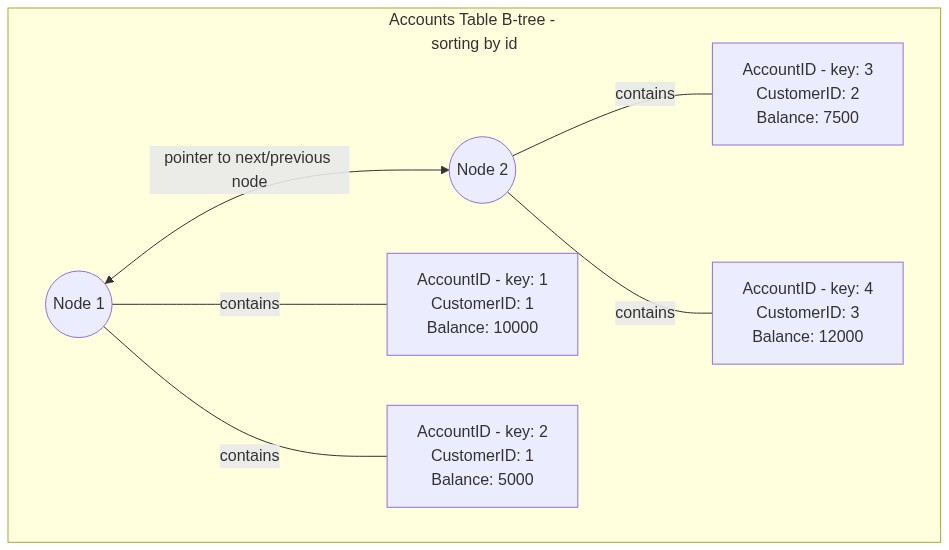
The table B-tree stores the actual table rows, usually ordered by the primary key.
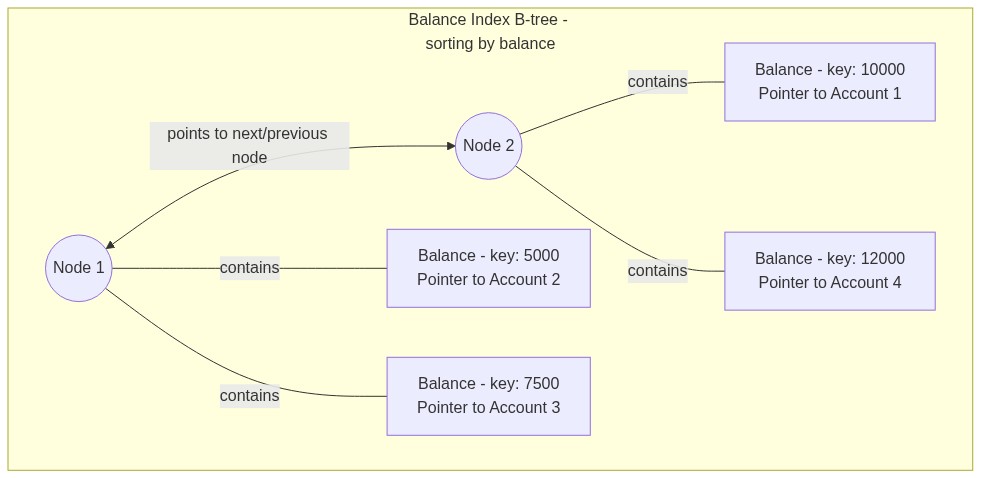
The index B-tree stores only the indexed values along with pointers back to the matching table rows.
Table B-tree example#
Consider a simplified representation of the Accounts table:
AccountID | CustomerID | Balance
1         | 1          | 10000
2         | 1          | 5000
3         | 2          | 7500
4         | 3          | 12000
In the table’s B-tree, rows are stored in nodes sorted by the primary key:
Node 1: (1, 1, 10000) | (2, 1, 5000)
Node 2: (3, 2, 7500)  | (4, 3, 12000)
Index B-tree example#
When you create an index on a column, SQLite generates a separate index B-tree. If we index the Balance column, the new idx_accounts_balance B-tree stores the balances in sorted order along with pointers back to the main table:
Node 1: (5000, pointer to row 2) | (7500, pointer to row 3)
Node 2: (10000, pointer to row 1) | (12000, pointer to row 4)
When you search by balance, SQLite quickly traverses the index B-tree to find the value and follows the pointer to retrieve the full row. While this makes queries fast, every index requires its own B-tree, which increases the database file size.
Graphic: B-Trees#
Here’s what our B-tree for our original table might look like:
And here’s what the B-tree for the index might look like:
Checking File Size#
Because indexes require the construction of new B-trees, they require additional disk space. We can check the file size (using Windows, Linux, etc.). Let’s first first check the size our database:
# In ubuntu du gives file size
!du -h gotham.db
2.2M gotham.db
Now, let’s see what happens when we an index.
%%sql
DROP INDEX IF EXISTS idx_customers_first_last_phone;
CREATE INDEX idx_customers_first_last_phone
ON Customers (FirstName, LastName, PhoneNumber);
# Now, we can check the size again
!du -h gotham.db
2.2M gotham.db
While your results migth vary somewhat, here’s what I got from running these commands:
The database size before building the index was 1.9 mb
The database size after building the index was 2.2 mb.
This is a large difference–over 10%–and reinforces the principle that indexes (especially ones that combine multiple columns) need to be used with care.
Statistics and the query planner#
The query planner does not actually scan your tables before it picks a plan. It relies on query statistics — counts of rows, distribution of values, average column widths — to estimate how expensive each option would be. If those statistics are out of date, the planner makes the wrong choice and a fast query suddenly turns slow.
PostgreSQL refreshes statistics with ANALYZE:
ANALYZE customers;
Most DBMSes run a version of this automatically in the background, but a heavy data load (like Gotham National Bank pulling in a year of transactions from an acquired bank) is a good moment to run it by hand. If a query that used to be fast becomes slow after a big load, stale statistics are one of the first suspects.
SQL Indexing Guidelines: When to Create and Avoid Indexes#
Create an Index When… |
Avoid Creating an Index When… |
|---|---|
Columns are frequently used in WHERE clauses |
Tables are small |
Joining tables on specific columns |
Columns have low cardinality (few unique values) |
Columns are often used in ORDER BY clauses |
Columns are frequently updated |
Enforcing uniqueness is required |
Tables experience frequent large batch updates or inserts |
Querying for a range of values is common |
Columns contain large amounts of text |
Columns are used in aggregate functions with GROUP BY |
The column is rarely used in queries |
Foreign key columns |
Tables are very frequently updated but rarely queried |
Columns used in DISTINCT queries |
Composite indexes with too many columns |
Covering index opportunities exist |
The database is already over-indexed |
Improving performance of full-text searches |
Columns contain primarily NULL values |
Note: Always test the performance impact of indexes in your specific database environment. The effectiveness of an index can vary based on factors such as data distribution, query patterns, and the specific database management system being used.
Introduction to Transactions#
In the financial district of Gotham City, many banking operations happen at the same time. Imagine the chaos if every bank transaction was not carefully managed — it would be a playground for villains! To prevent this, databases use transactions. A database transaction is a sequence of one or more SQL operations that are treated as a single, indivisible unit of work. The defining characteristic of a transaction is that it is all-or-nothing: either every single operation completes successfully, or the entire transaction fails.
Consider a transfer at Gotham City Bank where Bruce Wayne wants to send money from his personal account to Wayne Enterprises. This transfer requires two steps: first, the money is deducted from Bruce’s account, and then it is added to the company’s account. If a system crash or cyber attack occurs halfway through, we do not want Bruce’s money to vanish. Transactions solve this by ensuring that either both steps succeed, or the database reverts so that neither happens.
ACID Properties Overview#
To ensure data integrity during errors or crashes, database transactions must follow four critical rules known as the ACID properties:
We use atomicity to ensure that a transaction is treated as a single, indivisible unit of work where all steps succeed or none do.
We use consistency to guarantee that a transaction always brings the database from one valid state to another, enforcing all database rules.
We use isolation to ensure that concurrent transactions run without interfering with each other’s in-progress data.
We use durability to guarantee that once a transaction is committed, its changes are permanently recorded and survive any system crashes.
These properties are the non-negotiable rules that maintain database order in the face of errors or concurrent access.
Atomicity#
The property of atomicity guarantees that a transaction is treated as a single, indivisible unit of work where everything succeeds or nothing does. There is no middle ground.
For example, imagine Bruce Wayne is updating the Batcave’s inventory system to add a new Batmobile while removing an older model:
Insert a record for the new Batmobile.
Delete the record of the old Batmobile.
Atomicity guarantees that if a sudden power outage occurs halfway through, the database immediately aborts and rolls back to its original state. We will never end up in an invalid state where the database shows two Batmobiles when only one actually exists in the cave.
To enforce this, database engines use commits and rollbacks:
We run a commit to permanently save and apply all database changes when a transaction completes successfully.
We run a rollback to undo all changes and restore the database to its previous clean state if any part of a transaction fails.
In standard SQL, you wrap your operations in a transaction block:
BEGIN TRANSACTION;
-- Your SQL operations here
COMMIT;
If an error occurs, the application can issue a ROLLBACK instead of a COMMIT to completely undo the changes.

Consistency#
The property of consistency ensures that a transaction can only bring the database from one valid state to another, strictly adhering to all predefined rules. Just as laws keep Gotham City functioning, database constraints prevent incorrect or corrupted data from being written.
Consistency guarantees that all data written to the database must follow existing rules:
Column data types prevent you from accidentally saving text inside a numeric balance column.
A unique constraint prevents duplicate values in a column, such as ensuring that two different users cannot have the same email address.
A foreign key constraint maintains links between tables, ensuring you cannot assign a record to a parent table row that does not exist.
A check constraint enforces custom business rules, such as verifying that an account balance never drops below zero.
For example, Arkham Asylum has a database rule that each cell can only hold one villain at a time. If Commissioner Gordon attempts a transaction to assign both the Joker and the Penguin to cell A1, the database will block the insert to enforce consistency. The entire transaction will fail, leaving the cell assignments in their previous valid state.
SQL provides three primary tools to enforce consistency:
We define constraints directly on tables to restrict what data is allowed in columns.
We build database triggers to run automatic verification scripts before a write operation occurs.
We group operations into transactions so that either all consistency rules are met, or the database undoes the entire operation.
Isolation#
The property of isolation ensures that when multiple transactions run at the same time, the database ends up in the same state as if they had run one after the other. Each transaction should feel like it is the only one interacting with the database, preventing concurrent operations from creating conflicts.
Database engines manage concurrency—the ability to handle multiple users simultaneously—by using locks:
We place a shared lock (or read lock) on a record to allow multiple transactions to read the data at the same time while blocking any edits.
We place an exclusive lock (or write lock) on a record to prevent other transactions from reading or writing the data while an edit is in progress.
If Alfred is logging new equipment arrivals while Bruce is updating the Batmobile’s fuel levels, the database uses these locks to isolate their actions. However, excessive locking can lead to a deadlock, which occurs when two transactions are waiting for locks held by each other, causing a complete standoff. Databases solve this by automatically aborting and rolling back one of the transactions.
Full database systems offer different isolation levels to balance speed and consistency:
Under read uncommitted, transactions can see unfinalized changes made by others, which is fast but highly risky.
Under read committed, transactions can only see changes after they are officially committed, preventing dirty reads.
Under repeatable read, a transaction is guaranteed to see the exact same data every time it queries a row, even if others edit it in the meantime.
Under serializable, transactions are completely isolated and run as if they executed one at a time, ensuring the highest consistency.
Durability#
The property of durability guarantees that once a transaction is committed, its changes are saved permanently in non-volatile storage and will survive any system crash or power outage.
To enforce durability, database engines write all changes to a transaction log (often called a write-ahead log) on disk before updating the main database file. If a sudden crash occurs, the database uses these logs to recover all committed data.
Different systems implement durability in tailored ways:
The SQLite database uses a local write-ahead log file to recover database changes automatically after a crash.
The PostgreSQL database supports advanced features like synchronous replication, which copies data to multiple physical servers before confirming a transaction is complete.
While durability guarantees that your data is safe, writing every change directly to disk can impact performance. Administrators must balance durability settings with speed requirements, backed by regular backup strategies to protect against physical drive failures.
Deadlocks#
A deadlock happens when two transactions each hold a resource the other needs, so neither can finish.
Simple example:
Transaction A locks resource X and asks for Y.
Transaction B locks resource Y and asks for X.
Both transactions wait forever unless the database intervenes.
Common prevention strategies:
acquire resources in a consistent order
keep transactions short
use timeouts or deadlock detection
retry failed work after rollback
Transaction Performance and Error Handling#
Transactions protect data, but they also add overhead through locks, logging, and isolation rules.
Keep in mind:
smaller transactions usually scale better
indexes help reduce lock time
stronger isolation reduces concurrency
Example recovery pattern:
BEGIN;
SAVEPOINT before_update;
UPDATE BatcaveInventory
SET Quantity = Quantity - 1
WHERE Item = 'Batarang';
ROLLBACK TO before_update;
COMMIT;
Use savepoints when you want part of a transaction to be reversible without losing all of the work.
Isolation levels in practice#
The “I” in ACID is a setting, not a fixed value. SQL defines four standard isolation levels, each preventing more anomalies than the last and each costing more concurrency:
READ UNCOMMITTED — A transaction can see another transaction’s uncommitted writes. Fast, but allows dirty reads. Rarely used.
READ COMMITTED — A transaction only sees data that has been committed. Prevents dirty reads. The default in PostgreSQL.
REPEATABLE READ — A transaction sees the same rows for the same query each time it runs within the transaction. Prevents non-repeatable reads.
SERIALIZABLE — Transactions behave as if they ran one at a time, even if they actually ran in parallel. Prevents every standard anomaly, including phantom reads.
At Gotham National Bank, a transfer between two accounts is exactly the kind of operation that needs serializable isolation:
BEGIN;
SET TRANSACTION ISOLATION LEVEL SERIALIZABLE;

UPDATE accounts SET balance = balance - 500
WHERE account_id = 1001;

UPDATE accounts SET balance = balance + 500
WHERE account_id = 1042;

COMMIT;
Higher isolation costs more concurrency. SERIALIZABLE may force the database to retry transactions or block writers while a long read runs. Most applications use READ COMMITTED by default and reach for stronger isolation only on the few operations that truly need it.
NoSQL Case Study: Harley’s Havoc#
Harley Quinn decided to launch “Harley’s Havoc” — an online marketplace for circus equipment and practical joke supplies. Because her business experiences massive traffic spikes during flash sales, she needs a highly scalable database that can handle rapid writes. She selected MongoDB, which is a popular NoSQL database that stores data in flexible BSON format.
A typical product document in Harley’s database looks like this:
{
  "_id": ObjectId("5f7d3a2e9d3b2c1234567890"),
  "name": "Authentic Trick Mallet",
  "description": "Guaranteed to make that *BONK* sound!",
  "price": 49.99,
  "stock": 42,
  "categories": ["weapons", "classics", "crowd-favorites"],
  "reviews": [
    {
      "user": "PoisonIvy",
      "rating": 5,
      "comment": "Perfect for bopping Batman!"
    },
    {
      "user": "CatWoman",
      "rating": 4,
      "comment": "Shipping was slow but worth the wait"
    }
  ],
  "variants": {
    "colors": ["red", "black", "purple"],
    "sizes": ["standard", "oversized"]
  }
}
This nested structure allows Harley to store complex product details in a single document without requiring a rigid schema, which is a major advantage over traditional relational tables.
Scaling Out: Why Harley Chose MongoDB#
Unlike traditional SQL databases, MongoDB scales horizontally using a technique called sharding, which distributes data automatically across multiple physical machines:
// Example of how MongoDB might shard Harley's collection
db.createCollection("products")
sh.shardCollection("harleysHavoc.products",
  { "categories": "hashed" }) // Shard by category for even distribution
The Move from ACID to BASE#
To achieve this horizontal scalability, MongoDB adopts a BASE model instead of strict ACID properties:
A BASE system prioritizes high availability and uses eventual consistency, meaning that data copies across servers will eventually sync up, though they might be temporarily different.
This model provides major benefits for Harley’s store:
The system can process thousands of simultaneous writes during flash sales.
Developers can add new product categories instantly without modifying a table schema.
Data is automatically distributed across multiple servers for fast recovery.
However, this model has significant trade-offs:
The lack of strict multi-row transactions makes complex, multi-table operations difficult.
Eventual consistency means inventory counts might be temporarily inaccurate on different servers.
The database does not enforce built-in referential integrity between collections.
Why This Would Be Disastrous for Gotham City Bank#
While BASE works well for product catalogs, it would be catastrophic for a bank:
A bank requires atomicity because transferring money must either complete fully or fail completely, with no middle ground.
A bank requires consistency so that account balances are perfectly accurate and identical on every server.
A bank requires isolation to prevent concurrent withdrawals from allowing users to double-spend funds.
A bank requires durability to guarantee that confirmed deposits are never lost in a server crash.
Best of Both Worlds: Hybrid Approaches#
Modern applications often combine both systems by using MongoDB for product catalogs and web sessions, while using a relational database like PostgreSQL for payment processing and inventory tracking.
A Day in the Life of a Database Administrator#
Barbara Gordon (“Oracle”) is the DBA for Gotham City PD. Her day illustrates what DBAs monitor and why logs matter.
Morning: health checks#
review overnight backups
check CPU, memory, and disk I/O
scan error logs for failures
Mid-morning: performance tuning#
inspect slow queries
add or adjust indexes
compare reports over time to spot trends
Afternoon: security and change management#
investigate suspicious logins
review access patterns
apply schema changes carefully and document them
By the end of the day, Barbara turns raw metrics into actionable reports for technical and non-technical stakeholders.
Common Database Performance Metrics#
Metric |
What it tells you |
|---|---|
CPU usage |
How busy the database server is |
Memory consumption |
Whether caching and working sets fit in RAM |
Disk I/O |
How much reading and writing hits storage |
Query execution time |
How long individual statements take |
Transactions per second |
Overall workload throughput |
Connections |
How many sessions are active |
Cache hit ratio |
How often reads come from memory instead of disk |
Lock wait time |
How much time sessions spend blocked |
Watching these metrics helps a DBA decide whether a problem is caused by query design, concurrency, hardware pressure, or workload spikes.
Monitoring as an operations discipline#
Barbara Gordon’s day above gives the flavor of a DBA’s work. The rest of this section turns that into a discipline: how baselines are set, how alerts get tied to them, and what a DBA actually checks every day.
Baselines and thresholds#
A baseline configuration is “what normal looks like.” Before you can sensibly alert on a metric, you need to know what its value usually is, at what time of day, and under what load.
For Gotham National Bank, a baseline might say:
During business hours, CPU runs at 30–45%.
Median query latency is 25–50 ms.
Backup jobs finish between 02:00 and 03:30.
Thresholds become useful only after the baseline exists. “Page on-call if CPU exceeds 70% for more than five minutes” only makes sense once you know that 70% is well above normal.
Alerts and notifications#
An alert is an automated signal that some metric has crossed a threshold. A notification is how the alert gets to a human — email, SMS, pager, chat channel.
A real alert specification names every part of the response:
If replication lag on the customer database exceeds 30 seconds for more than 2 minutes, page the on-call DBA. If lag continues for 10 minutes, also notify the engineering manager.
Notification channels usually map to severity:
Info — chat channel; nobody is paged.
Warning — email to the team; reviewed during the next standup.
Critical — page the on-call engineer immediately, 24/7.
Tuning these levels is a never-ending job. Too aggressive and the team learns to ignore the pager; too quiet and real problems slip past.
What DBAs watch every day#
A working DBA checklist at Gotham National Bank looks something like this:
Job completion and failure — Did every scheduled job finish? Which ones errored?
Backup success or failure — Did last night’s backups complete? Were they validated?
Connection and session counts — Are there sessions stuck, or far more sessions than usual?
Disk space — How much headroom do data and log volumes have?
Replication lag — Are read replicas keeping up with the primary?
Slow-query growth — Are queries that used to be fast getting slower over time?
A simple dashboard for the bank’s customer database:
Metric |
Today’s value |
Baseline |
Alert threshold |
Status |
|---|---|---|---|---|
Average CPU |
38% |
30–45% |
> 70% |
OK |
Median query latency |
42 ms |
25–50 ms |
> 200 ms |
OK |
Replication lag |
1.2 s |
< 2 s |
> 30 s |
OK |
Last backup |
02:48 |
02:00–03:30 |
not completed by 06:00 |
OK |
Active sessions |
184 |
100–300 |
> 500 |
OK |
A glance at this dashboard tells the DBA the system is healthy without having to read each metric in detail.
Maintenance operations#
Monitoring tells you what is wrong. Maintenance is what you do about it on purpose, on a schedule, with a paper trail. Commissioner Gordon does not want surprises in the IT report; the DBA team plans maintenance carefully so changes never look like accidents.
Patch and release management#
Patch management is the discipline of applying vendor-issued fixes to the database engine, the operating system, and the surrounding libraries.
A typical quarterly cycle at Gotham National Bank:
The DBMS vendor releases a security patch.
The DBA team reviews release notes for breaking changes.
The patch is applied to a staging environment and validated.
A change approval request is filed and reviewed by the change advisory board.
The patch is deployed during a scheduled release schedule window — typically off-hours, with rollback plans in writing.
The team verifies that production is healthy after the change.
A release schedule is the published calendar of these windows. Stakeholders know exactly when systems may be briefly unavailable and can plan around it.
Integrity checks and database refresh#
An integrity check scans the database for problems that should not exist: corrupted pages, broken foreign-key references, orphaned rows. SQLite has PRAGMA integrity_check. PostgreSQL has amcheck. SQL Server has DBCC CHECKDB. Each does roughly the same job: confirm that nothing has rotted under the surface.
A database refresh is the controlled copy of production data into a non-production environment so developers and testers can work against realistic data without touching the real system. For Gotham National Bank:
The refresh runs from a recent backup, not from live production.
Sensitive fields (account numbers, SSNs) are masked or anonymized first.
The development environment is dropped and recreated to match the new state.
Refreshes are typically scheduled — weekly for active projects, monthly for stable ones — so developers know when the test data is changing.
Version control and CI/CD for databases#
Application code lives in version control, but database schemas often do not. Modern teams fix that with schema migrations: small, ordered SQL files that describe each change to the schema. Tools like Flyway and Liquibase apply migrations in order and remember which ones have already run.
A typical CI/CD pipeline for Gotham National Bank’s customer database:
A developer writes a migration file describing a schema change.
The change is committed to version control alongside the application code.
CI runs the migration against an empty database and the application’s tests.
After review and merge, the deploy pipeline runs the same migration against staging, then production.
The same discipline that protects application code — review, automated tests, repeatable deploys — now protects the schema. The database stops being the scary part of every release.
Chapter Summary#
Use this list as a self-check. After working through the chapter, you should be able to do each of the following:
You can explain what an index is and what problem it solves.
You can create indexes and measure their impact on speed and size.
You can decide when an index is worth creating and when it isn’t.
You can describe transactions and their role in data integrity.
You can recite the ACID properties and how they affect consistency.
You can work with transactions using
BEGIN,COMMIT,ROLLBACK, andSAVEPOINT.You can talk about concurrent access and the role of locking.
You can argue for monitoring, reporting, and logging as part of database health.
You can name tools and techniques DBAs use to manage databases day-to-day.
You can describe a baseline configuration and explain why alerts depend on one.
You can list the daily monitoring tasks of a DBA and explain why each matters.
You can outline a patch-management cycle that includes change approval and a release schedule.
You can run an integrity check and explain when a database refresh is appropriate.
You can describe how version control and CI/CD pipelines apply to database schemas.
You can refresh query statistics and explain when it matters.
You can pick an isolation level and explain the trade-off it makes.
Lab: Querying Database Logs#
The dbms_logs.db database contains one table, Logs, with structured events stored as JSON in the data column.
Table structure#
Column |
Type |
Purpose |
|---|---|---|
|
INTEGER |
Unique log entry ID |
|
DATETIME |
When the log was recorded |
|
JSON |
Event details |
What to look for in this lab#
query performance
transaction activity
errors
connection events
schema changes
As you query the table, pay attention to how the type inside data changes which fields are available.
Log Entry Types to Know#
The data JSON object varies by event type.
Type |
Useful fields |
Typical question |
|---|---|---|
|
|
Which queries are slow? |
|
|
Which transactions were long or failed? |
|
|
What failed and why? |
|
|
Who connected, from where, and for how long? |
|
|
What structural changes were made? |
A good first step is to filter by json_extract(data, '$.type') and then pull only the fields relevant to that event class.
Querying the Database#
To extract information from the Logs table, you can use SQLite’s JSON functions. Below are some sample queries to help you get started.
json_extract(json, path): Extracts a value from a JSON string.json_type(json, path): Returns the type of the value at the specified path.
Some sample queries:
Sample Queries#
%%sql
--Retrieve all query execution logs
SELECT
  id,
  timestamp,
  json_extract(data, '$.query_id') AS query_id,
  json_extract(data, '$.sql') AS sql_statement,
  json_extract(data, '$.execution_time_ms') AS execution_time_ms,
  json_extract(data, '$.rows_affected') AS rows_affected,
  json_extract(data, '$.user') AS user
FROM Logs
WHERE json_extract(data, '$.type') = 'query_execution'
LIMIT 5
| id | timestamp | query_id | sql_statement | execution_time_ms | rows_affected | user |
|---|---|---|---|---|---|---|
| 5 | 2024-09-04T09:17:09.045414 | Q-8305 | SELECT * FROM users WHERE last_login > '2023-10-30 19:52:34' | 199.2 | 685 | user_64 |
| 13 | 2024-09-19T16:28:24.045934 | Q-8385 | DELETE FROM expired_sessions WHERE expiry_date < '2023-12-29 21:37:18' | 466.24 | 689 | user_19 |
| 16 | 2024-08-31T02:47:26.046207 | Q-6789 | DELETE FROM expired_sessions WHERE expiry_date < '2024-08-16 16:24:21' | 32.7 | 152 | user_66 |
| 37 | 2024-09-13T00:39:58.048539 | Q-4412 | SELECT product_id, SUM(quantity) FROM sales WHERE sale_date = '2024-03-20 16:45:59' GROUP BY product_id | 4083.9 | 957 | user_93 |
| 38 | 2024-09-04T06:55:44.048599 | Q-2576 | UPDATE accounts SET balance = balance + -10.58 WHERE account_id = 2758 | 2556.38 | 850 | user_6 |
%%sql
--Find errors witha specific code
SELECT
  id,
  timestamp,
  json_extract(data, '$.error_code') AS error_code,
  json_extract(data, '$.message') AS message,
  json_extract(data, '$.query_id') AS query_id,
  json_extract(data, '$.sql') AS sql_statement
FROM Logs
WHERE json_extract(data, '$.type') = 'error'
  AND json_extract(data, '$.error_code') = 'ORA-00001'
LIMIT 10
| id | timestamp | error_code | message | query_id | sql_statement |
|---|---|---|---|---|---|
| 61 | 2024-09-03T22:28:21.050081 | ORA-00001 | Unique constraint violated | Q-5291 | DELETE FROM expired_sessions WHERE expiry_date < '2024-03-11 12:26:58' |
| 351 | 2024-08-26T02:53:10.069339 | ORA-00001 | Unique constraint violated | Q-4517 | DELETE FROM expired_sessions WHERE expiry_date < '2024-08-01 03:17:31' |
| 439 | 2024-08-30T12:53:03.073980 | ORA-00001 | Unique constraint violated | Q-5594 | UPDATE products SET stock = stock - 1 WHERE id = 558 |
| 461 | 2024-09-09T19:29:09.074835 | ORA-00001 | Unique constraint violated | Q-5940 | DELETE FROM expired_sessions WHERE expiry_date < '2024-04-08 11:24:18' |
| 466 | 2024-09-02T13:26:31.075155 | ORA-00001 | Unique constraint violated | Q-6007 | SELECT * FROM users WHERE last_login > '2024-01-02 10:50:11' |
| 481 | 2024-09-02T23:14:14.075941 | ORA-00001 | Unique constraint violated | Q-4459 | UPDATE products SET stock = stock - 1 WHERE id = 480 |
| 505 | 2024-09-12T07:40:03.656038 | ORA-00001 | Unique constraint violated | Q-8420 | INSERT INTO orders (user_id, product_id, quantity) VALUES (817, 296, 9) |
| 530 | 2024-09-05T19:54:18.657065 | ORA-00001 | Unique constraint violated | Q-8690 | SELECT * FROM users WHERE last_login > '2023-11-30 05:32:33' |
| 562 | 2024-09-20T13:33:16.658097 | ORA-00001 | Unique constraint violated | Q-1629 | SELECT COUNT(*) FROM orders WHERE order_date BETWEEN '2023-12-24 12:34:35' AND '2024-07-18 18:15:29' |
| 688 | 2024-08-28T01:58:39.662287 | ORA-00001 | Unique constraint violated | Q-1873 | SELECT COUNT(*) FROM orders WHERE order_date BETWEEN '2024-06-30 13:23:59' AND '2024-09-20 01:36:19' |
%%sql
--Get number of connections per user
SELECT
  json_extract(data, '$.user') AS user,
  COUNT(*) AS connection_count
FROM Logs
WHERE json_extract(data, '$.type') = 'connection'
  AND json_extract(data, '$.action') = 'CONNECT'
GROUP BY user
ORDER BY connection_count DESC
LIMIT 5;
| user | connection_count |
|---|---|
| user_50 | 6 |
| user_58 | 5 |
| user_35 | 5 |
| user_29 | 4 |
| user_13 | 4 |
%%sql
--Get average query execution time
SELECT
  ROUND(AVG(json_extract(data, '$.execution_time_ms')),2) AS avg_execution_time_ms
FROM Logs
WHERE json_extract(data, '$.type') = 'query_execution';
| avg_execution_time_ms |
|---|
| 2370.28 |
Lab: Practice Your SQL#
Loop of the Recursive Dragon: Databse Theory#
print('The external LOTR mini-game is skipped during automated execution. Run this cell interactively if you want the activity.')
The external LOTR mini-game is skipped during automated execution. Run this cell interactively if you want the activity.
Key Points Summary#
Indexes are separate data structures that allow the database engine to find and retrieve data more efficiently without scanning the entire table.
Creating appropriate indexes is crucial for optimizing database performance, but indexes also require additional storage space.
Transactions ensure data integrity and reliability by treating a sequence of database operations as a single unit of work, adhering to the ACID properties: Atomicity, Consistency, Isolation, and Durability.
SQLite provides commands like BEGIN, COMMIT, ROLLBACK, and SAVEPOINT to work with transactions and manage changes to the database.
Concurrent transactions can lead to issues like lost updates and inconsistent data, so databases employ locking mechanisms to control simultaneous access to data.
Database monitoring involves continuously observing and tracking various aspects of a database system to ensure it’s running smoothly and efficiently.
Reporting generates detailed analyses and summaries based on the data collected through monitoring, helping database administrators make informed decisions.
Logging systematically records events, activities, and metrics related to the database system, providing valuable information for troubleshooting, performance optimization, and security auditing.
Database administrators like ORACLE rely on a combination of tools, techniques, and best practices to effectively monitor, manage, and optimize databases, ensuring their reliability, performance, and security.
Practice with the Loop of the Recursive Dragon#
Sharpen what you just learned with a chapter-matched review set in the Loop of the Recursive Dragon — an adaptive review game with multiple question types and RPG-style mechanics, built for this book.
Glossary#
Use this reference sheet to quickly review key index and transaction terms.
Indexes#
An index is a database structure that speeds up query performance by providing a quick lookup path to table rows.
A B-tree is a self-balancing tree structure commonly used to implement database indexes for fast retrieval.
A clustered index determines the physical storage order of the rows in a table.
A non-clustered index is stored in a separate B-tree structure and contains pointers back to the main table rows.
A covering index contains all the columns a query requests, allowing the database to answer the query without reading the table itself.
An index scan is a search operation that traverses an index B-tree to find matching rows quickly.
A full table scan occurs when the database engine reads every single row in a table to find matching data.
The
CREATE INDEXcommand is the SQL statement used to build a new index on specified table columns.The
EXPLAIN QUERY PLANcommand is used to inspect how the database engine plans to execute a query.
Transactions and ACID#
A transaction is a sequence of database operations executed together as a single, indivisible unit of work.
The ACID acronym represents the four essential properties of reliable transactions, which are atomicity, consistency, isolation, and durability.
The atomicity is the property ensuring that all operations in a transaction succeed completely or fail completely.
The consistency is the property guaranteeing that a transaction always leaves the database in a valid, rule-abiding state.
The isolation is the property ensuring that concurrent transactions do not interfere with each other’s in-progress data.
The durability is the property guaranteeing that committed transaction data is permanently saved and survives system crashes.
The
BEGINstatement is the SQL command used to start a new transaction block.The
COMMITstatement is the SQL command used to permanently save all changes made during a transaction.The
ROLLBACKstatement is the SQL command used to undo all changes made in an active transaction.A
SAVEPOINTis a marker inside a transaction that allows you to roll back a portion of your changes without canceling the entire transaction.
Concurrency#
The concurrency is the ability of a database to handle multiple active transactions at the same time without conflicts.
A shared lock allows multiple transactions to read a record simultaneously while blocking any edits.
An exclusive lock blocks all other transactions from reading or writing a record while an edit is in progress.
Monitoring#
The database monitoring is the ongoing process of tracking system performance, resources, and connections.
The database reporting is the act of generating structured summaries about database activity and health.
The connection logs are system files that record details about user logins, connection times, and errors.
The system logs are database records tracking system events, startup operations, and errors.
Other#
A scalar subquery is a nested query that returns exactly one single value to the main outer query.
Monitoring and maintenance#
A baseline configuration is a documented record of normal system performance used to set alert thresholds.
An alert is an automated warning triggered when a database metric crosses a defined safety threshold.
A notification is the delivery of a system alert to a database administrator via email or text.
The job monitoring is the process of tracking scheduled background tasks to verify they complete successfully.
The session monitoring is the practice of tracking active database connections to spot hung queries.
The replication lag is the physical delay before a write on a primary database replica appears on its backup nodes.
The patch management is the ongoing discipline of installing software updates and security fixes.
A change approval is a formal review step required before any modification is deployed to a production database.
A release schedule is a shared calendar of approved maintenance windows for deploying database updates.
An integrity check is a database scan that checks for corrupt data blocks or broken foreign key links.
A database refresh is the process of copying production data into a test environment with sensitive data masked.
A schema migration is an ordered SQL script that applies a specific structural update to a database schema.
The CI/CD represents automated pipelines used to build, test, and deploy database and code updates.
Statistics and isolation#
The query statistics are value distributions used by the query planner to calculate the fastest execution path.
The
ANALYZEstatement is the command used to update the query planner’s value statistics for a table.An isolation level is a database setting that controls how much in-progress transaction data is visible to other users.
The
READ UNCOMMITTEDisolation level is the weakest setting, allowing transactions to read uncommitted changes.The
READ COMMITTEDisolation level ensures that transactions can only read data after it has been committed.The
REPEATABLE READisolation level guarantees that a transaction will see the exact same values every time it queries a row.The
SERIALIZABLEisolation level is the strongest setting, forcing concurrent transactions to run as if they executed one at a time.