

Chapter 11: Architecture Patterns & Testing (The Springfield Power Plant)#
Database and SQL Through Pop Culture | Brendan Shea, PhD#
Modern database systems need careful thought about three things: how the data is shaped, where the servers live, and how you confirm it all works. This chapter walks through each one using familiar characters — Springfield’s power plant for normalization, Rick and Morty for deployment choices, SpongeBob for unit tests, and a few other cameos along the way.
Learning Outcomes#
By the end of this chapter, you will be able to:
Choose appropriate database design patterns, such as normalization, star schemas, bridge tables, temporal data, and polymorphic associations.
Evaluate database patterns in terms of consistency, query simplicity, flexibility, and scalability.
Compare OLTP and OLAP workloads and design schemas optimized for each query type.
Compare on-premises, cloud, and hybrid deployment models and select client/server or embedded architectures.
Identify operational concerns in deployments, including requirements gathering, resource projection, costs, and standard deployment phases.
Apply SLAs, SLOs, KPIs, RPO, and RTO to database deployment and monitoring plans.
Select high-availability deployment structures, including load-balanced and multizone replica architectures.
Identify default ports, transport protocols, and connection strings of common database engines.
Distinguish unit, integration, and performance testing in database systems.
Design database unit tests for schemas, stored procedures, and automated triggers.
Design integration tests for system dependencies and run load, stress, and scalability tests.
Brendan’s Lecture#
from IPython.display import YouTubeVideo
YouTubeVideo('fLkjTZPn5q8', width=800, height=500)
Introduction to Design Patterns#
A design pattern is a tested solution to a common problem. Database patterns come from decades of practice across many industries. No pattern fits every situation, but knowing the common ones helps you choose well. This section covers seven patterns, with the trade-offs of each.
Planning and operations#
“I want a database. Buy me one!” Mr. Burns slams his fist on Homer’s desk at the Springfield Nuclear Power Plant. Homer blinks. Behind him, the plant’s IT team exchanges nervous glances. You cannot just buy a database — you have to plan one.
Patterns sit on top of planning. Before you choose a star schema or a partitioning strategy, you have to know who needs the system, how much data will land in it, how fast it has to respond, and what happens when it goes down. This section walks through the planning work that makes the patterns later in the chapter useful.
Requirements gathering#
Requirements gathering is the process of asking the right questions before you build anything. The inputs typically include:
Stakeholders. Who uses the system? At the plant: control-room operators, safety auditors, payroll, Mr. Burns.
Regulatory requirements. What rules apply? Nuclear plants have to meet NRC reporting standards; a hospital has HIPAA; a school has FERPA.
Expected data volume. How many rows per day? Per year? Will it grow?
Peak concurrent users. How many people will hit the system at the same time during a busy shift?
Latency targets. How fast does a query need to come back before the user gives up?
Skip this step and you end up with a system that meets nobody’s needs particularly well. Mr. Burns does not actually want “a database.” He wants a system that prints a quarterly safety report on demand and never embarrasses him in front of regulators.
Resource projection, SLAs, and KPIs#
Once you know the requirements, you can project resources and write commitments around them.
SLA (Service Level Agreement) — A formal promise to the people who depend on the system. “The plant’s safety database will be available 99.9% of the time.”
SLO (Service Level Objective) — An internal target that supports the SLA. “Mean query response under 200 ms during normal hours.”
KPI (Key Performance Indicator) — A measurable signal you watch to know whether you are meeting the SLO. “Average query latency over the last 24 hours.”
Sample targets for the Springfield safety database:
Metric |
Target |
Why |
|---|---|---|
Uptime SLA |
99.9% |
Safety reporting cannot stall during an inspection |
Query latency SLO |
< 200 ms median |
Control-room dashboards refresh every few seconds |
Backup completion KPI |
100% nightly success |
Without backups, the next outage is permanent data loss |
RPO |
1 hour |
Worst-case data loss the plant is willing to accept |
RTO |
4 hours |
Time the plant has to be back up before regulators are notified |
RPO (Recovery Point Objective) and RTO (Recovery Time Objective) were introduced in Chapter 4. They belong here too: they are the disaster-recovery side of a deployment plan.
Deployment phases#
A real database deployment moves through a predictable sequence of phases. Each phase produces something you can hand to the next.
Provision — Stand up the hardware or cloud resources. Decide on CPU, memory, storage, network.
Configure — Install the DBMS, apply the baseline configuration, set up users and roles.
Import — Move existing data into the system, often through an ETL or ELT process (see Chapter 12).
Validate — Run the database validation workflow: confirm schema correctness, sample queries, expected row counts, and that constraints fire when they should.
Operate and upgrade — Apply patches, run maintenance, deliver new features. The data must keep its computational persistence — values survive crashes, restarts, and software upgrades.
Decommission — When the system retires, archive the data, document the move, and destroy the storage according to policy.
Patterns sit on top of planning. The next sections cover the design patterns; everything you build with them lives or dies by the plan above.
Normalize to 3NF: Bringing Order to Chaos#
The Springfield Nuclear Power Plant database was a mess. Mr. Burns insisted on keeping all employee records, department details, safety certifications, and incident reports in one giant spreadsheet. Homer Simpson, who was somehow promoted to database administrator, was completely overwhelmed.
Whenever a worker moved, Homer had to update their address in dozens of different rows, creating massive headaches. This situation highlights two classic database problems:
Having data redundancy means you are storing the exact same piece of information in multiple places.
Creating data anomalies means that when you update one record, the other copies do not change and your data becomes inconsistent.
To solve this, designers use normalization. This design pattern breaks one large, messy table into several smaller tables that each focus on a single topic by following rules called normal forms.
The problem table#
EmpID |
Name |
Address |
Department |
DeptLocation |
Certification |
CertExpiry |
SupervisorName |
SupervisorDept |
|---|---|---|---|---|---|---|---|---|
1 |
Homer Simpson |
742 Evergreen Terrace |
Safety |
Sector 7G |
Nuclear Operations |
2024-06-15 |
Mr. Burns |
Executive |
1 |
Homer Simpson |
742 Evergreen Terrace |
Safety |
Sector 7G |
Donut Quality |
2024-08-01 |
Mr. Burns |
Executive |
This table contains three major design flaws:
The employee name and home address repeat for every single certification they earn.
The department location is duplicated for every employee assigned to that department.
The supervisor details are typed out over and over again for each employee record.
The three normal forms#
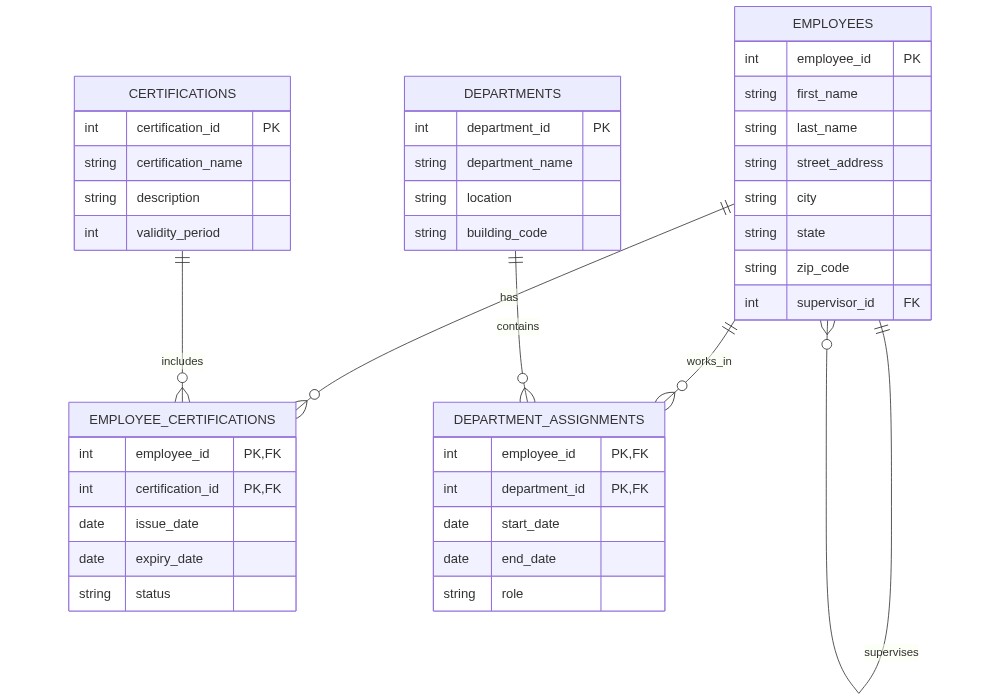
A table is in First Normal Form (1NF) when every cell contains only one single, indivisible value with no repeating groups. Homer started by giving each certification its own row and splitting the addresses into street, city, state, and zip code columns.
A table reaches Second Normal Form (2NF) when you remove partial dependencies, meaning every column must depend on the entire primary key. Because employee names and addresses depend only on the employee ID and not on their certifications, Homer moved employee details into their own table.
A table achieves Third Normal Form (3NF) when you remove transitive dependencies, meaning columns cannot depend on other non-key columns. Since department locations depend on the department name rather than the employee, Homer moved department details into a separate table.
After normalization, Homer only has to update an address in a single row. Department records stay consistent, and new certifications can be added without messing up employee profiles. The resulting clean structure is shown in the diagram below.
OLTP vs. OLAP#
Before the star schema makes sense, the difference between OLTP and OLAP has to be clear.
Bob Belcher’s burger restaurant runs on OLTP — online transactional processing. Every order is a small, fast transaction: a few row inserts and updates, finished in milliseconds, hundreds of times an hour. The schema is normalized, the queries are short, and the workload is many small writes.
Louise’s analytics, built on top of those orders, are OLAP — online analytical processing. The queries are bigger (“how do Tuesday burger sales compare to Wednesday over the last two years?”), the writes happen in batches (last night’s data loaded once), and the schema is denormalized so the joins do not crush the laptop.
Aspect |
OLTP |
OLAP |
|---|---|---|
Workload |
Many small reads and writes |
Few large analytical reads |
Schema style |
Normalized |
Denormalized (often a star schema) |
Typical query |
“Insert one order, update inventory” |
“Total sales by week by burger type” |
Row vs. column orientation |
Row-oriented storage |
Often column-oriented |
Refresh cadence |
Real time |
Periodic batch (nightly, hourly) |
Tuning priority |
Low latency on small queries |
High throughput on big aggregations |
Most businesses end up with both — a normalized OLTP database for the day-to-day, and a denormalized OLAP warehouse built from it for reporting. The Star Schema below is the canonical OLAP design.
The Star Schema Pattern: Optimizing for Analysis#
Bob Belcher’s burger restaurant had a problem. His daughter Louise wanted to analyze their sales from every angle: daily sales by burger type, ingredient costs by supplier, and the impact of Jimmy Pesto’s daily specials. Their normalized database worked well for recording each individual customer order, but Louise’s reports required joining six or seven tables, which caused Bob’s ancient laptop to freeze.
This is a common issue in database design. Normalization is excellent for day-to-day transactions, but it slows down deep analytical queries. The Star Schema pattern solves this by organizing data specifically for analysis.
A Star Schema intentionally denormalizes data around a central fact table surrounded by multiple dimension tables, resembling points around a star. This structure creates a dimensional model that makes complex queries much faster and simpler.
Key components#
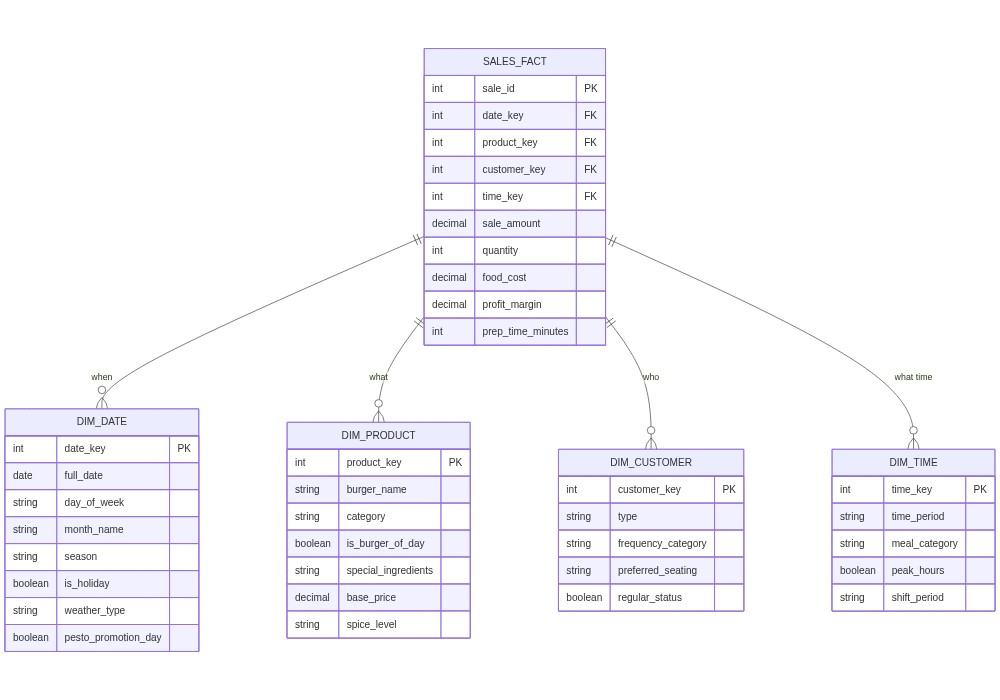
A fact table holds the actual numbers and measurements you want to analyze. For Bob’s Burgers, the fact table records individual sale events, storing numeric details like quantity sold, price, cost, and foreign keys to the surrounding dimension tables.
A dimension table holds the descriptive context that answers who, what, where, when, and why. For Bob’s Burgers, the dimensions include time (dates, months, and seasons), products (burger names and categories), customers (visit frequency), and locations (table numbers).
From normalized to star: Bob’s transformation#
Louise kept the normalized tables for daily restaurant operations but built a new star schema for analysis. Now, her sales fact table records each sale alongside its cost and prep time.
The dimension tables add crucial context:
The date dimension tracks local weather, events, and competitor promotions.
The product dimension tracks burger type, ingredients, and whether a burger was the special of the day.
The customer dimension tracks dining preferences.
The time-of-day dimension groups sales into breakfast, lunch, and dinner shifts.
With this setup, Louise can quickly find which burgers sell best on rainy days, or how competitors’ promotions impact her family’s business. To move data from daily operations into this analytical warehouse, engineers use a process called Extract, Transform, Load (ETL), which we will explore in detail in Chapter 12.
After the star schema went live, Louise’s analytical queries got dramatically faster. Bob could identify the most profitable Burger-of-the-Day creations, see how weather affected outdoor seating, and tune ingredient ordering for seasonal patterns. The family could make data-driven calls on staffing, inventory, and promotions — all while Gene made questionable musical puns about database joins.
The star schema has trade-offs. It adds some redundancy and is not meant for transaction processing. That is why many businesses keep both: a normalized operational database and a denormalized analytical star schema, with an ETL (Extract, Transform, Load) process moving data between them.
Next up: handling many-to-many relationships with the Bridge Tables pattern, illustrated at South Park Elementary.
The Bridge Tables Pattern: Managing Many-to-Many Relationships#
Principal Victoria of South Park Elementary had a major database headache. Mr. Garrison complained that the school database could not track which students were in which classes, which parents sat on which PTA committees, or who joined extracurricular activities. The old design forced staff to cram multiple classes into a single student record, which turned every schedule change into a maintenance nightmare.
This is a classic many-to-many relationship problem. A single student can enroll in many classes, and a single class contains many students.
A bridge table (also known as a junction table or association table) resolves this problem by sitting directly between the two main tables. The bridge table holds foreign keys pointing to both parent tables, linking them together cleanly.
Anatomy of a bridge table#
The table contains foreign keys pointing to both parent tables to establish the connection.
The database uses a composite primary key made by combining both foreign keys to ensure each relationship is unique.
The table can store relationship attributes to record extra details, such as the date a student enrolled or the grade they earned in that class.
South Park Elementary’s solution#
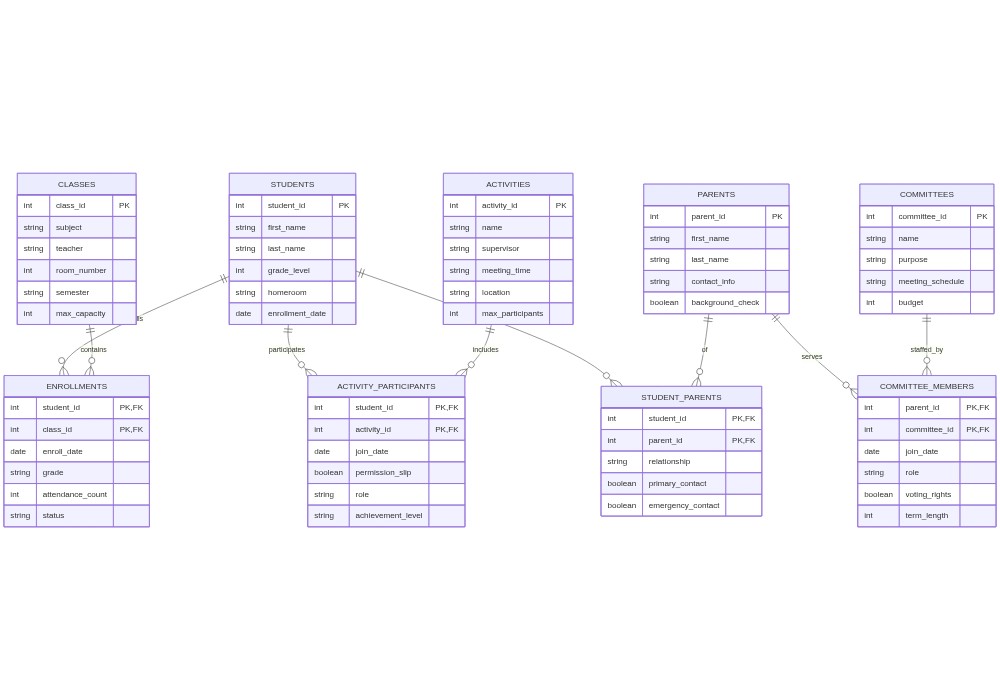
School staff moved student-class relationships into an enrollments bridge table that tracks which student is in which class, when they joined, and their current grade.
They moved parent-committee relationships into a memberships bridge table that tracks parent roles, term dates, and contact preferences.
They moved student-activity relationships into an extracurriculars bridge table that tracks participation and permission slips.
This simple change solved their database problems. Cartman’s class switches became simple single-row updates, Kenny’s attendance could be tracked per class without touching his main profile, and Mr. Garrison could generate clean rosters instantly. The diagram below shows the bridge table pattern in action.
The bridge table pattern brought order to South Park Elementary’s chaos. Mr. Garrison could track participation, Principal Victoria could generate accurate board reports, and even Cartman couldn’t find a way to game the system (not for lack of trying).
Bridge tables add some schema complexity, but they preserve data integrity while letting you store information about the relationship itself. Next up: handling change over time with the Temporal Pattern, illustrated through Professor Farnsworth’s troubled employee database at Planet Express.
The Temporal Pattern: Tracking Changes Through Time#
“Good news, everyone!” Professor Farnsworth announced. “I’ve discovered our employee database is completely wrong about everyone’s past salaries, job titles, and delivery routes!” This was, of course, terrible news. The Planet Express database only stored current values, overwriting history with each update. When the Space Tax Bureau audited, no one could explain why Fry’s salary had suddenly jumped (a glitch caused by Dr. Zoidberg eating a sandwich over the keyboard).
Many databases only store the current state of a record. However, businesses frequently need to see how data has changed over time, such as tracking salary histories, price evolution, or address changes.
Understanding temporal data#
We use temporal data to describe information whose meaning and validity depends directly on time.
The database uses effective dating to mark when a record was valid by adding an effective start date and an effective end date to each row.
The system can track valid time, which is when an event was true in the real world, and transaction time, which is when the data was actually written to the database.
Employee history at Planet Express#
Planet Express built temporal tables to track salary history and job title changes. Fry’s salary history table shows this pattern in action:
Employee |
Salary |
Effective_Start |
Effective_End |
Current |
|---|---|---|---|---|
Fry |
$0.05/min |
2999-12-31 |
3001-06-15 |
False |
Fry |
$0.01/min |
3001-06-16 |
3001-06-16 |
False |
Fry |
$100.00/min |
3001-06-17 |
3001-06-17 |
False |
Fry |
$0.10/min |
3001-06-18 |
NULL |
True |
Using this layout, Planet Express can easily track historical delivery routes, pricing updates, and space-time anomalies. The diagram below shows how the temporal tracking system fits together.
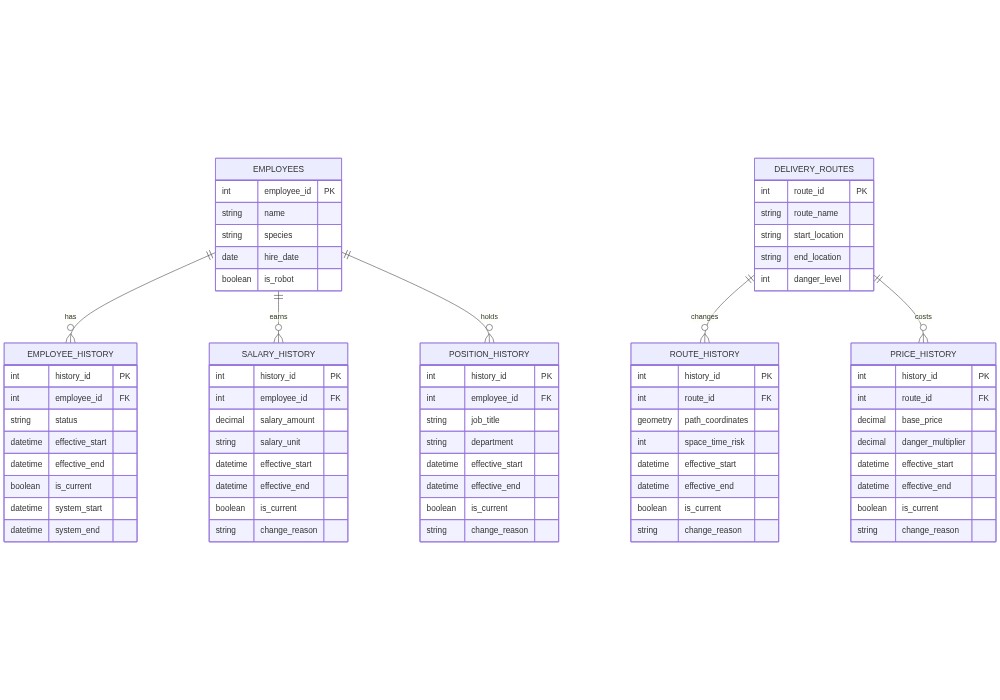
This design solved several problems for Planet Express:
The Space Tax Bureau could audit accurate salary histories.
Professor Farnsworth could analyze how route changes affected efficiency.
Hermes could track employee status changes (useful for crew who frequently died and returned).
The company could maintain pricing histories across temporal zones.
Implementation considerations#
The temporal pattern adds power but also costs:
Storage: keeping every historical row uses far more space.
Query complexity: date-range queries need care.
Write performance: inserts and updates do more work.
Retention policy: decide how long to keep history.
Temporal consistency: make sure ranges don’t overlap or leave gaps.
Edge cases at Planet Express included timeline alterations and the time Fry became his own grandfather. Those were handled with temporal consistency checks and paradox detection.
Next up: the Polymorphic Associations Pattern, illustrated through the diverse characters in Professor Oak’s Pokémon research database.
The Polymorphic Associations Pattern: Connecting to Multiple Tables#
Professor Oak faced a unique database challenge at his Pokémon Research Laboratory. Researchers needed to track many different kinds of interactions: Pokémon could belong to Trainers or live in the wild, Items could be held by either Pokémon or Trainers, and Battles could involve different combinations of wild and trained Pokémon.
The problem with simple relationships#
Oak’s team first created a separate table for each relationship type:
TRAINER_POKEMON
trainer_id |
pokemon_id |
nickname |
catch_date |
|---|---|---|---|
1 |
25 |
Sparky |
2024-01-15 |
WILD_POKEMON
pokemon_id |
location_id |
last_seen_date |
|---|---|---|
147 |
23 |
2024-03-20 |
TRAINER_ITEMS
trainer_id |
item_id |
quantity |
acquire_date |
|---|---|---|---|
1 |
1 |
5 |
2024-03-01 |
POKEMON_ITEMS
pokemon_id |
item_id |
acquire_date |
|---|---|---|
25 |
3 |
2024-03-10 |
This approach quickly became unmanageable. Every new kind of interaction required creating a brand new table, and simple queries like “find who holds this item” had to search across multiple tables at the same time.
The polymorphic solution#
To solve this, Oak’s team designed a flexible model where a single relationship table can connect any entities in the database:
ENTITIES
entity_id |
type |
name |
|---|---|---|
1 |
trainer |
Ash |
2 |
pokemon |
Pikachu |
3 |
item |
Poké Ball |
4 |
location |
Viridian Forest |
5 |
tv_show |
Pokémon Watch |
RELATIONSHIPS
id |
from_entity_id |
relationship_type |
to_entity_id |
started_at |
|---|---|---|---|---|
1 |
1 |
owns |
2 |
2024-01-15 |
2 |
2 |
holds |
3 |
2024-03-10 |
3 |
2 |
watches |
5 |
2024-03-24 |
RELATIONSHIP_ATTRIBUTES
relationship_id |
attribute |
value |
|---|---|---|
1 |
nickname |
Sparky |
2 |
duration_minutes |
30 |
This design handles any kind of connection. When researchers discovered that Pokémon enjoyed watching TV shows, they simply added a new row to the database without needing to change the table structure. The diagram below shows this flexible design.
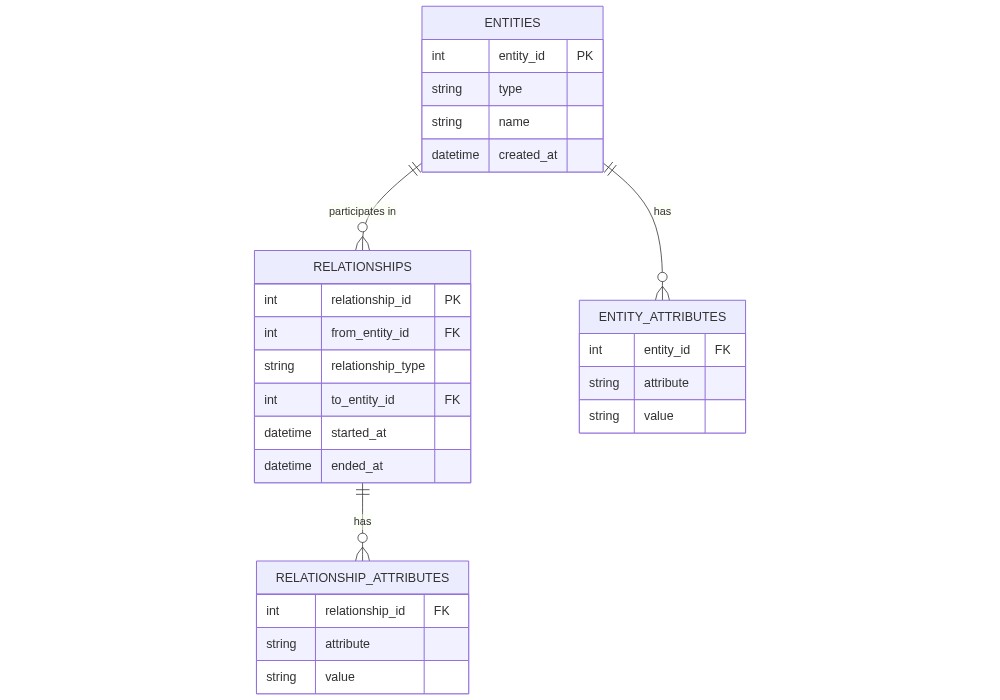
The polymorphic design gave Oak’s team a lot of flexibility. When they discovered that Pokémon could form friendships with inanimate objects (like Pikachu’s fondness for ketchup bottles), they just inserted new relationships rather than creating new tables.
The trade-off: queries are a bit more complex, and you have to be careful about validating data, since the database can’t enforce constraints across polymorphic relationships the way it can with fixed foreign keys. For Oak’s ever-evolving research, the flexibility was worth it.
The Partitioning Pattern: When Tables Get Too Big#
“Dee Dee, get out of my laboratory database!” Dexter’s frustration was mounting. His research database had grown to billions of rows of experimental data, and basic queries were taking hours instead of milliseconds.
The problem with big tables#
When a single table grows too large, the database engine must search through billions of rows to find a record, which slows down queries and stalls backups. Dexter’s primary experiments table had simply grown too massive:
EXPERIMENTS table
experiment_id |
timestamp |
experiment_type |
temperature |
pressure |
voltage |
results |
|---|---|---|---|---|---|---|
1 |
2024-03-24 09:00 |
particle_accel |
295.2 |
1.013 |
1000000 |
[binary] |
2 |
2024-03-24 09:15 |
quantum_tunnel |
2.1 |
0.001 |
500000 |
[binary] |
… |
… |
… |
… |
… |
… |
… |
The partitioning solution#
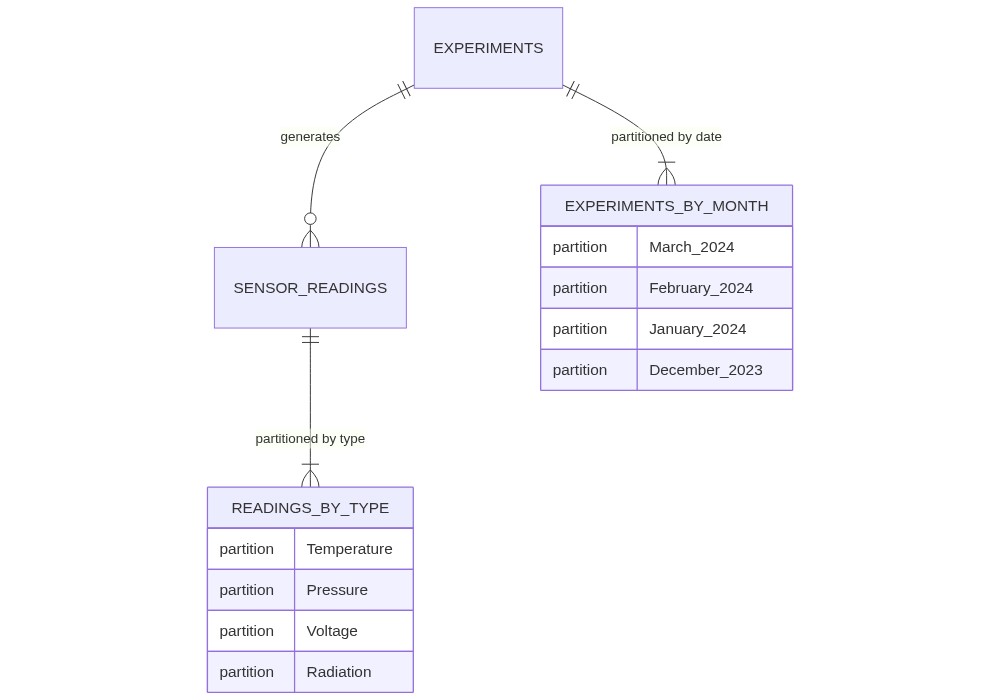
To fix this, Dexter used partitioning, which splits a giant table into smaller physical pieces that still act like a single logical table. The application code still queries a single table name, but the database engine only reads the relevant slice.
Dexter implemented two main partitioning strategies:
We use range partitioning to split data by a continuous range of values, such as grouping Dexter’s experiments into separate monthly tables.
We use list partitioning to group rows by a specific list of values, such as partitioning sensor readings by the type of measurement.
EXPERIMENTS_2024_03 (March experiments only)
experiment_id |
timestamp |
experiment_type |
temperature |
pressure |
|---|---|---|---|---|
1001 |
2024-03-01 09:00 |
particle_accel |
295.2 |
1.013 |
TEMPERATURE_READINGS (Temperature list partition)
reading_id |
experiment_id |
value |
timestamp |
|---|---|---|---|
1 |
1001 |
295.2 |
2024-03-01 09:00 |
By splitting the data, queries for a specific month or sensor type run incredibly fast, and backups can be managed in smaller, safer batches. The diagram below shows how partitioning slices the database.
The fix made several things better at once:
When Dexter needed recent data, the database only had to search the current month’s partition.
When Dee Dee’s dance videos needed to be purged, Dexter could drop just that partition.
Different data could use different storage tiers — recent experiments on fast disk, old ones on slower, cheaper disk.
Even when accidents happened (like the time Dee Dee’s ballet shoes ended up in the particle accelerator), damage was contained to specific partitions. The database stayed up, experiments continued, and Dexter could fix the affected partition without shutting down the whole lab.
Hybrid Relational-JSON: Balancing Structure and Flexibility#
Wile E. Coyote, the database administrator for ACME Corporation, faced a major challenge. ACME’s product catalog was highly diverse, ranging from explosive TNT to giant rubber bands. Each product type had its own unique attributes: TNT required an explosion radius and fuse length, while rubber bands needed flexibility ratings.
The problem: fixed columns for a diverse catalog#
ACME’s initial table design used fixed columns for every possible product attribute:
product_id |
name |
category_id |
base_price |
weight |
explosion_radius |
fuse_length |
stretch_distance |
flexibility_rating |
|---|---|---|---|---|---|---|---|---|
TNT-123 |
Deluxe TNT |
1 |
99.99 |
5.0 |
50 |
10 |
null |
null |
RBD-456 |
Giant Rubber |
2 |
149.99 |
2.0 |
null |
null |
100 |
95 |
This rigid design had serious drawbacks:
It causes attribute sparsity because most columns are left empty and marked as null for any given product.
It creates a rigid schema where adding a new ACME invention forces Wile E. to run risky database modifications to add new columns.
The hybrid solution#
Wile E. solved this by combining relational columns and flexible JSON data. The shared attributes that apply to every product remain in standard columns, while product-specific details are stored in a single JSON column:
ACME Products Table
product_id |
name |
base_price |
weight |
attributes |
|---|---|---|---|---|
TNT-123 |
Deluxe TNT |
99.99 |
5.0 |
{“explosion_radius”: 50, “fuse_length”: 10} |
RBD-456 |
Giant Rubber |
149.99 |
2.0 |
{“stretch_distance”: 100, “flexibility_rating”: 95} |
This hybrid pattern gives ACME the best of both worlds: standard columns ensure fast indexes for common queries, while the JSON column allows Wile E. to add new products instantly without changing the table structure.
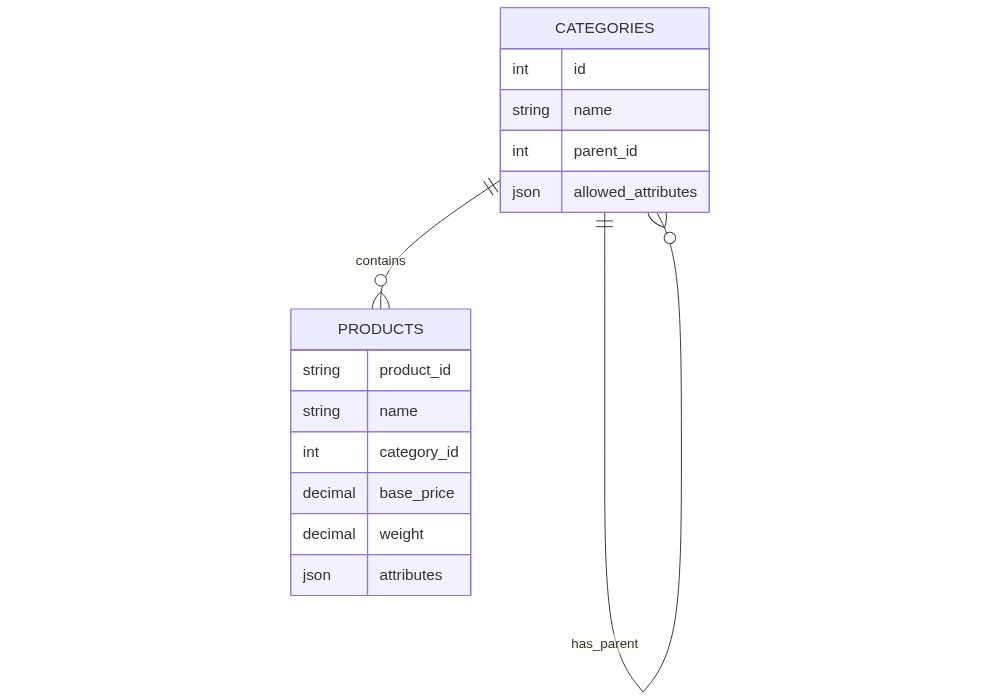
This design helped ACME manage their ever-growing catalog of improbable products without losing the benefits of a relational database. Even when they introduced “Quantum Tunnel Paint” (warning: may cause temporary existence in multiple dimensions), adding it was a single insert with the right JSON attributes.
The trade-off: the database cannot enforce constraints on JSON the way it can on regular columns, so validation has to live in the application or in a check process. For ACME’s wildly varied inventory, that was a price worth paying.
Database Deployment Models: Choosing Your Data’s Home#
“Morty, burp Morty! The Council of Ricks hacked our database again!” Rick frantically unplugged servers in his garage while liquid oozed from a nearby portal. “They got into our local servers, our cloud backups, everything! This is why we need to talk about database deployment models, Morty!”
“Oh geez Rick, what does that even mean?”
There are three common deployment models, and each has trade-offs:
The three deployment models#
On-Premises (Rick calls it “Paranoid Mode”)
Your own servers in your own facility
Complete control over everything
Like keeping your portal gun recipes in the garage
Cloud (Rick calls it “Lazy Mode”)
Your data on someone else’s computers
Accessed over the internet
Like storing your Meeseeks box instructions on Amazon’s servers
Hybrid (Rick calls it “Hedging Your Bets Mode”)
Some data local, some in the cloud
Best of both worlds — or worst, depending on your luck
Like keeping dangerous formulas local but putting Mr. Poopybutthole’s family photos in the cloud
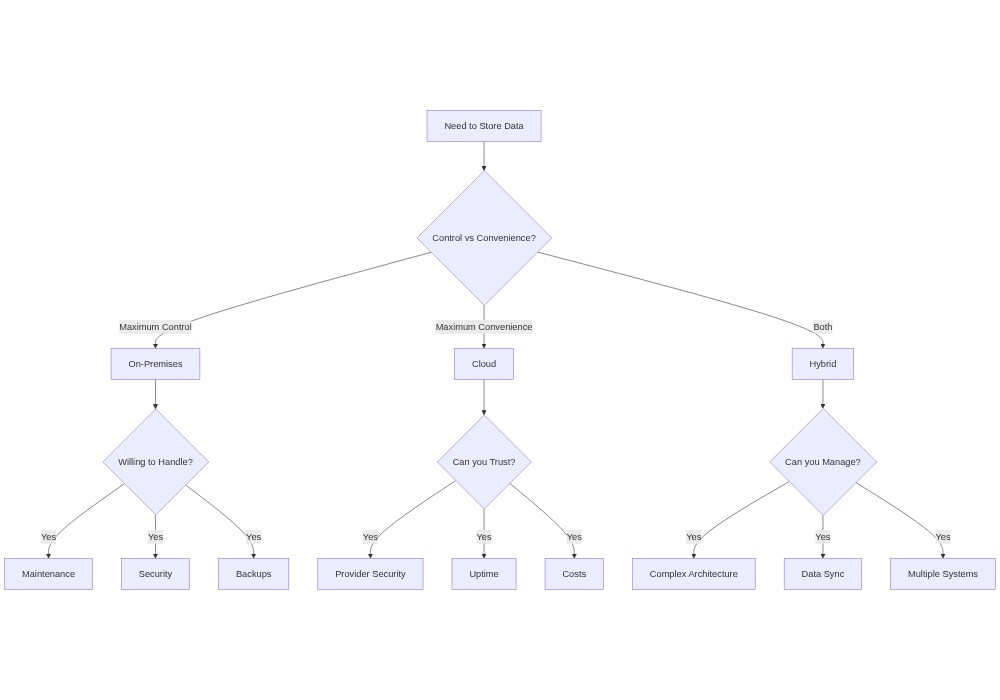
Rick stumbled over to his workbench. “See Morty, choosing a deployment model is like choosing which dimension to live in. On-premises is like dimension C-137 — it’s home, you know it, but the maintenance is a pain. Cloud is like the dimension where everyone sits on chairs — seems comfy until you realize someone else controls all the chairs. Hybrid? That’s like being a time-traveling snake, Morty — burp everywhere and nowhere at once.”
“But which one should we choose, Rick?”
“Depends what you care about most:
On-premises if you’re paranoid about control (like me).
Cloud if you’re lazy and rich (like Jerry).
Hybrid if you can’t make up your mind (like Morty in every adventure).”
Just then, a portal opened and another Rick stepped through. “Hey, C-137! Your cloud provider just leaked our interdimensional cable subscription list!”
“See, Morty? This is why the sensitive stuff stays in the garage.”
On-Premises: Your Data at Home#
“Bojack, I just got off the phone with the publisher,” Princess Carolyn paced around her office at VIM. “They want to store your tell-all autobiography data on their cloud servers. I told them absolutely not — we’re keeping everything on-premises after what happened with Sarah Lynn’s ghostwriter leaks.”
“But PC, what does ‘on-premises’ even mean?”
On-premises (or just “on-prem”) means keeping your data and servers physically in your own facility. At VIM, that meant:
A dedicated server room in the basement of Bojack’s mansion
Their own hardware and network gear
Complete control over security and access
Todd somehow ending up as the system administrator (“Hooray! Root access!”)
“Think of it like your house, Bojack,” Princess Carolyn explained. “Instead of renting an apartment where the landlord controls everything, you own the place. More work, but when things go wrong, you know exactly who to blame.”
“So… like always, blame Todd?”
The reality of running your own servers#
VIM’s on-prem setup needed three things:
Physical infrastructure
Climate-controlled server room
Backup power systems
Network equipment
(“And no, Bojack, we can’t store the backup tapes in your pool house.”)
Ongoing maintenance
Hardware refreshes
Software patches
Security monitoring
(“Todd, please stop naming the servers after characters from Horsin’ Around.”)
Disaster recovery
Regular backups
Redundant systems
Emergency procedures
(“No, Mr. Peanutbutter, a doggy door for the server room is NOT a good backup strategy.”)
Let’s look at how data flows in an on-premises setup:
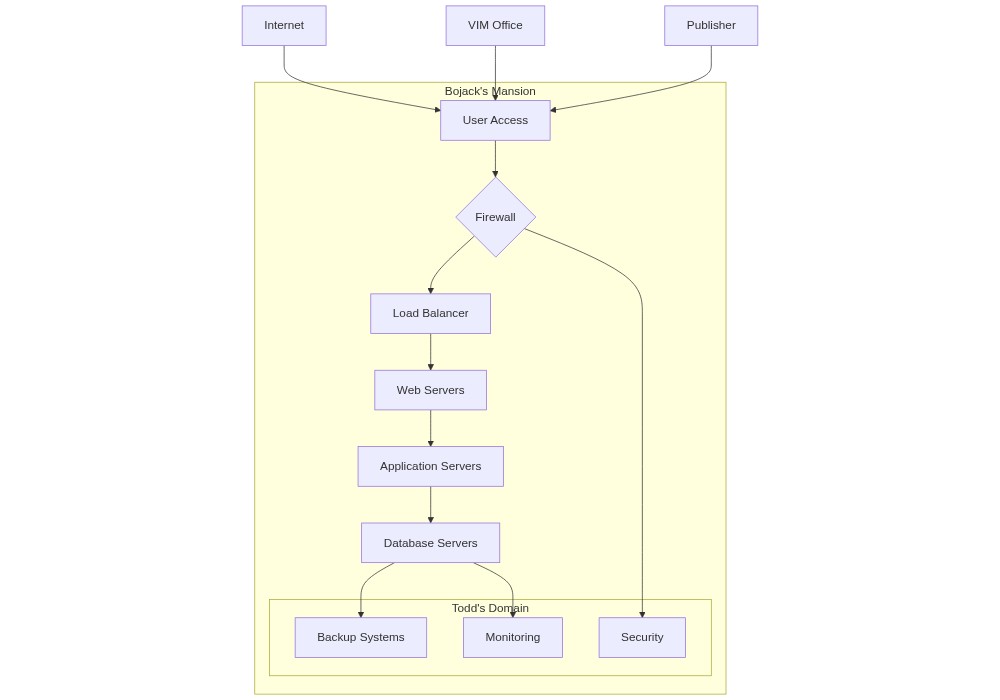
When on-premises makes sense#
Princess Carolyn chose on-prem for VIM because:
Control. “After the ‘What Time Is It Right Now’ data breach, we need total control over our celebrity client data.”
Security. “Do you really want your deepest secrets stored next to Vanessa Gecko’s client files in some random cloud?”
Compliance. “The Hollywoo Star-Tribune settlement requires us to know exactly where our data lives.”
Long-term cost. “Believe it or not, Bojack, sometimes owning is cheaper than renting.”
The downsides#
On-prem isn’t perfect:
Scaling up means buying new hardware, not clicking a button.
Maintenance is constant. Hardware fails. Patches are urgent.
Staffing the team is expensive and specialized.
Todd’s server naming convention caused chaos (“Which one is ‘That’s too much, man!’?”).
One time Bojack tried to use a server rack as a liquor cabinet.
The honest takeaway: running your own database in-house takes time, money, and expertise. It is not for the faint of heart.
Cloud: Your Data in Someone Else’s Datacenter#
“STIMPY, YOU EEDIOT!” Ren’s eye twitched as he stared at their empty server room. “What happened to all our servers?”
“Oh joy! I moved everything to the CLOUD!” Stimpy giggled. “Now our Happy Happy Pet Shop data lives in magical internet land!”
What cloud deployment means#
A cloud deployment means storing your database on remote servers owned and managed by large providers like Amazon Web Services, Google Cloud, or Microsoft Azure. Instead of maintaining physical hardware in your office, your data lives in highly secure, professional datacenters.
Cloud service models#
Stimpy explained how companies rent cloud databases using a few standard service models:
We use Infrastructure as a Service (IaaS) when we rent raw virtual servers and install the operating system and database software ourselves.
We use Platform as a Service (PaaS) when the cloud provider manages the operating system and database platform, leaving us to focus only on building our application.
We use Software as a Service (SaaS) when we rent a fully completed software application over the web with no hosting worries.
We use Database as a Service (DBaaS) when the provider handles all database administration, backups, and server maintenance, letting us focus entirely on writing SQL and designing schemas.
To connect your applications to a cloud database, you also need the Domain Name System (DNS) to translate database domain names into network IP addresses. You can choose a static IP for a permanent, unchanging address, or a dynamic IP which can change periodically. The diagram below shows how applications connect to a cloud database.
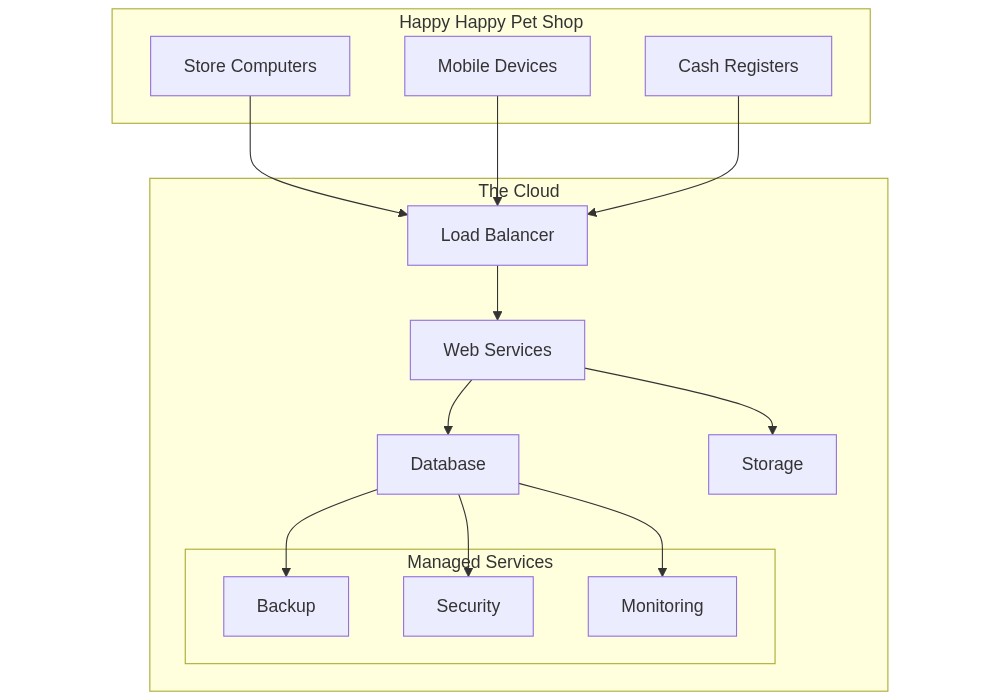
“But Stimpy,” Ren growled, “where is our precious inventory data ACTUALLY stored?”
“Oh, somewhere in Virginia! Or Oregon! Or maybe Mars! That’s the beauty of it — we don’t have to worry about those details anymore!”
Benefits of cloud deployment#
Stimpy’s move to the cloud solved several problems:
Scalability. The database grows automatically when they get rushed during Free Nose Hair Day.
Cost management. Pay only for what you use. No upfront hardware bills.
Maintenance. No more cleaning server-room litterboxes. Updates and patches are automatic.
Reliability. Multiple backup locations and professional monitoring.
The downsides#
Cloud has its own headaches:
Unpredictable bills. That time Stimpy’s infinite loop kept spawning new servers cost a fortune.
Internet dependency. They learned this during the Great Hairball Network Outage.
Less direct control. “No, Stimpy, you can’t visit your data in Virginia.”
Data security concerns. Especially after Mr. Horse’s sensitive vet records leaked.
“But Ren,” Stimpy hugged his increasingly agitated friend, “think of all the space we have now! We turned the old server room into a rubber walrus suit storage facility!”
That leads us to the next section: hybrid deployment — keeping some data close to home while sending the rest to live in magical internet land.
Hybrid: The Best (or Worst) of Both Worlds#
“Aww geez, what do you mean we’re doing hybrid deployment?” Summer stared at her grandfather, who was simultaneously uploading data to the cloud and reinforcing the bunker servers under the garage.
“burp Look Summer, some data you want close, and some data you want far away.”
What hybrid deployment means#
Hybrid deployment uses both on-premises and cloud storage in a coordinated way. Sensitive or frequently used data stays local, while the rest goes to the cloud.
“It’s like how I keep my favorite booze in the garage but store my infinite backup booze in warehouses across multiple dimensions,” Rick explained. “You never want all your eggs — or interdimensional contraband — in one basket.”
Common hybrid setups#
Rick’s deployment looked something like this:
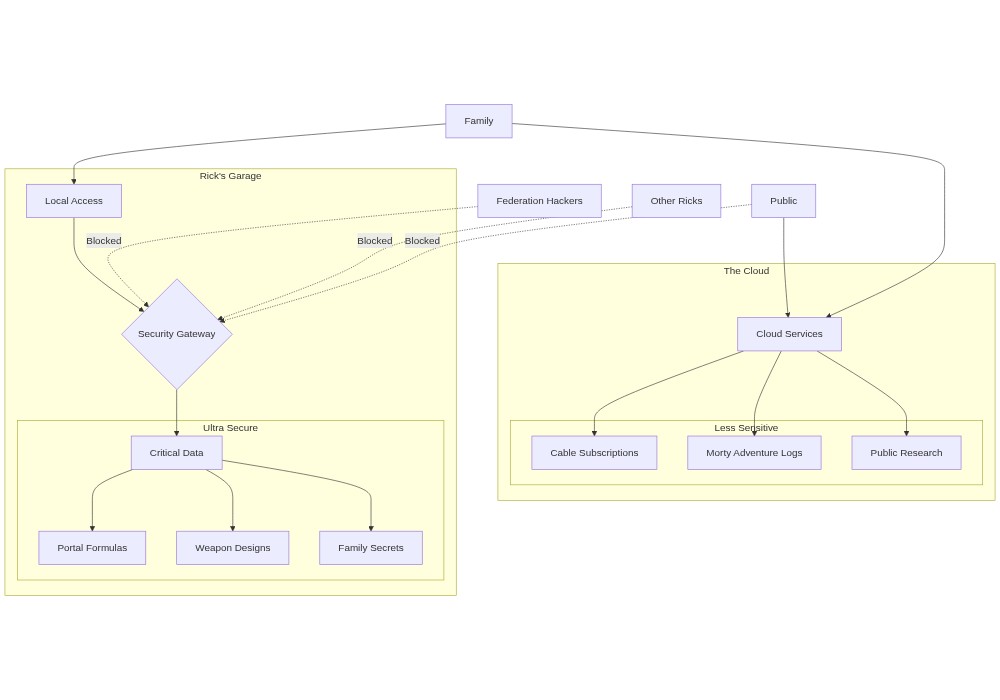
How Rick uses hybrid deployment#
Kept locally:
Portal gun formulas
Weapon schematics
Beth’s childhood photos
“Anything that could collapse the multiverse if leaked”
Stored in the cloud:
Interdimensional cable guides
Morty’s adventure logs
Jerry’s job applications
“Stuff even the Galactic Federation wouldn’t want”
Benefits of going hybrid#
Rick’s reasons for hybrid:
Security control. Critical data stays under direct supervision.
Cost efficiency. Cloud for scalable needs, local for constant-use data.
Compliance. Some jurisdictions (or dimensions) require local data storage.
Flexibility. Easy to shift workloads as needs change.
The challenges#
Hybrid is not free:
Complex setup. Two architectures to design instead of one.
Double the maintenance. Both systems need attention.
Synchronization. Data has to stay consistent across both.
Cost tracking. Bills come from two directions.
“But Grandpa Rick,” Summer interrupted, “isn’t this just making everything more complicated?”
“burp That’s the point, Summer. If I can barely manage it, imagine how confused the Galactic Federation gets. Security through complexity. Plus, when one system fails, we still have the other.”
Just then, Jerry walked in. “Hey, I was thinking, what if we moved everything to MySpace? They probably have lots of free space nowadays…”
Rick’s eye twitched. “This is why we need hybrid deployment, Summer. This right here.”
Connectivity#
“burp Morty, the database has to stay up across dimensions. That means more than one server, on more than one network, talking through more than one channel.” Rick scrawls a diagram on the garage whiteboard while Morty looks confused.
Deployment decides where the database lives. Connectivity decides how anything reaches it. This section covers three pieces: the difference between embedded and client/server databases, the patterns that let a database stay reachable when one server fails, and the ports and protocols you will see again and again.
Client/server vs. embedded, named explicitly#
Two patterns cover almost every database deployment.
Client/server architecture. The database runs as its own server process, and applications connect to it over the network. The client and the database are separate programs, often on separate machines. PostgreSQL (Chapter 9) is the canonical example —
psqlis a client,postgresis the server, and they talk over TCP.Embedded database. The database engine is a library inside the application. There is no separate server, no network hop. SQLite (used in most of this book) is embedded — the database is just a file on disk that the application opens directly.
Each pattern has its place. Embedded databases are simple, fast, and great for one user at a time. Client/server databases support many concurrent users, central administration, and remote access — at the cost of a separate process to manage.
Load balancing and multizone deployment#
A single database server is also a single point of failure. Two techniques smooth the rough edges.
Load balancing. Place a load balancer in front of multiple database replicas. Read queries are spread across the replicas; writes go to a primary node and replicate to the rest. The Council of Ricks’s read-heavy “find Rick by serial number” lookups can fan out across many replicas without overloading any one of them.
Multizone region. Cloud providers offer regions (large geographic areas) made up of zones (independent data centers within a region). Multizone deployment places replicas in different zones inside the same region, so an outage in one zone does not take down the whole database. For Rick’s interdimensional setup, “Council East” might run in two zones; if one fails, the other keeps the cluster up.
A simple multizone topology looks like:
                    +-----------------+
       Apps ------> | Load balancer   |
                    +--------+--------+
                             |
                +------------+------------+
                |                         |
        +---------------+         +---------------+
        |  Replica A    |         |  Replica B    |
        |  (Zone 1)     |         |  (Zone 2)     |
        +---------------+         +---------------+
The application talks to the load balancer; the load balancer routes around any replica that is unavailable.
Ports and protocols you’ll see#
Every DBMS has a default network port. Knowing them by sight is half the connectivity battle, because firewall rules, connection strings, and error messages all reference them.
Service |
Default port |
Transport |
Typical client tool |
|---|---|---|---|
PostgreSQL |
5432 |
TCP |
|
MySQL / MariaDB |
3306 |
TCP |
|
Microsoft SQL Server |
1433 |
TCP |
|
Oracle |
1521 |
TCP |
SQL*Plus, SQL Developer |
MongoDB |
27017 |
TCP |
|
Redis |
6379 |
TCP |
|
A database connection string combines the host, port, database name, and credentials into one URL-shaped value:
postgresql://app_user:secret@db.example.com:5432/safety_db
If the port is wrong, the connection times out. If the host is wrong, it fails to resolve. If the credentials are wrong, it gets refused. Each kind of failure looks different in the logs.
Database Testing: Making Sure Your Data Doesn’t Go Full Schwifty#
“GIR! Why are the humans not succumbing to my latest evil plan?” Zim stared at his base’s computer screen. “According to our database, they should be helpless against the power of… cheese?”
“I PUT THE CHEESE IN THE DATABASE!” GIR rolled around happily. “AND TACOS! AND WAFFLES! I DIDN’T TEST IT THOUGH! I LOVE UNTESTED DATA!”
“GIR! This is why our conquest of Earth keeps failing! We need… shudders… database testing.”
Why we test#
Database testing is checking your evil plans for flaws before unleashing them on an unsuspecting planet. Without testing:
Data can become corrupt (like GIR’s “humans are made of soap” theory).
Systems can break (like the time Zim’s base thought it was a chicken).
Performance can suffer (like when GIR filled the database with infinite pizza recipes).
Types of testing#
Three kinds of tests catch three different kinds of problems:
Unit tests check individual parts in isolation.
Integration tests check that parts work together.
Performance tests check that the system holds up under load.
The next sections walk through each one, starting with SpongeBob’s methodical approach to unit testing at the Krusty Krab.
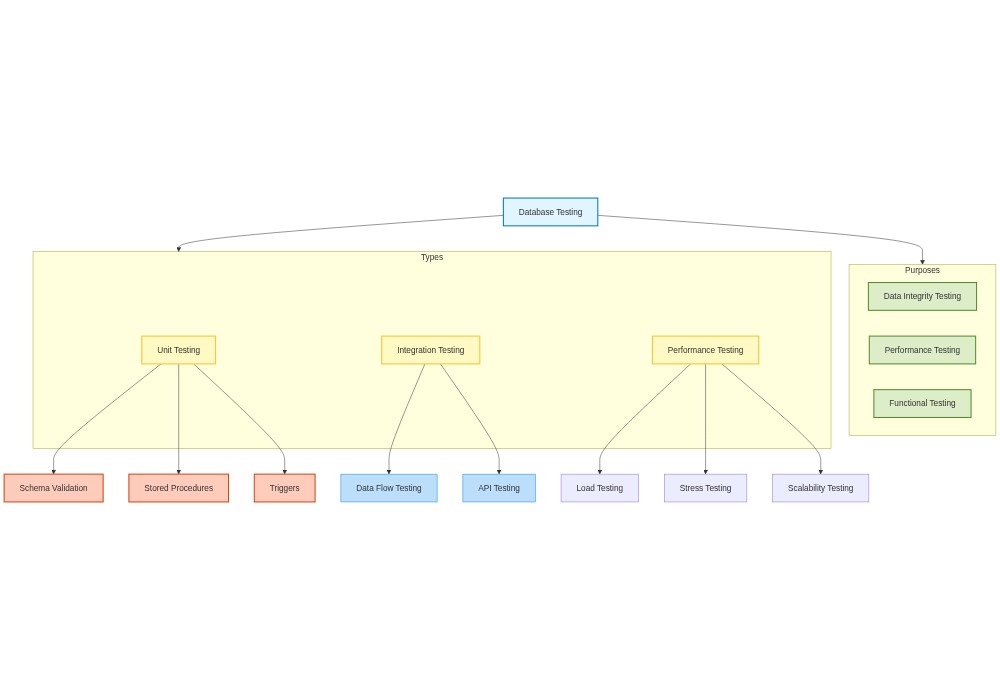
The real cost of not testing#
Zim’s failed invasions due to bad data:
The Cheese Incident. Database claimed humans were allergic to cheese. Reality: they really enjoy it. Result: humans thanked Zim for free cheese rain.
The Great Database Corruption of 2024. GIR added “dance party” as a critical weakness. System started playing disco music instead of running queries. The Tallest were not impressed with the quarterly invasion report.
The Performance Meltdown. Database couldn’t handle tracking all of GIR’s rubber pigs. Base started speaking in pig Latin. Took three weeks to restore from backups.
“You see, GIR,” Zim explained, trying to remove a taco from the server rack, “before we deploy our INGENIOUS plans to production, we must verify our data is correct, our systems work together, and everything can handle the load of conquering seven billion humans!”
“BUT I ALREADY PUT THE TACOS IN PRODUCTION!”
As Zim’s base began displaying nothing but taco emoji, he realized it was time for a serious lesson in proper testing. First, though: a quick look at unit testing, illustrated through SpongeBob’s careful work at the Krusty Krab.
Unit Testing: Keeping the Ingredients Fresh#
“Order up, Squidward!” SpongeBob yelled. “Schema validated, stored procedures tested, triggers ready for action!”
“SpongeBob!” Mr. Krabs warned. “Be sure you are testing all the database parts, boy! The last thing we need is a faulty trigger messing up my profits!”
Unit testing is the practice of checking the smallest individual parts of your database in complete isolation to verify they work correctly on their own.
Testing the schema#
We use schema validation to confirm that our tables, columns, and constraints match our exact design rules. For example, a unit test can verify that our database successfully blocks entries with missing information:
-- SpongeBob's Test Case: Schema Validation
DESCRIBE "Customer Table Schema"
IT "should not allow null values in Order Time"
EXPECT INSERT INTO Customers (Name, OrderTime) VALUES ('Squilliam', NULL)
TO FAIL WITH ERROR 'Column "OrderTime" cannot be null'
Testing stored procedures#
A stored procedure is a pre-written block of SQL stored in the database to run specific tasks, like calculating a daily revenue report. Unit tests verify the procedure returns the correct output for a given input:
-- SpongeBob's Test Case: Stored Procedure Validation
DESCRIBE "getDailyRevenue()"
IT "should return the correct total for a given day"
EXPECT CALL getDailyRevenue('2024-11-25')
TO RETURN 500.00
Testing triggers#
A trigger is a database script that runs automatically when a specific event occurs, such as updating inventory whenever a customer places a new order. Unit tests verify that these automatic updates execute correctly:
-- SpongeBob's Test Case: Trigger Validation
DESCRIBE "updateInventory Trigger"
IT "should reduce inventory when an order is placed"
EXPECT INSERT INTO Orders (Customer, Item, Quantity) VALUES ('Patrick', 'Krabby Patty', 2)
TO CHANGE Inventory WHERE Item = 'Krabby Patty' BY -2
By isolating and testing these individual components, SpongeBob ensures that structural bugs, calculation errors, and unexpected side effects are caught before they disrupt the business.
Table: Unit Tests#
Subtype |
Description |
|---|---|
Schema Validation |
Verifies that database structures (e.g., tables, columns, constraints) are correct and functional. |
Stored Procedures |
Tests individual stored procedures to ensure they return expected results and handle errors. |
Triggers |
Confirms that triggers execute at the correct time and modify data as intended. |
Data Types |
Checks if columns are assigned the appropriate data types for their purpose. |
Nullability Rules |
Ensures that columns correctly enforce or allow |
Integration Testing: Making Sure It All Works Together#
“Uncle Scrooge!” Huey exclaimed. “The database is online, but the systems are not communicating. We need to test how all the parts interact!”
Scrooge McDuck adjusted his top hat. “Bah! I didn’t build my fortune by letting parts of a system act like strangers. We need integration testing, lads!”
Integration testing verifies that different database and software components work together correctly, checking that data flows smoothly across system boundaries and external APIs.
Example 1: testing data flow between systems#
Huey tested the gold-delivery pipeline to ensure that updating the gold inventory database automatically triggers the shipping system to send a treasure chest:
-- Integration Test: Data Flow
DESCRIBE "GoldInventory to Shipping System"
IT "should send a notification when gold stock decreases"
INSERT INTO GoldInventory (Item, Quantity) VALUES ('Gold Coin', -100)
EXPECT SELECT Notification FROM ShippingSystem TO RETURN 'Send chest for 100 Gold Coins'
Example 2: testing API interactions#
Dewey tested the Application Programming Interface (API) that routes data from the gold vault to Scrooge’s dashboard. If the API link breaks, the dashboard might display an empty vault:
-- Integration Test: API Interaction
DESCRIBE "API for Gold Vault Balance"
IT "should return the correct gold amount"
EXPECT getGoldBalance('vault123') TO RETURN 1000000
Example 3: testing dependencies between components#
Louie verified the ordering system. When a customer buys memorabilia, the system must check both the discounts database and the product inventory database. If either connection fails, the order should fail gracefully:
-- Integration Test: Dependency Handling
DESCRIBE "OrderProcessing System"
IT "should process orders only when Discounts and Inventory are valid"
INPUT Order = {Item: 'Duckburg T-Shirt', Quantity: 1, DiscountCode: 'SAVE50'}
EXPECT OrderProcessingSystem TO RETURN 'Order confirmed'
While unit tests check each part in isolation, integration tests ensure that communication links work, dependencies resolve correctly, and errors surface early before they affect production.
Integration Tests#
Subtype |
Description |
|---|---|
Data Flow Testing |
Validates that data flows correctly between systems or components (e.g., inventory to shipping system). |
API Testing |
Ensures that APIs interact correctly with the database, including input/output formats and error handling. |
Dependency Testing |
Confirms that dependent components, like an order system relying on inventory, function together seamlessly. |
Notification Testing |
Verifies that triggers or changes in one system send appropriate notifications to other systems. |
Error Propagation Testing |
Tests how errors in one component (e.g., API failures) affect dependent systems. |
Performance Testing: Can the System Take Over the World?#
“Gee, Brain, what are we doing tonight?” “The same thing we do every night, Pinky: test the database’s performance so we can take over the world!”
Pinky watched as Brain typed furiously. “But, Brain, why does our database speed matter so much?”
Brain adjusted his lab coat. “Pinky, performance testing ensures our database can handle extreme loads and unexpected traffic spikes. Without it, our global network will collapse.”
Performance testing measures a database’s speed, stability, and responsiveness under varying workloads to ensure it can survive real-world demands.
Types of performance testing#
We run load testing to measure how the database performs under normal, expected user traffic:
-- Load Test
DESCRIBE "User Login System Under Load"
IT "should handle 10,000 simultaneous logins"
EXPECT RESPONSE_TIME < 2 seconds
We run stress testing to push the database past its normal limits to find the breaking point and see how it recovers from failure:
-- Stress Test
DESCRIBE "Order Processing System Under High Stress"
IT "should not crash with 50,000 simultaneous orders"
EXPECT SYSTEM_UPTIME > 99.9%
We run scalability testing to verify that the database continues to perform quickly as the total volume of data grows over time:
-- Scalability Test
DESCRIBE "Database Response Time With Increased Data"
IT "should maintain query response time under 5 seconds"
FOR 1 million, 10 million, and 100 million rows
By measuring these limits, Brain ensures the system remains reliable, stays online during traffic spikes, and delivers a fast user experience.
Performance Tests#
Subtype |
Description |
|---|---|
Load Testing |
Simulates normal usage levels to check the system’s performance under expected conditions. |
Stress Testing |
Pushes the system beyond normal limits to identify breaking points and ensure it handles extreme loads. |
Scalability Testing |
Evaluates how well the database performs as the volume of data or users increases. |
Response Time Testing |
Measures how quickly the system responds to user requests under various loads. |
Resource Utilization |
Monitors CPU, memory, and disk usage to identify potential bottlenecks. |
Recovery Testing |
Verifies that the system can recover gracefully from failures or stress conditions. |
Chapter Conclusion#
Good database architecture comes down to three connected choices:
Design patterns — normalization, star schema, bridge tables, temporal, polymorphic, partitioning, and hybrid relational/JSON — each fits a specific problem.
Deployment models — on-premises, cloud, and hybrid — each carries different trade-offs in security, cost, and operational effort.
Testing — unit, integration, and performance — keeps the system reliable as it evolves.
A few takeaways:
Pick patterns for the problem at hand, not because they are popular.
Deployment decisions are business decisions, not just technical ones.
Testing belongs in the development cycle, not at the end of it.
Real systems usually combine several patterns and approaches.
Architectural choices should be revisited as requirements change.
Chapter Summary#
Use this list as a self-check. After working through the chapter, you should be able to do each of the following:
You can apply common database design patterns to architectural problems.
You can choose among deployment models for different use cases.
You can plan unit, integration, and performance testing for a database.
You can identify trade-offs between architectural approaches.
You can troubleshoot common database architecture issues.
You can list the inputs to requirements gathering and resource projection.
You can define SLA, SLO, KPI, RPO, and RTO and pick reasonable targets.
You can name and order the deployment phases from provisioning through decommission.
You can tell OLTP and OLAP workloads apart and pick the right schema style for each.
You can name client/server, embedded, load-balanced, and multizone architectures and pick the right one for a situation.
You can list the default port for each common DBMS.
Lab: Practice Your SQL#
Run the following cell to practice your SQL.
Practice with the Loop of the Recursive Dragon#
Sharpen what you just learned with a chapter-matched review set in the Loop of the Recursive Dragon — an adaptive review game with multiple question types and RPG-style mechanics, built for this book.
Glossary#
Use this reference sheet to quickly review the key terms from this chapter.
Design and schemas#
A database design is the complete process of planning and producing a detailed data model for a database.
A database schema is the formal description of the structure, organization, and relationships of data in a database.
A logical schema is a conceptual representation of the database structure that does not depend on a specific database software.
A physical schema is the actual implementation of a database design in a specific database software, including data types and indexes.
A view schema describes the structure of a virtual table created by running a SQL query.
The data cardinality refers to a measure of how unique the values in a database column are.
The database connectivity is the ability of a database to communicate and exchange data with other systems.
Deployment#
A database deployment is the process of setting up and making a database system ready for use in a specific environment.
The database provisioning is the act of allocating hardware resources and setting up a new database instance.
The database implementation refers to the complete process of installing, configuring, testing, and maintaining a database system.
In a client-server architecture, client programs request services and data from a central server program over a network.
In a cloud computing model, computing services like servers, storage, and databases are delivered over the internet.
A Database as a Service (DBaaS) is a managed cloud model where a provider handles database hosting and maintenance.
A Platform as a Service (PaaS) is a cloud model where the provider delivers the hardware and software tools used to build applications.
An Infrastructure as a Service (IaaS) is a cloud model that rents basic computing resources like virtual servers and storage.
The Domain Name System (DNS) is a network service that translates human-readable domain names into numerical IP addresses.
A static IP is a permanent, unchanging network address manually assigned to a computer or server.
A dynamic IP is a temporary network address that is assigned automatically and can change over time.
The hardware refers to the physical components of a computer system, such as the CPU, memory, and storage drives.
The software refers to the digital programs and operating systems that run on a computer system.
The storage capacity is the total amount of data a device can hold, usually measured in gigabytes or terabytes.
Testing#
The database testing is the process of verifying that a database meets its functional and performance requirements.
A database quality check is the process of evaluating the accuracy, consistency, and reliability of the data.
The stress testing is the practice of pushing a database past its normal limits to observe how it handles extreme workloads.
The regression testing verifies that existing database features and code still work correctly after a new update is applied.
The negative testing is the practice of verifying that a database handles invalid inputs and errors gracefully.
The version control testing confirms that different versions of database schemas and software are compatible.
Requirements and process#
The requirements gathering is the process of collecting and documenting what users and businesses need from a database.
The systems requirement documentation is a formal document describing the features, constraints, and goals of a database project.
A gap analysis is a business method that compares current database performance to desired performance to find improvements.
Other#
A Customer Relationship Management (CRM) system is a software application used to manage interactions with customers.
A firewall is a security system that monitors and controls network traffic based on predefined security rules.
A notification trigger is an automatic database action that sends an alert when a specific event occurs.
Planning, operations, and OLTP/OLAP#
A Service Level Agreement (SLA) is a formal commitment to users regarding the uptime and performance of a database.
A Service Level Objective (SLO) is an internal performance target chosen to support an external SLA.
A Key Performance Indicator (KPI) is a measurable metric used to track whether a database is meeting its SLOs.
The resource projection is the process of estimating the hardware, storage, and network needs of a database.
The computational persistence is the property that ensures database values survive system crashes and upgrades.
A database validation workflow is a sequence of checks that confirm a new database meets its design requirements.
The provisioning is the act of allocating and preparing the hardware resources needed for a database.
The decommission is the process of retiring a database, archiving its data, and safely destroying the storage.
The OLTP (Online Transactional Processing) workload is characterized by many small, fast reads and writes against a normalized database.
The OLAP (Online Analytical Processing) workload is characterized by fewer, larger analytical queries against a denormalized database.
Connectivity#
In a client/server architecture, the database runs as its own server process and applications connect to it over a network.
An embedded database runs as a code library directly inside the host application, with no separate database server process.
The load balancing is the practice of distributing incoming database requests across multiple replicas to prevent overload.
A multizone region is a cloud deployment that places database replicas in different physical zones to ensure high availability.
A database connection string is a formatted text string containing the host, port, credentials, and database name needed to connect.