

Chapter 10: Database Security & Defense (Toad Town Medical Center)#
Databases Through Pop Culture | Brendan Shea, PhD#
Databases hold some of the most sensitive information an organization owns. This chapter walks through the core ideas of database security using a single running example: Toad City Hospital. You’ll see the CIA Triad, common threats, encryption, data masking, auditing, the three As (authentication, authorization, access control), firewalls, and network segmentation — and how each one helps protect a database from real attacks.
Learning Outcomes#
By the end of this chapter, you will be able to:
Apply the CIA triad to database security planning and policy decisions.
Defend databases against common threats including SQL injection, DDoS, phishing, malware, and data poisoning.
Plan data protection using data-at-rest encryption, data-in-transit encryption, BYOK/KYOK keys, and confidential computing.
Apply data discovery, classification, anonymization, and masking to protect sensitive user details.
Implement secure data retention and permanent deletion policies that comply with global frameworks like GDPR and CCPA.
Compare data sovereignty with data residency rules for global database hosting.
Apply authentication, authorization, IAM, single sign-on (SSO), and the principle of least privilege to secure access.
Distinguish OAuth, OpenID Connect, and Kerberos federated identity frameworks.
Use database auditing, monitoring, and patch remediation cycles to identify and shrink your platform’s attack surface.
Describe physical security, firewalls, and network segmentation as crucial network defense layers.
Explain the Zero Trust security model and manage the SSL/TLS certificate lifecycle for database servers.
Keywords: database security, CIA triad, encryption, data masking, data discovery, data classification, secure deletion, auditing, least privilege, SQL injection, firewalls, network segmentation
Brendan’s Lecture#
## Video Lecture
from IPython.display import YouTubeVideo
YouTubeVideo('YO6D5Zj6rGc', width=800, height=500)
What is the CIA Triad and why is it important for database security?#
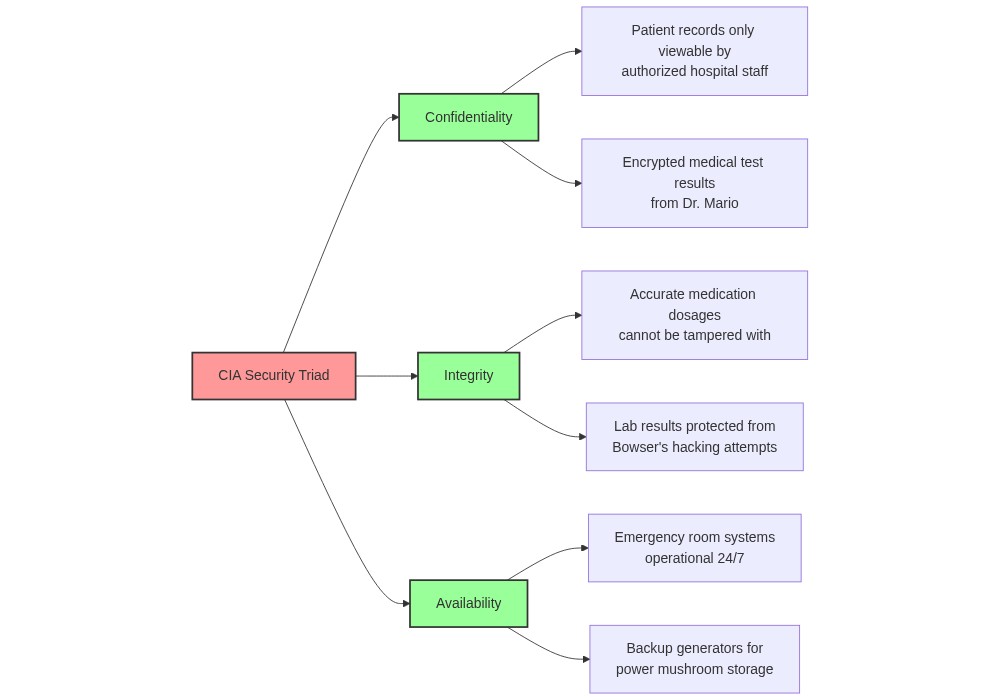
The CIA Triad is the foundational model of information security. It stands for three principles:
Confidentiality — data is reachable only by people and systems that are allowed to see it. Confidentiality is protected through encryption, access control, and authentication.
Integrity — data stays accurate and consistent over its whole lifecycle. Integrity is protected through validation, checksums, and version control.
Availability — data is reachable by authorized users whenever they need it. Availability is protected through redundancy, backups, and disaster recovery planning.
The CIA Triad matters for database security because databases hold sensitive and critical information. A failure on any one of the three sides can lead to data leaks, financial losses, reputational damage, or legal trouble.
Case Study: Database at the Toad City Hospital#
Let’s consider a case study of the database at the Toad City Hospital, the Mushroom Kingdom’s main medical center (which we encountered in earlier chapters). The hospital uses a PostgreSQL database to store sensitive patient information.
Here’s an example of a sample table named patients with sensitive data:
%%sql
DROP TABLE IF EXISTS patients;

CREATE TABLE patients (
  patient_id SERIAL PRIMARY KEY,
  name VARCHAR(100) NOT NULL,
  date_of_birth DATE NOT NULL,
  social_security_number VARCHAR(200) NOT NULL,
  medical_history JSONB
);
The patients table holds sensitive information: names, dates of birth, social security numbers, and medical histories. All three sides of the CIA Triad apply:
Confidentiality — patient information should be visible only to authorized healthcare staff. Unauthorized access could lead to privacy breaches and legal consequences.
Integrity — the records must stay accurate. Tampered data could lead to wrong diagnoses, wrong treatments, and real harm to patients.
Availability — authorized staff must be able to reach the data, especially in emergencies. Downtime hurts patient care.
To meet all three at once, the hospital needs the layered defenses covered in the rest of this chapter.
What are the common threats to databases and how do they work?#
Databases face a wide variety of threats that can compromise their security. Understanding these threats is the first step toward defending against them.
Who might want the data? (Types of attackers)#
Many attacks are launched by cybercriminals who are motivated by money and steal information for identity theft or financial fraud.
We must also guard against insider threats like disgruntled employees who misuse their access privileges to steal or modify data.
Organizations sometimes face threats from competitors who want to steal trade secrets and customer data.
Some databases are targeted by hacktivists who are driven by political or social motives to expose perceived wrongdoing.
The most advanced networks face Advanced Persistent Threats (APTs) which are sophisticated, nation-state sponsored groups that use new, unknown zero-day exploits to breach secure targets.
SQL Injection#
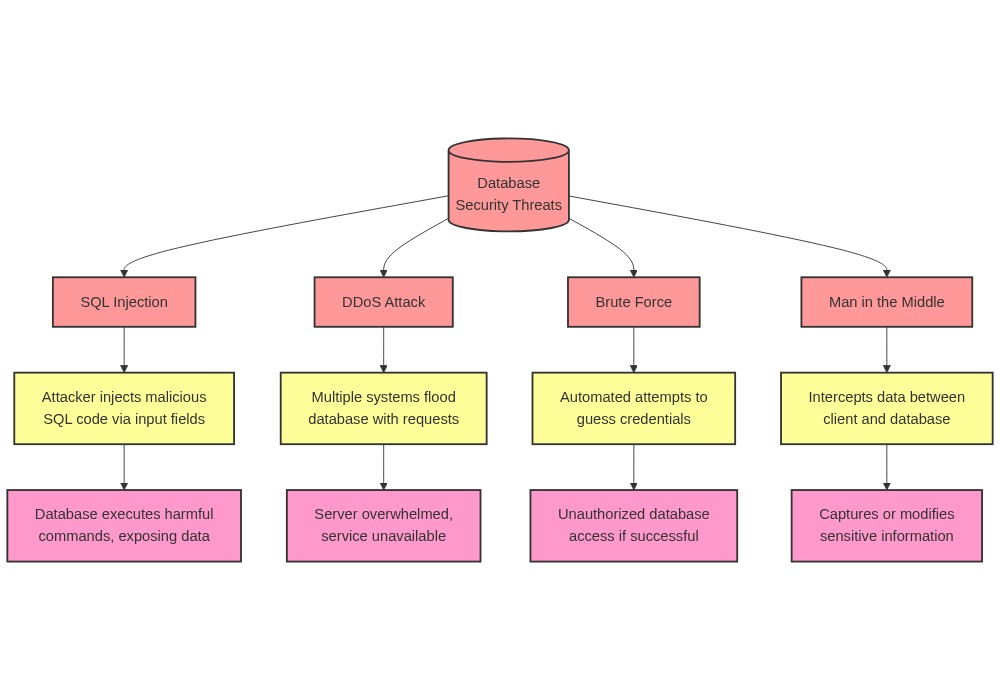
An attack called SQL injection exploits weak input validation. An attacker types malicious SQL statements directly into an application input field, causing the database to run it.
For example, a standard login form takes a username and password. If the application does not validate what the user types, an attacker can input:
Username: admin' --
Password: this_is_now_irrelevant
The resulting SQL query becomes:
SELECT * FROM users WHERE username = 'admin' -- AND password = 'this_is_now_irrelevant';
The double dash -- acts as a SQL comment character, telling the database to ignore the rest of the query. This completely bypasses the password check. To prevent this, developers must always use parameterized queries and validate every input.
Distributed Denial of Service (DDoS)#
A Distributed Denial of Service (DDoS) attack floods a database with massive amounts of network traffic from many different sources at once until the system crashes. For a hospital like Toad City Hospital, a DDoS attack can block doctors from reaching patient records in a critical medical emergency. We defend against this by using rate limiting, traffic filtering, and multi-region servers.
Brute Force Attacks#
A brute force attack is a simple method where an attacker tries every possible combination of usernames and passwords until they guess correctly. For instance, an automated script might try hundreds of common passwords against Toad City Hospital accounts. We defend against this by enforcing strong password policies, locking accounts after a few failed attempts, and requiring multi-factor authentication (MFA).
Phishing#
We use the term phishing to describe a social engineering trick where attackers send fake emails that look completely legitimate to trick victims into revealing sensitive information. An attacker might email hospital staff pretending to be from the IT department, linking to a fake login page that steals their credentials. We block this through email filters and employee security training.
Malware#
The term malware refers to any malicious software designed to damage a computer system or steal credentials. On a database, malware can log keystrokes to steal administrator passwords and send them to the attacker. Keeping systems patched and running reputable anti-malware tools are our primary defenses.
Ransomware#
An attack called ransomware is a specific type of malware that encrypts a database and demands payment for the decryption key, halting entire operations. During a real-world ransomware attack on the UK’s National Health Service in 2017, hospitals were blocked from accessing patient databases, forcing them to cancel surgeries. We defend against this by maintaining offline, regularly tested backups, restricting user privileges, and following a clear incident response plan.
Graphic: Threats to Databases#
Compliance frameworks at a glance#
Toad City Hospital’s compliance officer keeps a shelf of binders. Each binder is a different regulation, each with its own rules about what data can be stored where, how long, and under what protections.
You will not be a compliance expert after this section, but you should recognize the major frameworks by name and know what kind of data each one protects.
Framework |
Region |
Applies to |
Sample requirement |
|---|---|---|---|
GDPR |
European Union |
Personal data of EU residents |
Right to erasure; breach notification within 72 hours |
CCPA |
California, USA |
Personal data of California residents |
Right to know what data is collected; right to opt out of sale |
PIPL |
China |
Personal data of individuals in China |
Cross-border data transfer requires regulator approval |
HIPAA |
USA |
Protected health information (PHI) |
Encrypt PHI at rest and in transit; track every access |
PCI-DSS |
Worldwide |
Payment card data |
Encrypt card numbers; never store CVV after authorization |
SOX |
USA |
Financial records of public companies |
Tamper-evident logs; controls on who can change financials |
FERPA |
USA |
Student education records |
Limit disclosure; allow students to inspect their own records |
Data sovereignty and residency#
Two related terms come up in every cross-border compliance conversation:
Data sovereignty is the principle that data is subject to the laws of the country in which it is collected or stored. An EU resident’s personal data is subject to EU law, even if a US-based company is the one collecting it.
Data residency is the physical or geographic location where data is stored. “All EU patient records are stored on servers physically located in Frankfurt” is a residency requirement.
Sovereignty is the legal framing; residency is the engineering response. Toad City Hospital’s expansion into the EU means its patient records have to live on EU servers (residency) because EU law decides what can be done with them (sovereignty).
What is encryption and how does it protect databases?#
Encryption converts readable data into protected ciphertext so unauthorized users cannot make sense of it without the right key.
Asymmetric vs. symmetric encryption#
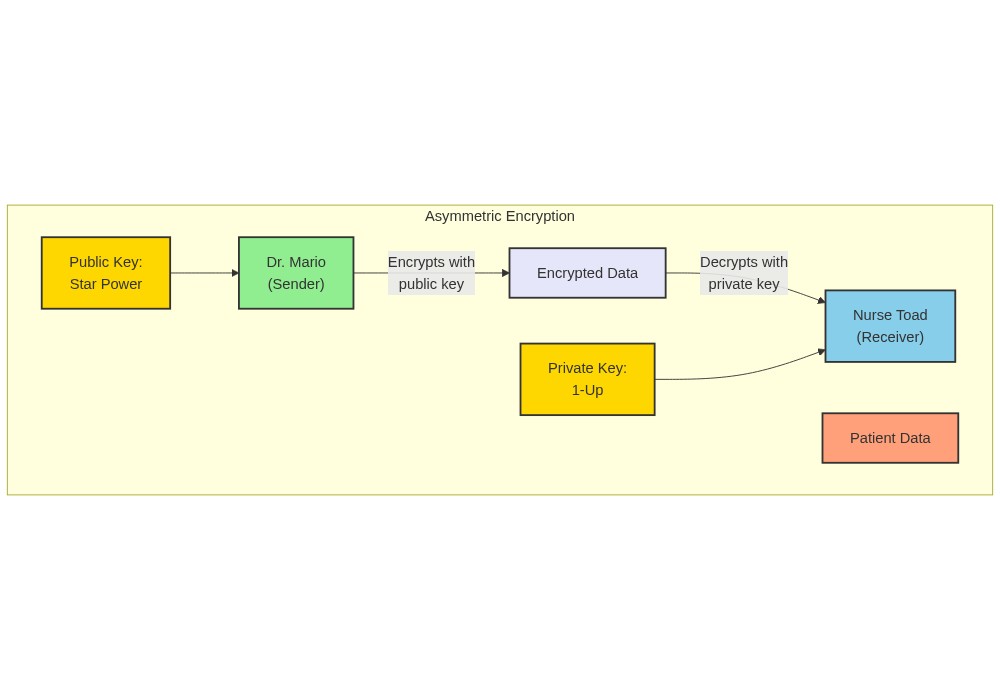
Asymmetric encryption uses a public/private key pair and is common for secure connection setup and digital signatures.
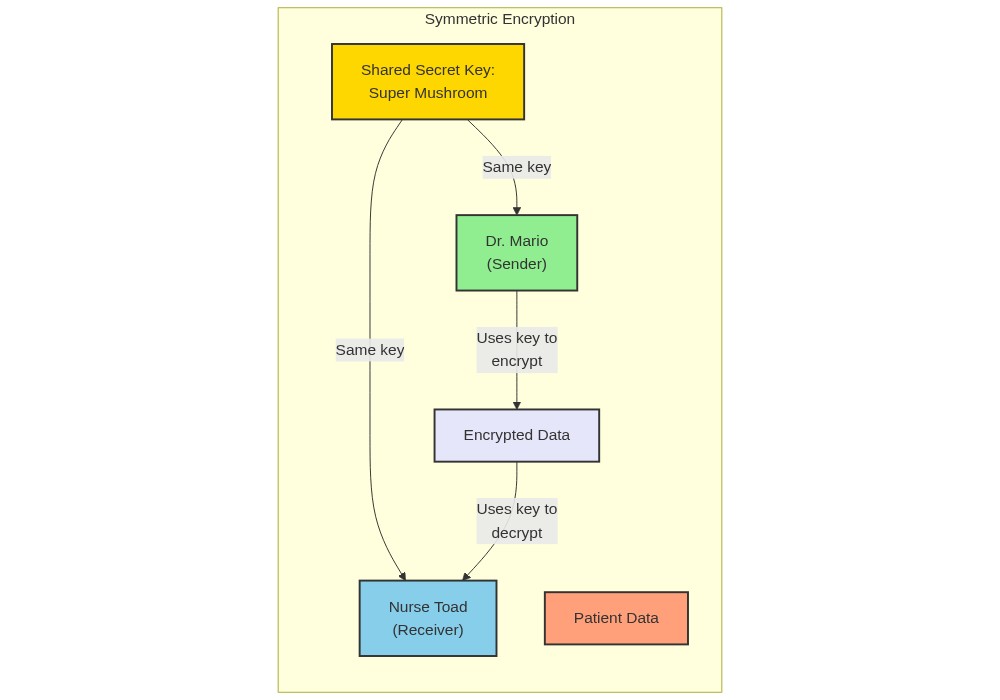
Symmetric encryption uses one shared secret key and is common for protecting stored data because it is faster.
Hospital example:
a client can use the server’s public key to help establish a secure session
the database can use symmetric encryption to protect sensitive patient columns at rest
The main design question is not whether encryption matters, but where it should be applied and how keys will be managed.
Where Encryption Is Applied#
Data in transit#
Use TLS/HTTPS to protect data moving between clients and the database.
Data at rest#
Encrypt files, tables, or sensitive columns so stolen storage media does not reveal raw data.
Client-side, in-transit, and server-side encryption#
Client-side: data is encrypted before it leaves the application.
In-transit: data is protected while crossing the network.
Server-side: data is encrypted as the database stores it.
Strong database security usually combines more than one of these layers.
Advanced key management#
The encryption section above answered “is the data encrypted?” The harder question, in regulated environments like Toad City Hospital, is “who controls the keys?” Three patterns matter:
BYOK (bring your own key). The customer generates the encryption key and provides it to the cloud provider, which uses it to encrypt data at rest. The provider holds the working copy of the key, but the customer can revoke it at any time. Toad City might require BYOK for any cloud database that stores patient records.
KYOK (keep your own key). The customer keeps the key in their own hardware security module, and the cloud provider never sees the plaintext key. Even the provider’s own administrators cannot decrypt the data. KYOK is stricter than BYOK and used when regulators or the customer demand it.
Confidential computing. A pattern in which data is decrypted only inside a protected, hardware-enforced memory enclave on the server. Even the operating system and the cloud provider cannot read the cleartext. Toad City might use confidential computing to process patient records during analytics without ever exposing the raw values to the cloud provider’s infrastructure.
Graphic: Symmetric and Assymetric Encryption#
Example of a Postgres encrypted column#
Let’s consider an example of encrypting sensitive patient data in the Toad City Hospital’s PostgreSQL database. We’ll focus on encrypting the social security numbers (SSN) of patients using symmetric encryption for at-rest data.
Suppose we have a table named patients with a column ssn that needs to be encrypted. We can use the pgcrypto extension in PostgreSQL to encrypt the data using symmetric encryption.
%%sql
-- To use encyption, we need to enable an extension
CREATE EXTENSION IF NOT EXISTS pgcrypto;

DELETE FROM patients;

INSERT INTO patients (name, date_of_birth, social_security_number, medical_history)
VALUES
  ('Mario Mario', '1981-07-09', pgp_sym_encrypt('123-45-6789', 'my_secret_key'), '{"allergies": "none", "medications": "none"}'),
  ('Luigi Mario', '1983-07-14', pgp_sym_encrypt('987-65-4321', 'my_secret_key'), '{"allergies": "pollen", "medications": "none"}'),
  ('Princess Peach', '1985-10-18', pgp_sym_encrypt('456-78-9123', 'my_secret_key'), '{"allergies": "none", "medications": "none"}'),
  ('Yoshi', '1990-11-21', pgp_sym_encrypt('789-01-2345', 'my_secret_key'), '{"allergies": "none", "medications": "none"}'),
  ('Toad', '1985-07-14', pgp_sym_encrypt('567-89-0123', 'my_secret_key'), '{"allergies": "none", "medications": "none"}');

SELECT * FROM patients LIMIT 5;
| patient_id | name | date_of_birth | social_security_number | medical_history | |
|---|---|---|---|---|---|
| 0 | 1 | Mario Mario | 1981-07-09 | \xc30d0407030201a4824eb7adcdfa6dd23c01868d63d4... | {'allergies': 'none', 'medications': 'none'} |
| 1 | 2 | Luigi Mario | 1983-07-14 | \xc30d040703025561fecf0ec23a2264d23c014ffa45be... | {'allergies': 'pollen', 'medications': 'none'} |
| 2 | 3 | Princess Peach | 1985-10-18 | \xc30d04070302552f7efeff6e9b8576d23c017f19bfdd... | {'allergies': 'none', 'medications': 'none'} |
| 3 | 4 | Yoshi | 1990-11-21 | \xc30d040703025bbf65c787d7679262d23c01184c75ce... | {'allergies': 'none', 'medications': 'none'} |
| 4 | 5 | Toad | 1985-07-14 | \xc30d0407030281019730dfbac3856fd23c01b8dd0bb8... | {'allergies': 'none', 'medications': 'none'} |
As you can see, the ssn numbers have now been encrypted, so they cannot be without knowing the key.
To decrypt the SSN value, we can use the pgp_sym_decrypt function with the same secret key:
%%sql

SELECT
  patient_id,
  name,
  date_of_birth,
  pgp_sym_decrypt(social_security_number::bytea, 'my_secret_key') AS social_security_number,
  medical_history
FROM patients;
| patient_id | name | date_of_birth | social_security_number | medical_history | |
|---|---|---|---|---|---|
| 0 | 1 | Mario Mario | 1981-07-09 | 123-45-6789 | {'allergies': 'none', 'medications': 'none'} |
| 1 | 2 | Luigi Mario | 1983-07-14 | 987-65-4321 | {'allergies': 'pollen', 'medications': 'none'} |
| 2 | 3 | Princess Peach | 1985-10-18 | 456-78-9123 | {'allergies': 'none', 'medications': 'none'} |
| 3 | 4 | Yoshi | 1990-11-21 | 789-01-2345 | {'allergies': 'none', 'medications': 'none'} |
| 4 | 5 | Toad | 1985-07-14 | 567-89-0123 | {'allergies': 'none', 'medications': 'none'} |
By encrypting sensitive data like social security numbers, the Toad City Hospital adds an extra layer of protection to its database. Even if an attacker gains access to the database, they would need the secret key to decrypt and make sense of the encrypted data. In the next section, we will explore data masking techniques and how they can be used to protect sensitive information in databases.
Data Masking: Protecting Sensitive Information#
Data masking replaces real sensitive data with realistic but fake values. The goal is to create a version of the data that can be used outside of production — for testing, development, training, or analytics — without exposing the real records.
Masking is especially important when data must be shared with third parties or used in less secure environments. With masking, organizations can:
Comply with privacy regulations like HIPAA or GDPR.
Protect personally identifiable information (PII) and other sensitive fields.
Reduce the risk of accidental data exposure.
Provide realistic data for testing without revealing real values.
Types of data masking#
Static data masking — masks data in a separate copy of the database. The masked copy is used in non-production environments.
Dynamic data masking — masks data at query time, showing different views based on the user’s role and permissions.
Deterministic masking — the same input always maps to the same masked output, so related records stay linked across systems.
Random masking — replaces values with random data, making it impossible to recover the original.
Implementing data masking in PostgreSQL#
The example below walks through static data masking in PostgreSQL using the patients table. The first step is to create a copy of the table that will hold the masked values.
%%sql
DROP TABLE IF EXISTS patients_masked;
CREATE TABLE patients_masked (
  patient_id SERIAL PRIMARY KEY,
  name VARCHAR(100) NOT NULL,
  date_of_birth DATE NOT NULL,
  social_security_number VARCHAR(200) NOT NULL,
  medical_history JSONB
);
Now, let’s again insert our original patient (with unecrypted social security numbers).
%%sql
DELETE FROM patients;

INSERT INTO patients (name, date_of_birth, social_security_number, medical_history)
VALUES
  ('Mario Mario', '1981-07-09', '123-45-6789', '{"allergies": "none", "medications": "none"}'),
  ('Luigi Mario', '1983-07-14', '987-65-4321', '{"allergies": "pollen", "medications": "none"}'),
  ('Princess Peach', '1985-10-18', '456-78-9123', '{"allergies": "none", "medications": "none"}'),
  ('Yoshi', '1990-11-21','789-01-2345', '{"allergies": "none", "medications": "none"}'),
  ('Toad', '1985-07-14', '567-89-0123', '{"allergies": "none", "medications": "none"}');

SELECT * FROM patients LIMIT 5;
| patient_id | name | date_of_birth | social_security_number | medical_history | |
|---|---|---|---|---|---|
| 0 | 6 | Mario Mario | 1981-07-09 | 123-45-6789 | {'allergies': 'none', 'medications': 'none'} |
| 1 | 7 | Luigi Mario | 1983-07-14 | 987-65-4321 | {'allergies': 'pollen', 'medications': 'none'} |
| 2 | 8 | Princess Peach | 1985-10-18 | 456-78-9123 | {'allergies': 'none', 'medications': 'none'} |
| 3 | 9 | Yoshi | 1990-11-21 | 789-01-2345 | {'allergies': 'none', 'medications': 'none'} |
| 4 | 10 | Toad | 1985-07-14 | 567-89-0123 | {'allergies': 'none', 'medications': 'none'} |
Now, let’s populate our new database with a masked version of our original data.
%%sql
DELETE FROM patients_masked;
INSERT INTO patients_masked (name, date_of_birth, social_security_number, medical_history)
SELECT
  'Patient ' || patient_id,
  '1900-01-01',
  'XXX-XX-' || substr(social_security_number, 8),
  '{"allergies": ["masked"], "conditions": ["masked"]}'
FROM patients;
In this example, we:
Replace the
namewith a generic “Patient” followed by thepatient_idSet the
date_of_birthto a fixed value ('1900-01-01')Mask all but the last four digits of the
social_security_numberReplace the
medical_historyJSON data with a masked version
The resulting patients_masked table will contain the masked data:
%%sql
SELECT * FROM patients_masked;
| patient_id | name | date_of_birth | social_security_number | medical_history | |
|---|---|---|---|---|---|
| 0 | 1 | Patient 6 | 1900-01-01 | XXX-XX-6789 | {'allergies': ['masked'], 'conditions': ['mask... |
| 1 | 2 | Patient 7 | 1900-01-01 | XXX-XX-4321 | {'allergies': ['masked'], 'conditions': ['mask... |
| 2 | 3 | Patient 8 | 1900-01-01 | XXX-XX-9123 | {'allergies': ['masked'], 'conditions': ['mask... |
| 3 | 4 | Patient 9 | 1900-01-01 | XXX-XX-2345 | {'allergies': ['masked'], 'conditions': ['mask... |
| 4 | 5 | Patient 10 | 1900-01-01 | XXX-XX-0123 | {'allergies': ['masked'], 'conditions': ['mask... |
Anonymization and suppression#
Data masking, above, changes a sensitive value into a realistic-looking substitute so the data stays usable in a non-production environment. Two related techniques complete the picture:
Anonymization removes the link between data and an identifiable person. Names, dates of birth, and other identifying fields are stripped or replaced so the remaining data cannot be tied back to an individual, even with effort. Toad City Hospital might publish anonymized records to a public research database.
Suppression simply removes the value entirely. A patient’s full ZIP code might be replaced with blanks in a research export so the location cannot be inferred.
A quick rule of thumb:
Masking changes the value but preserves linkage.
Anonymization preserves the value’s general meaning but removes linkage.
Suppression removes the value altogether.
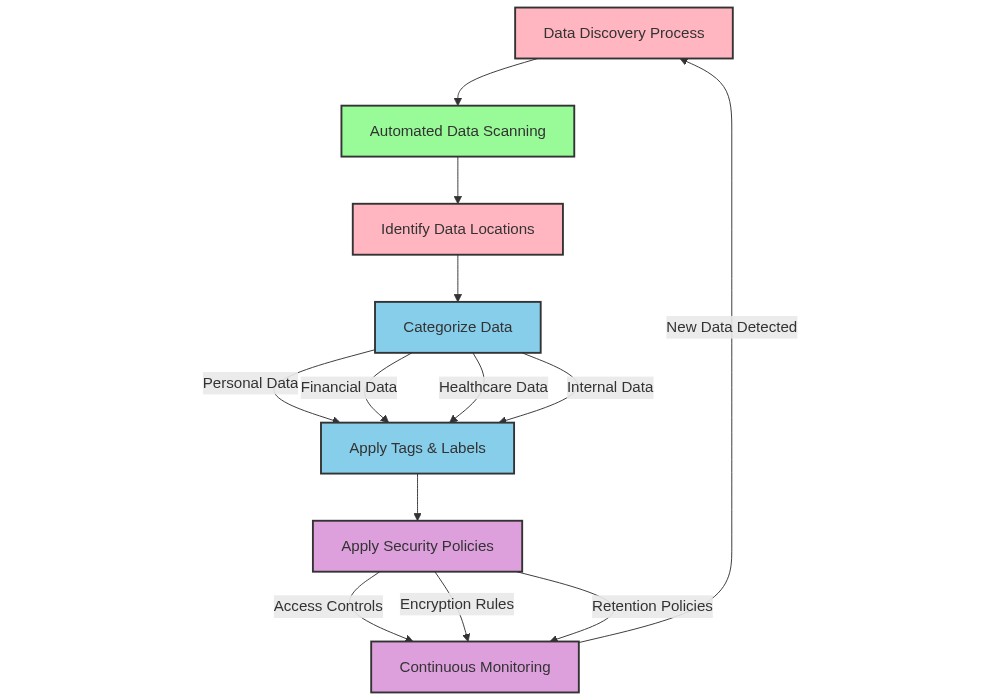
Data Discovery and Classification: Understanding Your Data#
Before you can protect data well, you need to know what exists, where it lives, and how sensitive it is.
Data discovery#
Data discovery identifies sensitive information across databases, files, and cloud systems.
Common techniques:
metadata analysis
pattern matching
content analysis
machine learning-assisted classification
Data classification#
Classification labels data based on impact if it is disclosed or mishandled.
Common levels:
Public
Internal
Confidential
Restricted / Highly Confidential
Those labels drive access control, encryption, retention, and audit requirements.
Applying Discovery and Classification at Toad City Hospital#
A practical workflow looks like this:
Inventory sensitive data across systems and owners.
Classify records such as PHI as restricted and business records at lower levels when appropriate.
Apply controls that match the label: least-privilege access, encryption, logging, and review.
Define safe handling, sharing, retention, and disposal procedures.
The goal is to make security decisions based on known data assets instead of treating every table or file the same way.
Graphic: Data Discovery and Classification#
When and How to Destroy Data#
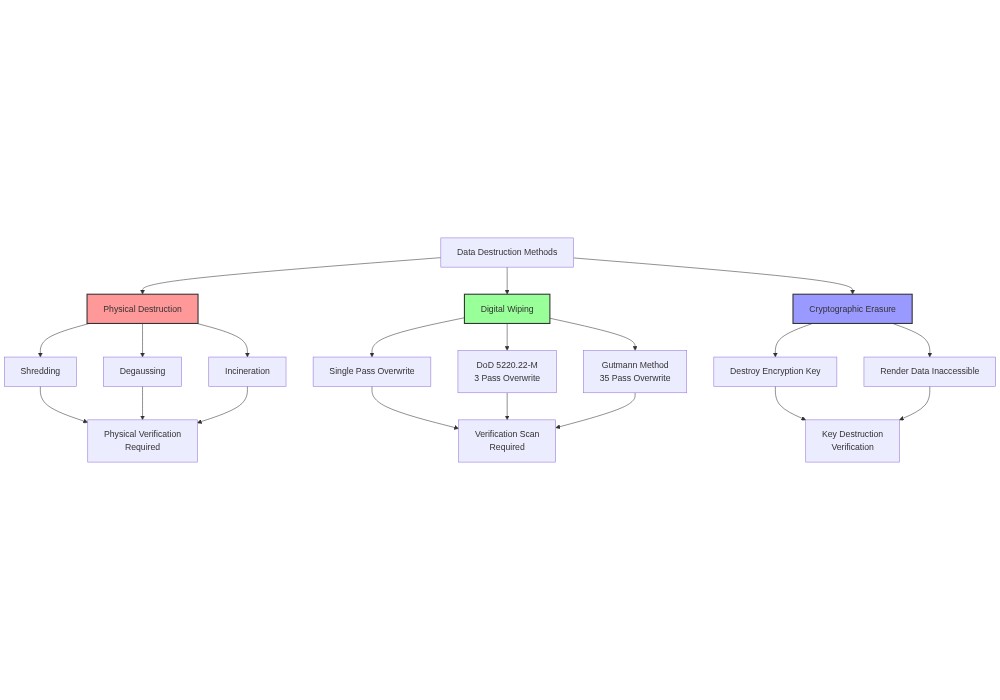
Data destruction is just as important as data protection. Securely removing data that is no longer needed prevents unauthorized access and helps with privacy and legal compliance.
Principles of data destruction#
Data lifecycle management — know the full lifecycle of each kind of data, from creation to destruction, and set retention rules accordingly.
Data retention policies — write down how long each category of data should be kept and when it must be destroyed. Review the policies regularly.
Secure deletion methods — use methods that make the data unrecoverable. A simple
DELETEor disk format can often be undone with the right tools.Overwriting sensitive data — before deleting, overwrite the data with random values. This makes recovery much harder.
Auditing and logging — record every destruction event: when it happened, who initiated it, and whether it followed policy.
Authorization and approval — only authorized personnel should be able to start a destruction process, and the workflow should require approval.
Compliance and legal requirements — make sure your practices match the laws, regulations, and industry standards that apply to your data.
Example: Destroying patient records at Toad City Hospital#
The next example shows how Toad City Hospital can securely destroy patient records that have passed their retention period.
-- Create a temporary table to store the patient IDs to be deleted
CREATE TEMPORARY TABLE patients_to_delete AS
SELECT patient_id
FROM patients
WHERE last_treatment_date < NOW() - INTERVAL '10 years';

-- Overwrite the sensitive data with random values
UPDATE patients
SET name = 'DELETED', date_of_birth = '1900-01-01', ssn = 'XXX-XX-XXXX'
WHERE patient_id IN (
  SELECT patient_id FROM patients_to_delete
);

-- Delete the records from the patients table
DELETE FROM patients
WHERE patient_id IN (
  SELECT patient_id FROM patients_to_delete
);

-- Drop the temporary table
DROP TABLE patients_to_delete;
In this example:
A temporary table
patients_to_deleteis created to store the patient IDs of the records that need to be deleted based on the last treatment date exceeding the retention period of 10 years.The sensitive data (name, date of birth, SSN) in the
patientstable is overwritten with random or meaningless values for the records that match the patient IDs in the temporary table.The records are then deleted from the
patientstable based on the patient IDs in the temporary table.Finally, the temporary table is dropped.
By following these steps, Toad City Hospital ensures that the sensitive patient data is securely destroyed while maintaining a record of the deletion process.
It’s important to note that data destruction should be carried out in accordance with the hospital’s data retention policies, legal requirements, and industry regulations. The hospital should also have proper backup and archival procedures in place to ensure that data is not lost prematurely and can be restored if needed for legal or regulatory purposes.
Why audits are awesome (really)#
A database audit is the process of monitoring, recording, and reviewing database activity. Audits help organizations detect suspicious behavior, track changes to sensitive data, and meet regulatory requirements.
How to conduct a data security audit#
Identify the sensitive data. Decide which fields are sensitive based on company policy, law, and industry standards. PII, financial data, and protected health information (PHI) almost always count.
Review access controls. Check user permissions and follow the principle of least privilege: every user should have only the access they actually need. Disable inactive accounts.
Check database configuration. Look for default or weak passwords, unnecessary features, and settings that don’t match security best practices.
Monitor database activity. Use database activity monitoring tools to log logins, modifications, and privileged operations. Review the logs for unusual patterns that might signal a breach.
Assess encryption. Check that data at rest and data in transit are protected with strong encryption and good key management.
Test for vulnerabilities. Run regular vulnerability scans and penetration tests to find weaknesses before attackers do. This includes SQL injection testing and simulated attacks against the database.
Example of audit logs#
Imagine the Toad City Hospital wants to monitor access to the patients table and track any changes. The audit logs might look like this:
Timestamp               | User       | Action  | Table    | Details
------------------------+------------+---------+----------+-------------------------------------
2023-06-18 09:30:15.123 | dr_mario   | SELECT  | patients | Query: SELECT * FROM patients WHERE patient_id = 1
2023-06-18 09:32:45.789 | nurse_toad | UPDATE  | patients | Old value: Mario, New value: Mario Mario
2023-06-18 09:35:20.456 | dr_bowser  | DELETE  | patients | Deleted rows: patient_id = 3
2023-06-18 09:40:10.987 | admin      | GRANT   | -        | Granted SELECT permission on patients to dr_peach
Each entry captures:
The timestamp of the activity.
The user who performed the action.
The type of action (
SELECT,UPDATE,DELETE,GRANT).The affected table, if any.
Extra details: the query that ran, old and new values for an update, or the number of deleted rows.
Regularly reviewing these logs lets the hospital spot suspicious behavior, investigate incidents, and prove compliance during audits.
Code Audit Case Study: Very Insecure SQL#
Bowser Jr., a new database intern at Toad City Hospital, was asked to write SQL queries and stored procedures. Because he did not understand secure coding practices, his code introduced several serious vulnerabilities. Toadette, the senior database administrator, conducted a code audit to fix his mistakes.
Query 1: Login authentication#
Bowser Jr.’s code:
CREATE PROCEDURE authenticate_user(username VARCHAR(50), password VARCHAR(50))
AS
BEGIN
    DECLARE @query VARCHAR(200);
    SET @query = 'SELECT * FROM users WHERE username = ''' + username + ''' AND password = ''' + password + '''';
    EXEC (@query);
END;
Issue: SQL injection vulnerability. The procedure concatenates user input directly into the query string. An attacker can easily input malicious SQL to bypass the login check.
Fix: Use parameterized queries so the database treats user input as harmless data rather than executable code.
CREATE PROCEDURE authenticate_user(username VARCHAR(50), password VARCHAR(50))
AS
BEGIN
    SELECT * FROM users WHERE username = @username AND password = @password;
END;
Query 2: Patient record retrieval#
Bowser Jr.’s code:
CREATE PROCEDURE get_patient_records(patient_id INT)
AS
BEGIN
    EXEC ('SELECT * FROM patients WHERE patient_id = ' + CAST(patient_id AS VARCHAR(10)));
END;
Issue: SQL injection vulnerability. Just like before, user input is concatenated directly into the dynamic SQL query.
Fix: Pass the parameter as a safe variable rather than a string fragment.
CREATE PROCEDURE get_patient_records(patient_id INT)
AS
BEGIN
    SELECT * FROM patients WHERE patient_id = @patient_id;
END;
Query 3: Sensitive data exposure#
Bowser Jr.’s code:
CREATE VIEW patient_info AS
SELECT patient_id, name, date_of_birth, ssn
FROM patients;
Issue: Sensitive data exposure. The database view exposes social security numbers to any user who queries it. Views should only show the specific columns that a user actually needs.
Fix: Drop the sensitive columns from the database view. If these details are required elsewhere, protect them with encryption or row-level access controls.
CREATE VIEW patient_info AS
SELECT patient_id, name, date_of_birth
FROM patients;
Query 4: Too-broad access grant#
Bowser Jr.’s code:
GRANT ALL PRIVILEGES ON patients TO 'guest_user';
Issue: Lack of access control. Granting all privileges to a guest account allows anyone to read, edit, or delete every row in the table, violating the principle of least privilege.
Fix: Grant only the specific columns and operations that the guest role requires.
GRANT SELECT ON patients(patient_id, name, date_of_birth) TO 'guest_user';
This audit highlights three critical database lessons: always use parameterized queries, expose only necessary data, and grant the absolute minimum privileges required to get the job done.
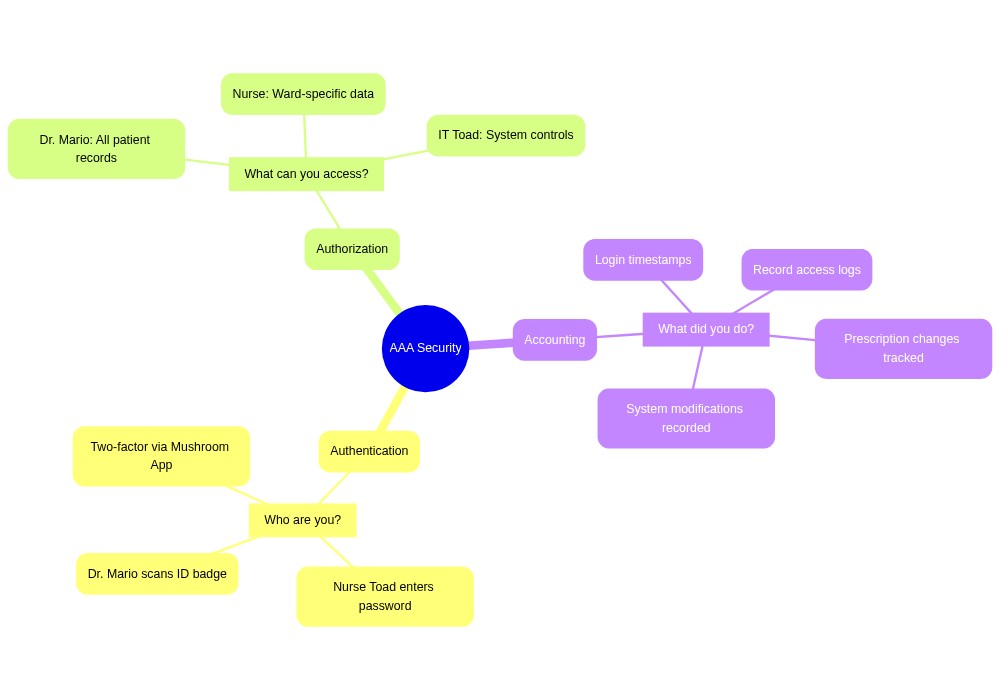
Three As: Authentication, Authorization, Access Control#
The Three As describe three closely related but distinct security questions that every database administrator must answer.
We use authentication to answer who are you? by verifying the identity of a user or system trying to access the database using passwords, two-factor authentication, or single sign-on.
We use authorization to answer what are you allowed to do? by granting or denying specific rights to authenticated users through role-based access control (RBAC).
We use access control to answer how is that enforced? by using database rules and permissions to carry out those authorization decisions.
A core security rule is the principle of least privilege, which states that every user should only have the absolute minimum database access needed to do their job, reducing the damage if an account is hacked.
The Three As at Toad City Hospital#
Toad City Hospital stores sensitive patient details and medical histories. The hospital implements four distinct layers of protection to secure this data:
Authentication: Every employee must log in with a unique username and strong password, while remote connections also require a temporary code sent to their phone.
Authorization: User roles dictate permissions. Doctors can read and write patient files, nurses can only read them, and billing staff can only see non-sensitive scheduling data.
Access control: The database engine enforces these roles at the SQL level. If a nurse tries to run a query to update a record, the database blocks the operation.
Auditing: The database logs every successful and failed query to create audit logs, which security officers review regularly to spot suspicious activity.
Advanced identity#
Toad City Hospital is opening three more clinic locations across the state. Each new clinic adds dozens of staff, each of whom needs to log into the patient database, the scheduling system, the lab portal, and the radiology viewer. The IT director knows the old way — one username and password per person per system — does not scale.
This section covers the identity patterns that make large, multi-system organizations workable: federated identity, IAM, OAuth, OpenID Connect, Kerberos, and certificate management.
Federated identity, IAM, and SSO in practice#
Identity and Access Management (IAM) is the umbrella discipline of who-is-allowed-to-do-what across all the systems an organization runs. It includes accounts, roles, groups, and the policies that tie them together.
Federated identity lets an account from one trusted system grant access to another. Toad City’s central identity provider tells the lab portal “yes, this user is who they claim to be.” The portal does not need its own copy of the user’s password.
Identity provider (IdP) is the system that issues those identity assertions. Common IdPs include Okta, Microsoft Entra ID (formerly Azure AD), and Google Workspace.
Single sign-on (SSO) is the user-visible outcome of federation. Log in once at the IdP, get access to many downstream systems without logging in again.
For Toad City, that means a nurse logs in once in the morning at the hospital’s identity provider and is then trusted by every authorized application for the rest of the shift.
OAuth and OpenID Connect#
Two protocols often appear together, and they are not the same thing.
OAuth 2.0 is an authorization protocol. It is designed to answer “is this application allowed to act on a user’s behalf?” When the lab portal asks “may I read this user’s calendar?”, OAuth issues a scoped token that says yes, and only for calendar reads.
OpenID Connect (OIDC) is an authentication layer built on top of OAuth. It answers “who is this user?” OIDC issues an identity token alongside the OAuth access token. The lab portal can read the user’s name and email from the identity token without having to handle a password.
A simple rule: OAuth is about what, OIDC is about who. Modern federated logins almost always use both together.
Kerberos and SPNs#
In a traditional on-premises Windows environment, the dominant authentication protocol is Kerberos, the protocol behind Active Directory logins.
When a user logs into a domain-joined workstation, the domain controller issues them a ticket-granting ticket (TGT).
When the user opens the patient database, the workstation presents the TGT to the domain controller and gets a service ticket for the database server.
The database server validates the service ticket and lets the user in. The password never crosses the wire.
A service principal name (SPN) identifies a specific service inside Active Directory — for example, MSSQLSvc/db01.toadcity.local:1433 identifies a SQL Server instance. Kerberos uses the SPN to issue the correct service ticket. Misconfigured SPNs are a common cause of “I can log in but the database says no” tickets at the help desk.
SSL/TLS certificate management#
A database server that accepts encrypted connections needs an SSL/TLS certificate. A certificate has a lifecycle:
Issue. A certificate authority (CA) signs the certificate, vouching for the server’s identity. Public CAs (Let’s Encrypt, DigiCert) cover internet-facing services; internal CAs cover intranet services like Toad City’s database.
Install. The certificate and its private key are installed on the database server.
Renew. Certificates expire — usually after 1–13 months. They have to be reissued and reinstalled before the expiration date, or every client will start failing to connect.
Revoke. If a private key is compromised, the certificate must be revoked so clients know to stop trusting it. Revocation is published through CRLs (certificate revocation lists) or the OCSP protocol.
Tracking expirations is a routine part of database operations. An expired certificate on the patient database means clinicians cannot log in, and “I forgot the renewal” is not an acceptable answer in a regulated environment.
Platform security architecture#
The IT director draws a new diagram on the whiteboard. “We do not trust anything by default — not the laptops, not the printers, not even our own services until they prove who they are. We assume an attacker is already inside.” The team nods. This is the modern posture for a database that stores sensitive data.
Zero Trust#
Zero Trust is a security model that does away with the older “trust the inside of the network, distrust the outside” assumption. Every request, even from inside the network, has to prove who it is and what it is allowed to do.
Three core principles:
Verify explicitly. Every request is authenticated and authorized using all available signals — user identity, device health, location, behavior — not just an IP address.
Use least-privilege access. Grant the minimum permissions needed to complete a task, for the shortest time possible.
Assume breach. Design as if an attacker is already inside. Segment networks, monitor everything, encrypt internal traffic.
For Toad City Hospital, Zero Trust means a clinician on the corporate Wi-Fi does not automatically get to query the patient database. They have to authenticate, prove their device is healthy, and be authorized by the application — every time.
Attack surface management#
Your attack surface is the sum of every place an attacker could try to get in. Attack surface management is the discipline of finding, tracking, and shrinking that surface over time.
Common attack surfaces for a database platform:
Open ports — TCP services exposed to networks they do not need to reach.
Exposed APIs — application endpoints reachable from the public internet.
Third-party libraries — vulnerable versions of dependencies pulled in by application code.
Employee endpoints — laptops and phones that hold credentials and can be lost or compromised.
Shared service accounts — accounts whose passwords are written down in too many places.
A practical first step is just inventorying these. Toad City’s IT team keeps a living list of every service that listens on the network and every account with elevated privileges. Anything not on the list gets investigated; anything on the list that nobody can justify gets removed.
Patch and remediation cycle#
When a vulnerability is announced — say, a flaw in the database driver Toad City’s clinicians use — the response follows a predictable cycle:
Discover. Monitor vendor advisories, security feeds, and internal scans. The vulnerability hits a dashboard.
Assess. Decide how exposed Toad City actually is. Is the affected driver installed? Reachable from the internet? Authenticated?
Patch. Apply the fix on a non-production system, validate, then push to production through the change-approval process described in Chapter 8.
Verify. Re-scan to confirm the vulnerability is gone. Document the response.
The cycle never really ends. Patching is a steady operational rhythm, not a one-time event.
Data poisoning#
Data poisoning is an attack that corrupts the data a system relies on, rather than the system’s code. It is especially dangerous in machine-learning contexts: an attacker submits crafted records that look legitimate but skew the model’s behavior.
Imagine an attacker who submits hundreds of fake patient encounters to Toad City’s readmission-risk model, all of them claiming “patient discharged in great health” when they were not. Over time, the model learns to under-predict readmissions, and the hospital cuts back on follow-up care — exactly what the attacker (or a bad-faith insurer) wanted.
Defenses parallel data integrity defenses elsewhere: validate inputs, monitor for unusual patterns in training data, and require human review before high-stakes models retrain. Chapter 12 returns to this in the context of AI-assisted data integration.
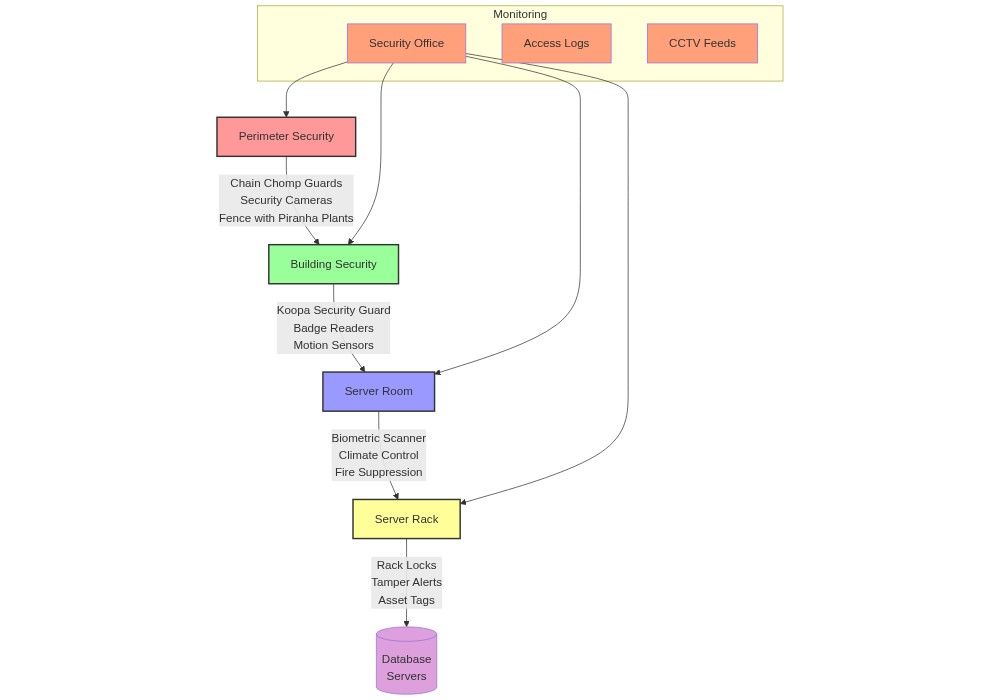
Database: Physical Security#
Most of database security is about logical defenses: encryption, access control, auditing. But physical security matters just as much. Physical security is about protecting the hardware, networks, and facilities that host the database from physical threats and unauthorized people.
Common physical security measures include:
Secure data centers. Host databases in purpose-built facilities with perimeter fencing, security gates, and reinforced walls.
Access control systems. Use biometric scanners, key cards, or PIN codes to restrict who can enter the data center and server rooms. Grant access only to authorized personnel.
Surveillance and monitoring. Install cameras and monitoring systems. Security staff should watch them 24/7 and respond to incidents quickly.
Environmental controls. Regulate temperature and humidity to protect the hardware. Install fire suppression systems — sprinklers or gas-based — to handle fire risks.
Power and cooling redundancy. Use uninterruptible power supplies (UPS) and backup generators so the systems keep running through outages. Use redundant cooling so the hardware stays in a safe temperature range.
Cable management. Label and secure network cables and power cords so they cannot be disconnected by accident or tampered with on purpose.
Hardware disposal. When old hardware is retired, wipe or destroy the storage so the data cannot be recovered. Shred or crush hard drives instead of just throwing them out.
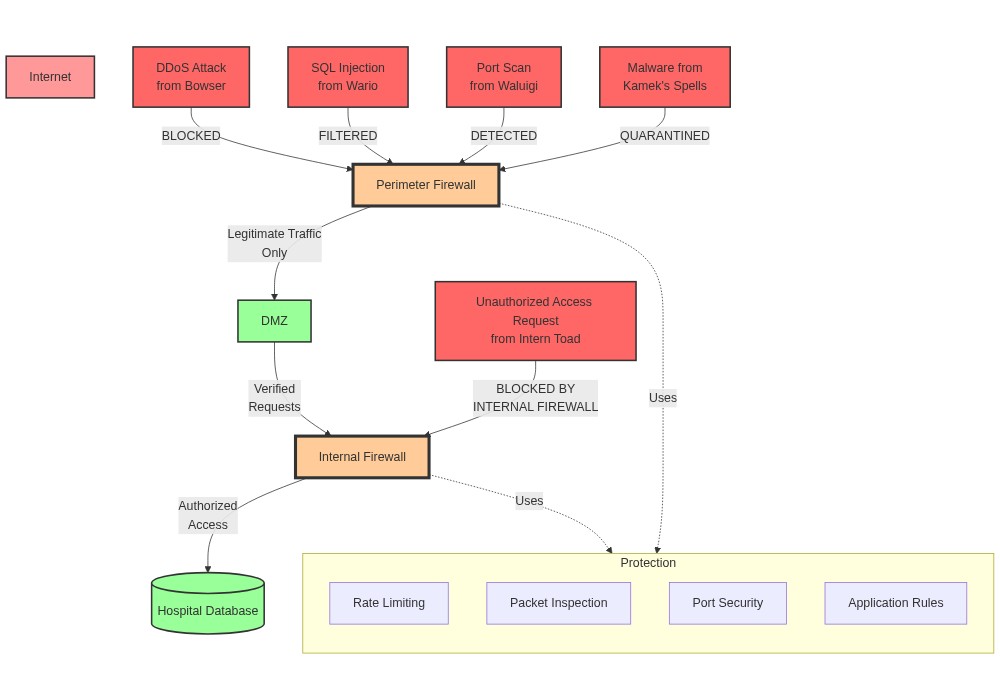
Firewalls#
A firewall is a security barrier between a database and the outside network. It monitors and controls incoming and outgoing network traffic using a defined set of security rules.
Firewalls protect databases using a few core capabilities:
The system can allow or block specific IP addresses to permit connections from trusted office networks while blocking untrusted external locations.
The firewall can restrict access to specific ports to ensure network traffic only reaches the database on the specific communication port it uses.
Administrators can apply access control lists (ACLs) to filter network traffic by combining source IP addresses, destination ports, and protocols.
The system keeps records of blocked attempts, allowing administrators to review logs and spot active hacking attempts early.
Example configuration#
The firewall rules below protect a PostgreSQL database server at IP 10.0.0.10:
Rule |
Source IP |
Destination IP |
Port |
Protocol |
Action |
|---|---|---|---|---|---|
1 |
192.168.1.0/24 |
10.0.0.10 |
5432 |
TCP |
Allow |
2 |
Any |
10.0.0.10 |
Any |
Any |
Deny |
Under this configuration:
The allow rule permits TCP traffic from the internal network to reach the database server on port 5432, which is the default port for PostgreSQL.
The deny rule blocks all other connections. Any traffic that is not explicitly allowed is immediately blocked.
This setup ensures that only trusted internal sources can connect to the database, leaving other communication ports safely closed.
Example: Firewall Log#
A typical firewall log entry (using iptables on Ubuntu) for the database server looks like this:
Jun 18 12:34:56 servername kernel: [123456.789123] IPTABLES DROP IN=eth0 OUT= MAC=01:23:45:67:89:ab:cd:ef:01:23:45:67:89:ab SRC=203.0.113.1 DST=10.0.0.10 LEN=60 TOS=0x00 PREC=0x00 TTL=55 ID=54321 DF PROTO=TCP SPT=56789 DPT=5432 WINDOW=29200 RES=0x00 SYN URGP=0
Jun 18 12:35:01 servername kernel: [123457.123456] IPTABLES ACCEPT IN=eth0 OUT= MAC=01:23:45:67:89:ab:cd:ef:01:23:45:67:89:ab SRC=192.168.1.15 DST=10.0.0.10 LEN=52 TOS=0x00 PREC=0x00 TTL=64 ID=54322 DF PROTO=TCP SPT=12345 DPT=5432 WINDOW=29200 RES=0x00 ACK URGP=0
Jun 18 12:35:07 servername kernel: [123458.456789] IPTABLES DROP IN=eth0 OUT= MAC=01:23:45:67:89:ab:cd:ef:01:23:45:67:89:ab SRC=198.51.100.2 DST=10.0.0.10 LEN=60 TOS=0x00 PREC=0x00 TTL=50 ID=54323 DF PROTO=TCP SPT=34567 DPT=5432 WINDOW=29200 RES=0x00 SYN URGP=0
Interpreting the log#
Each entry packs a lot of information into one line. Here is the first entry broken apart:
Date and time —
Jun 18 12:34:56. When the event was recorded.Hostname —
servername. The server that produced the log.Action —
IPTABLES DROP. The firewall dropped the packet. (The other common action isACCEPT.)Interface —
IN=eth0 OUT=. The packet came in on theeth0network interface.OUT=is empty because the packet was not forwarded.MAC address —
MAC=.... The physical addresses of the network interfaces involved.Source IP —
SRC=203.0.113.1. Where the packet came from.Destination IP —
DST=10.0.0.10. The database server.Packet length —
LEN=60. Size of the packet in bytes.TTL —
TTL=55. How many network hops the packet had left.Protocol —
PROTO=TCP. The transport protocol.Source port —
SPT=56789. The source machine’s port.Destination port —
DPT=5432. PostgreSQL’s default port.TCP flags —
SYN. A SYN packet, the first step of the TCP handshake — in other words, an attempt to open a new connection.
Reading the three entries together tells a story: an outsider at 203.0.113.1 tried to open a new connection to the database; the firewall dropped it. An internal client at 192.168.1.15 continued an existing session; the firewall let it through. A second outsider tried to connect; the firewall dropped that too.
Looking at logs this way is how you tell legitimate activity from unauthorized access attempts.
Network Segmentation and VLANs#
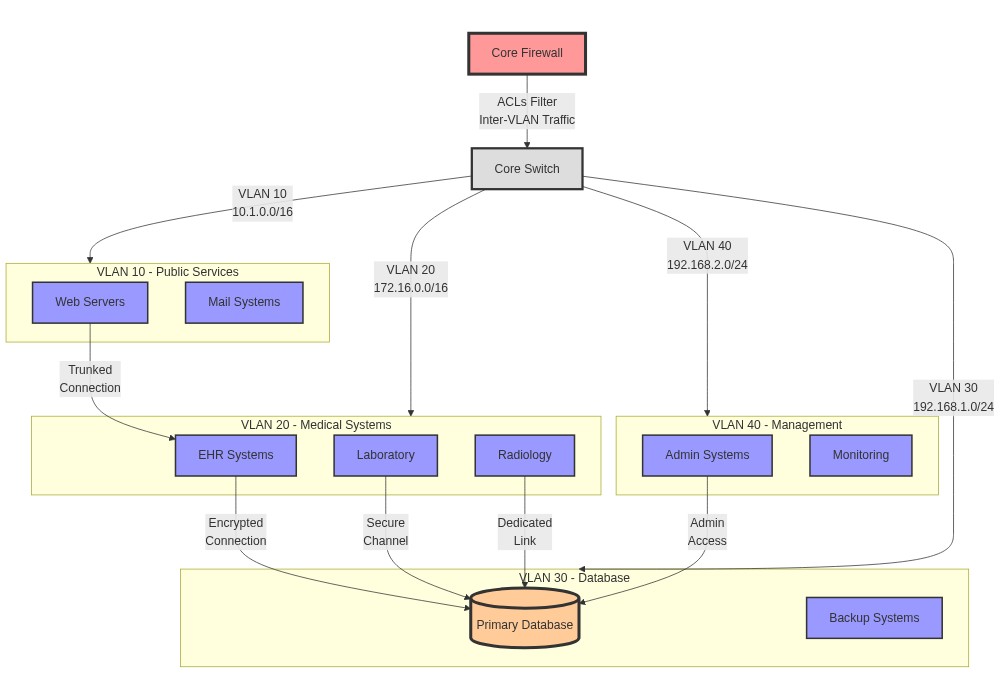
Network segmentation divides a computer network into smaller parts, each with its own security boundary. Just as a hospital has different departments with different security needs, a network can be divided so that problems in one zone don’t spread to others — and so attackers cannot freely move from one system to another.
Virtual Local Area Networks (VLANs) take this one step further. A VLAN is a logical grouping that works regardless of where the devices physically sit. At Toad City Hospital, VLANs group devices by function:
Public Services (VLAN 10). The front desk of the digital world. Web servers and public-facing services live here, so patients can check appointments and read general information without ever touching sensitive systems.
Medical Systems (VLAN 20). Clinical work happens here. Medical equipment, Electronic Health Record (EHR) systems, and clinician workstations stay isolated from public traffic.
Database Systems (VLAN 30). The secure vault for patient data. Databases and their backup systems live here with strict access controls. Only authorized systems from other VLANs may connect, and every connection is encrypted.
Management Systems (VLAN 40). IT Toad’s domain. Administrative systems and monitoring tools live here, fully separate from patient care and public access.
The core switch and the firewall work together as the traffic cops. The switch keeps the VLAN boundaries in place. The firewall uses Access Control Lists (ACLs) to decide which kinds of traffic may cross between VLANs, so traffic always follows an approved path.
Activity: Analyzing Hospital Firewall Logs#
In this activity, you will work with a day of firewall traffic from Toad City Hospital. The dataset mixes normal activity with security events. You will:
Query the logs to find security incidents.
Look for patterns in network traffic.
Watch access to sensitive medical systems.
Track user activity across network zones.
The Database#
Zones and Security Context#
The hospital’s network is split into three zones:
Medical Zone (
192.168.10.0/24,10.10.10.0/24) — clinical systems and patient data.Admin Zone (
192.168.20.0/24,10.20.20.0/24) — administration and IT systems.Public Zone (
192.168.30.0/24,10.30.30.0/24) — guest wifi and public-facing services.
Table Structure: firewall_logs#
Column Name |
Data Type |
Description |
Example Value |
|---|---|---|---|
timestamp |
TEXT |
When the connection occurred |
“2024-11-18T14:35:22” |
src_ip |
TEXT |
Source IP address |
“192.168.10.45” |
dst_ip |
TEXT |
Destination IP address |
“10.20.20.100” |
src_port |
INTEGER |
Source port |
50123 |
dst_port |
INTEGER |
Destination port |
443 |
protocol |
TEXT |
Service name |
“HTTPS” |
action |
TEXT |
ALLOW or BLOCK |
“ALLOW” |
user_id |
TEXT |
Username |
“mario.bros” |
bytes_sent |
INTEGER |
Upload size in bytes |
50000 |
bytes_received |
INTEGER |
Download size in bytes |
75000 |
Common Service Ports#
80, 443 — Web traffic
22 — SSH (remote access)
3389 — Remote Desktop
1433 — Database
8080 — Alternative web
Users#
Administrators: mario.bros, luigi.bros, princess.peach
Standard users: toad, yoshi, bowser, wario, waluigi, daisy, rosalina
Basic Queries#
Task |
Query |
Expected Output |
|---|---|---|
View Recent Blocks |
|
Recent security blocks |
Count by Protocol |
|
Traffic breakdown |
Find User Activity |
|
Single user’s connections |
Medical Zone Traffic |
|
Medical system access |
Large Transfers |
|
Big data movements |
Action Summary |
|
Allow vs block totals |
Hourly Activity |
|
Traffic by hour |
Active Users |
|
Most active users |
Practice Your SQL#
Run the following cell to practice querying the firewall logs just described.
Chapter Summary#
Use this list as a self-check. After working through the chapter, you should be able to do each of the following:
You can explain the CIA Triad and why it matters for databases.
You can identify common database threats and their impact.
You can describe encryption techniques that protect sensitive data.
You can apply data masking to safeguard confidential information.
You can explain why secure deletion and data destruction matter.
You can argue for auditing and monitoring database activity.
You can distinguish authentication, authorization, and access control.
You can describe physical security measures for databases.
You can explain the role of firewalls in database security.
You can use network segmentation to isolate and protect databases.
You can describe BYOK, KYOK, and confidential computing and explain when each applies.
You can tell anonymization, suppression, and masking apart and pick the right one for a situation.
You can match a major data-protection framework to the kind of data it covers.
You can tell data sovereignty and data residency apart.
You can describe IAM, federated identity, and SSO and how they relate.
You can tell OAuth and OpenID Connect apart.
You can describe how Kerberos and SPNs work in a Windows-domain environment.
You can list the stages of the SSL/TLS certificate lifecycle.
You can explain Zero Trust and its three core principles.
You can list common attack surfaces and walk through the patch and remediation cycle.
You can define data poisoning and give an example.
Practice with the Loop of the Recursive Dragon#
Sharpen what you just learned with a chapter-matched review set in the Loop of the Recursive Dragon — an adaptive review game with multiple question types and RPG-style mechanics, built for this book.
Glossary#
Use this reference sheet to quickly review key database security terms.
Security principles#
The CIA Triad is the foundational model of information security, representing confidentiality, integrity, and availability.
The confidentiality is the principle of keeping sensitive data private and hidden from unauthorized eyes.
The integrity is the principle of keeping database records accurate, complete, and uncorrupted.
The availability is the principle of ensuring that authorized users can access the database whenever they need it.
Threats and attacks#
The malware refers to any malicious software designed to harm computers or steal data.
The phishing is a trick where attackers send fake messages pretending to be trusted sources to steal credentials.
The ransomware is malware that encrypts files and database storage to demand a ransom payment.
A brute force attack is a password-guessing method where automated scripts try thousands of combinations.
A SQL injection is an attack that inserts malicious SQL code into input fields to run unauthorized commands.
An on-path attack occurs when an attacker intercepts and alters data as it travels across a network.
A Distributed Denial of Service (DDoS) attack floods a server with massive traffic to crash the system.
A zero-day exploit is an attack that targets a software vulnerability before developers have created a patch.
An Advanced Persistent Threat (APT) is a highly skilled, often state-sponsored hacking group targeting specific networks.
An insider threat is a security risk that comes from employees or contractors with legitimate system access.
A cybercriminal is an attacker who uses technology to commit illegal acts for financial profit.
A hacktivist is a hacker who breaches systems to promote political or social causes.
Access control#
The authentication is the process of verifying a user’s identity before they can log in.
The authorization is the process of deciding what specific files and actions an authenticated user is allowed to perform.
The access controls are the security rules and tools used to enforce those authorization decisions.
A biometric scanner is a physical device that identifies a user through fingerprints or facial scans.
Data protection#
In a symmetric encryption scheme, the database uses the exact same key to lock and unlock the data.
In an asymmetric encryption scheme, a public key locks the data and a private key unlocks it.
The data-at-rest refers to any information that is stored on physical drives and is not currently moving.
The data-in-transit refers to any information that is currently moving across a network.
The data masking is a technique that hides sensitive details behind fake but realistic data.
The data classification is the process of organizing data by how sensitive it is to the business.
The data discovery is the process of scanning network servers to locate sensitive or regulated information.
A data retention policy is a set of rules dictating how long data must be kept and when it must be deleted.
The secure deletion is a method of permanently erasing data by overwriting it multiple times so it cannot be recovered.
Network protection#
A firewall is a security tool that monitors and filters network traffic based on predefined rules.
An allow rule is a firewall setting that permits specific network connections to go through.
A deny rule is a firewall setting that explicitly blocks unauthorized network connections.
The network segmentation is the practice of splitting a network into smaller, isolated zones to improve security.
A Virtual Local Area Network (VLAN) is a logically grouped network of devices that can communicate as if they were on the same physical switch.
Testing and oversight#
A penetration test is an authorized, simulated security attack used to find weaknesses in a system.
A code audit is a structured review of source code to find security vulnerabilities and coding mistakes.
The audit logs are automatic records of system activity used to monitor database events.
Physical security#
An Uninterruptible Power Supply (UPS) is a battery system that provides emergency power when the main electricity fails.
Advanced key management and data protection#
In a BYOK (bring your own key) pattern, the customer supplies the encryption key used by the cloud host.
In a KYOK (keep your own key) pattern, the customer holds their key in dedicated hardware that the provider can never access.
The confidential computing is a security model where data is decrypted only inside a hardware-enforced CPU enclave, hidden from the cloud provider.
The anonymization is the process of removing identifying links between data and specific people while keeping the data’s general usefulness.
The suppression is the act of removing a sensitive value entirely from a dataset rather than masking it.
Compliance frameworks#
The data sovereignty is the rule that data is subject to the laws of the country where it is stored.
The data residency refers to the physical, geographic location where a database’s servers reside.
The PCI DSS is the global security standard that regulates how organizations handle credit card data.
The SOX (Sarbanes-Oxley Act) is a US law imposing strict auditing and recordkeeping rules on financial data.
The CCPA is a California state law granting residents privacy rights over their personal data.
The PIPL is a Chinese privacy law regulating how personal information is collected and transferred.
The FERPA is a US federal law protecting the privacy of student educational records.
Advanced identity#
The Identity and Access Management (IAM) is a framework used to manage who has access to which network resources.
A federated identity is a setup where a single account on one trusted system grants access to several others.
An Identity Provider (IdP) is a security service that authenticates users and issues digital login tokens to other applications.
The OAuth is an open authorization protocol that issues secure tokens letting one application access a user’s account in another.
The OpenID Connect (OIDC) is an identity layer built on top of OAuth that verifies user login details.
The Kerberos is a network authentication protocol that uses secure tickets to verify identities without sending passwords.
A Service Principal Name (SPN) is a unique directory identifier used by Kerberos to associate a service instance with a login account.
A Certificate Authority (CA) is a trusted entity that issues digital certificates to vouch for a server’s identity.
The certificate revocation is the act of publishing that a previously valid digital certificate should no longer be trusted.
Platform security#
The Zero Trust model is a security design that assumes no network connection is safe, requiring constant verification and minimal privileges.
The attack surface is the sum of all points where an attacker can try to enter or steal data from a system.
The attack surface management is the ongoing practice of mapping, monitoring, and shrinking a system’s attack surface.
A remediation cycle is the repeating sequence of finding, assessing, patching, and verifying system vulnerabilities.
The data poisoning is an attack that corrupts database training files to ruin the behavior of a machine learning model.