

Chapter 9: Enterprise Databases with PostgreSQL (The Pokémon Pokédex)#
Database and SQL Through Pop Culture | Brendan Shea, PhD#
Welcome to the exciting world of PostgreSQL! In this chapter, we’ll embark on a thrilling adventure as we explore the wonders of this powerful database system. Think of it as leveling up from SQLite to a more advanced and feature-packed database.
We’ll start by comparing PostgreSQL with SQLite, which you’ve already befriended in the previous chapters. You’ll discover the superpowers that PostgreSQL brings to the table, like its robust architecture, extensive feature set, and ability to handle more complex scenarios.
Get ready to dive into the practical side of things! We’ll guide you through the installation process and show you how to create your very own “Pokemon Research Center” database. It’s like building a virtual laboratory for your beloved Pokemon. You’ll learn how to define tables with special abilities, such as unique data types, powerful constraints, and relationships that bind them together. We’ll also teach you how to populate these tables with sample data, bringing your database to life!
We’ll uncover the secrets of advanced techniques like password hashing, which acts as a protective shield for sensitive information. You’ll learn how to harness the power of PostgreSQL’s array data type and perform incredible feats with the ALTER TABLE command, allowing you to modify your database structure with ease.
As we progress through the chapter, we’ll introduce you to the concept of stored procedures. Think of them as special moves that your database can perform, encapsulating complex operations into a single, reusable unit. We’ll also delve into the realm of user management and role-based access control, empowering you to become a master of database security and integrity.
So, grab your Pokedex and get ready to level up your database skills with PostgreSQL! Let’s embark on this exciting adventure together and become masters of the database universe!
Learning Outcomes#
By the end of this chapter, you will be able to:
Compare PostgreSQL with SQLite and explain when a server-based database is the better choice.
Install or connect to PostgreSQL, create a database, and define tables with stricter data types, constraints, and relationships.
Explain password hashing and why raw passwords should not be stored in database tables.
Use Postgres-specific data types such as arrays and JSON or JSONB where they fit the problem.
Modify schemas with ALTER TABLE, including adding columns, defaults, type changes, and constraints.
Create and use stored procedures for reusable database logic.
Manage users, roles, and privileges with role-based access control.
Perform analytical queries in Postgres, including aggregation, joins, and window functions.
Write a user-defined function in PL/pgSQL and call it from a query.
Create and use a computed (generated) column.
Keywords: PostgreSQL, SQLite, data types, constraints, password hashing, arrays, JSONB, ALTER TABLE, stored procedures, users, roles, privileges, window functions
Brendan’s Lecture#
## Video Lecture
from IPython.display import YouTubeVideo
YouTubeVideo('0xXMZ2qLM4k', width=800, height=500)
What is PostgreSQL? How Does it Differ from SQLite?#
PostgreSQL and SQLite are both relational database management systems that support ACID (Atomicity, Consistency, Isolation, Durability) properties and transactions. However, they have significant differences in their architectures, feature sets, and use cases.
SQLite is a lightweight, serverless, and self-contained database engine. It’s ideal for small to medium-scale applications, embedded systems, or local data storage. SQLite stores the entire database as a single file on disk, making it easy to set up and manage. It’s often used in mobile apps, desktop applications, and small websites.
On the other hand, PostgreSQL is a full-featured, server-based RDBMS designed to handle large amounts of data and support multiple concurrent users. Its client-server architecture allows it to manage resources more efficiently and handle heavier workloads.
When deciding between SQLite and PostgreSQL, consider the following factors:
Scalability: As your application grows and the number of concurrent users increases, PostgreSQL’s client-server architecture becomes crucial. It can handle a large number of simultaneous connections and efficiently manage resources. SQLite, being serverless, may struggle with high levels of concurrency and may not be suitable for applications with a large number of concurrent writers.
Data Size and Distribution: PostgreSQL is designed to handle large and massive datasets, even in the terabyte range. It offers features like table partitioning, which allows you to split large tables across multiple files or even servers, improving query performance and manageability. SQLite, while capable of handling moderately sized datasets, may not be the best choice for extremely large or distributed datasets.
Advanced Features: PostgreSQL offers a rich set of advanced features that become increasingly important as your application grows. These include:
Strict Typing: PostgreSQL enforces strict data typing, ensuring data integrity and reducing the chances of data inconsistencies. This becomes increasingly critical when there many “writers” to the database.
Complex Queries: PostgreSQL supports complex queries, including advanced joins, subqueries, and window functions, which are essential for handling sophisticated data retrieval tasks.
Stored Procedures and Triggers: PostgreSQL allows you to define stored procedures and triggers, enabling you to encapsulate complex business logic within the database itself. This can lead to better performance and maintainability.
Extensibility: PostgreSQL is highly extensible, allowing you to add custom data types, functions, and even programming languages. This flexibility becomes crucial as your application’s requirements evolve.
Security and User Management: Postgres has built-in support for things like encryption, user management, password hashing, and other security measures. SQLite, by contrast, relies on the surrounding “application” (written in Python, Java, C#, etc.) to handle these things. This can be become impractical as the numbers of users becomes large.
Replication and High Availability: As your application becomes mission-critical, you may need to ensure high availability and minimize downtime. PostgreSQL offers built-in replication features, such as streaming replication and logical replication, which allow you to create standby servers and distribute the workload. SQLite, being a serverless database, does not have built-in replication capabilities.
Available Resources. Postgres requires more physical resources (processing power, disk space) and human resources (e.g., a trained database administrator) than SQLite. SQLite’s dynamic typing can make database development and deployment quicker than Postgres’s strict typing. (In fact, SQLite is often used to develop protoype databases, which can then be “scaled up” to Postgres or a similar RDBMS).
While SQLite is a great choice for small to medium-sized applications, embedded systems, or local data storage, it may not be suitable for large-scale, high-concurrency, or mission-critical applications. In these cases, PostgreSQL’s robustness, scalability, and advanced features make it the better choice.
For example, a large institution like a university or a financial organization would likely choose PostgreSQL over SQLite due to its ability to handle large amounts of data, support multiple concurrent users, and provide advanced features necessary for complex data management tasks.
Table: PostgreSQL vs SQLite#
Feature |
PostgreSQL |
SQLite |
|---|---|---|
Architecture |
Client-server database |
File-based database |
Installation |
Requires server setup and configuration |
Self-contained, no server required |
Storage |
Data stored on server, accessed via network |
Data stored in a single file on disk |
Concurrency |
Excellent support for multiple simultaneous users |
Limited concurrency (reader locks) |
Performance |
Optimized for high-volume, complex operations |
Fast for simple operations, local access |
Scalability |
Can handle very large databases and high traffic |
Less suitable for very large datasets |
SQL Compliance |
Nearly complete SQL standard compliance |
Supports most common SQL features |
Security |
Robust user authentication and authorization |
Relies on file system permissions |
Use Cases |
Web applications, enterprise systems |
Mobile apps, embedded systems, small websites |
Administration |
Requires database administration skills |
Minimal administration needed |
Footprint |
Large memory and disk footprint |
Extremely lightweight (< 1MB library) |
Transactions |
ACID-compliant with robust transaction support |
ACID-compliant for basic transactions |
Backup |
Complex backup procedures, point-in-time recovery |
Simple file copy for backup |
Key Similarities#
Both are relational databases using SQL
Both support ACID transactions
Both are open-source and free to use
Both support common data types and SQL operations
Key Differences#
Deployment Model: PostgreSQL requires a server process to run continuously, while SQLite is just a file and library
Concurrency: PostgreSQL handles many users simultaneously, while SQLite has limitations with multiple writers
Feature Set: PostgreSQL has advanced features (JSON, full-text search, etc.) that SQLite lacks
Management Overhead: PostgreSQL requires more administration and configuration s.
Data Types in Postgres#
PostgreSQL offers a rich set of data types, including several that are not available in SQLite. These data types allow you to store and manipulate data more efficiently and with greater precision. Let’s explore some of the key data types in PostgreSQL.
Data Type Category |
Examples |
Description |
|---|---|---|
Numeric Types |
|
Whole numbers, fixed-point numbers, floating-point numbers, and auto-incrementing integers. |
Character Types |
|
Fixed-length and variable-length character strings. |
Date/Time Types |
|
Stores date, time, timestamp, and interval values. |
Boolean Type |
|
Stores a logical value of either |
Enumerated Type |
|
Defines a custom data type with a static set of values. |
Array Type |
Any data type followed by |
Represents an array of elements of the same type. |
UUID Type |
|
Stores Universally Unique Identifiers (UUIDs). |
JSON and JSONB Types |
|
Stores JSON data as text or in a binary format. |
Hstore Type |
|
Represents a key-value pair data type. |
Range Types |
|
Represent a range of values, such as integers, timestamps, or dates. |
Here are a few examples to illustrate the usage of some of these data types:
Enumerated Type:
CREATE TYPE mood AS ENUM ('sad', 'ok', 'happy');
Array Type:
CREATE TABLE scores (
      id SERIAL PRIMARY KEY,
      student_id INTEGER,
      grades INTEGER[]
    );
When choosing data types for your database schema, consider factors such as data integrity, storage efficiency, and the nature of the data being stored. PostgreSQL’s wide range of data types gives you flexibility and power in designing your database schema.
It’s worth noting that while SQLite also supports many of these data types, such as numeric, character, and date/time types, it lacks some of the more advanced types like arrays, UUIDs, and range types. PostgreSQL’s extensive set of data types is one of the factors that make it a more versatile and feature-rich database system.
Overview of the Pokemon Research Center Database#
To demonstrate the power of Postgres, we’ll be creating a Pokemon Research Center database consisting of three main tables: researchers, pokemon, and research_records. These tables are designed to store information about Pokemon researchers, their Pokemon, and the research records associated with each Pokemon.
%%sql
-- Drop existing tables if they exist
DROP TABLE IF EXISTS researchers CASCADE;
DROP TABLE IF EXISTS pokemon CASCADE;
DROP TABLE IF EXISTS research_records;

-- Create the researchers table
CREATE TABLE researchers (
  id SERIAL PRIMARY KEY,
  name VARCHAR(100) NOT NULL,
  email VARCHAR(100) UNIQUE NOT NULL,
  password_hash VARCHAR(100) NOT NULL,
  phone VARCHAR(20),
  date_of_birth DATE,
  CHECK (date_of_birth < CURRENT_DATE)
);

-- Create the pokemon table
CREATE TABLE pokemon (
  id SERIAL PRIMARY KEY,
  name VARCHAR(50) NOT NULL,
  species VARCHAR(50) NOT NULL,
  researcher_id INTEGER REFERENCES researchers(id),
  level INTEGER CHECK (level BETWEEN 1 AND 100),
  health_status VARCHAR(20),
  abilities TEXT[]
);

-- Create the research_records table
CREATE TABLE research_records (
  id SERIAL PRIMARY KEY,
  pokemon_id INTEGER REFERENCES pokemon(id),
  observation_date TIMESTAMP DEFAULT CURRENT_TIMESTAMP,
  findings TEXT,
  recommendations TEXT,
  funding NUMERIC(8, 2)
);
 * postgresql+psycopg2://@/postgres
Done.
Done.
Done.
Done.
Done.
Done.
Entity-Relationship Diagram#
The ERD for this database is as follows:
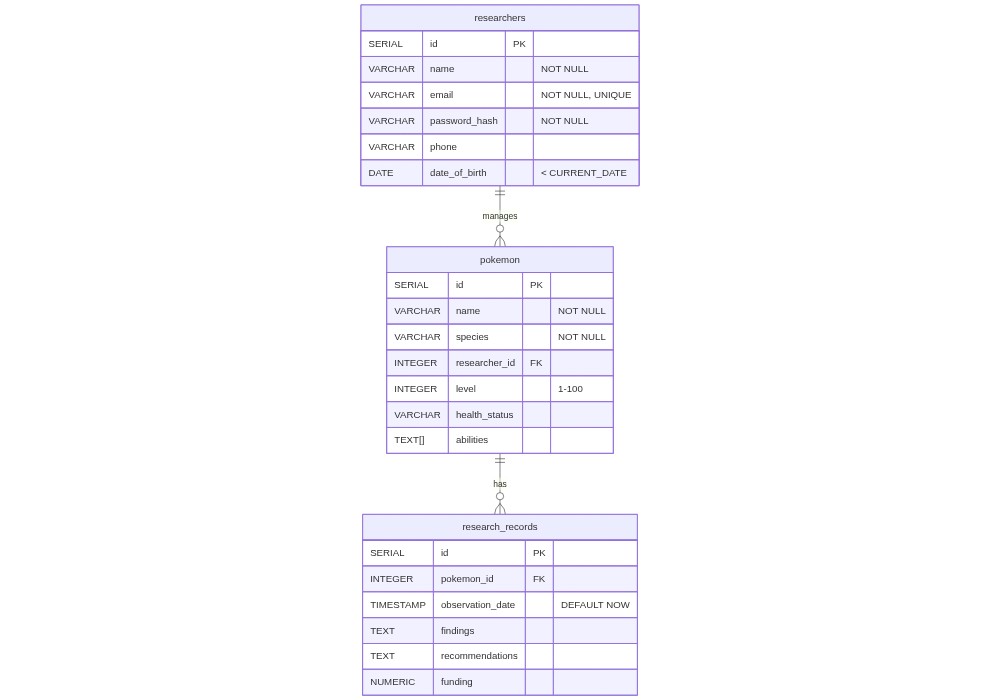
While much of this statement should be familiar, you might notice a few new things, as well.
The researchers table stores information about Pokemon researchers.
It includes columns for the researcher’s ID (auto-generated), name, email (unique), hashed password, phone number, and date of birth.
The
date_of_birthcolumn has a CHECK constraint that ensures the value is always less than the current date. This constraint uses theCURRENT_DATEfunction, which is specific to PostgreSQL and not available in SQLite.The
emailcolumn has a UNIQUE constraint to ensure that each email address is associated with only one researcher.
The pokemon table stores information about individual Pokemon.
It includes columns for the Pokemon’s ID (auto-generated), name, species, researcher ID (foreign key referencing the researchers table), level, health status, and abilities.
The
levelcolumn has a CHECK constraint that ensures the value is between 1 and 100.The
abilitiescolumn is of type TEXT[] (array), which allows storing multiple abilities for each Pokemon. Arrays are a feature specific to PostgreSQL and not available in SQLite.
The research_records table stores information about research observations and recommendations for each Pokemon.
It includes columns for the research record ID (auto-generated), Pokemon ID (foreign key referencing the pokemon table), observation date, findings, recommendations, and funding.
The
observation_datecolumn has a DEFAULT value ofCURRENT_TIMESTAMP, which automatically sets the value to the current timestamp if no value is provided during insertion. This is a PostgreSQL-specific feature.The
fundingcolumn is of type NUMERIC(8, 2), which allows storing monetary values with a precision of 8 digits and 2 decimal places. The NUMERIC type provides more precise decimal calculations compared to SQLite’s REAL type.
Test Data for Pokemon Research Center#
Now, let’s insert some test data for our Pokemon Research Center:
%%sql
CREATE EXTENSION IF NOT EXISTS pgcrypto;
-- Insert sample data into the researchers table
INSERT INTO researchers (name, email, password_hash, phone, date_of_birth)
VALUES
  ('Professor Oak', 'oak@example.com', crypt('bad_password', gen_salt('bf')), '123-456-7890', '1950-06-15'),
  ('Professor Elm', 'elm@example.com', crypt('long_password_with_symbols_23423odsgv*732x', gen_salt('bf')), '987-654-3210', '1965-12-01');

-- Insert sample data into the pokemon table
INSERT INTO pokemon (name, species, researcher_id, level, health_status, abilities)
VALUES
  ('Sparky', 'Pikachu', 1, 25, 'Healthy', ARRAY['Static', 'Lightning Rod']),
  ('Flare', 'Charizard', 1, 65, 'Healthy', ARRAY['Blaze']),
  ('Aqua', 'Totodile', 2, 30, 'Injured', ARRAY['Torrent', 'Sheer Force']),
  ('Bulby', 'Bulbasaur', 1, 20, 'Healthy', ARRAY['Overgrow']),
  ('Scorch', 'Charmander', 2, 15, 'Healthy', ARRAY['Blaze']),
  ('Wings', 'Pidgeotto', 1, 40, 'Healthy', ARRAY['Keen Eye', 'Tangled Feet']);

-- Insert sample data into the research_records table
INSERT INTO research_records (pokemon_id, findings, recommendations, funding)
VALUES
  (3, 'Behavioral study on water-type moves', 'Further observation needed', 1000.00),
  (1, 'Electrical discharge analysis', 'Monitor energy output', 2000.00),
  (4, 'Growth rate analysis', 'Increase sunlight exposure', 1500.00),
  (5, 'Fire-type behavior study', 'Control training environment', 1200.00),
  (6, 'Flight pattern study', 'Observe in natural habitat', 1800.00),
  (2, 'Advanced combat techniques', 'Enhance training regimen', 2200.00);
 * postgresql+psycopg2://@/postgres
Done.
2 rows affected.
6 rows affected.
6 rows affected.
Researchers Table: What is a Password “Hash”?#
Again, much of the above INSERT statement should be familiar. However, if you look closely at the ways the researcher’s passwords are handled, you’ll notice something a bit different.
The password_hash column stores the hashed version of the researcher’s password. Hashing is a one-way process that converts the plain-text password into a fixed-size string of characters. The resulting hash is irreversible, meaning it is computationally infeasible to obtain the original password from the hash.
In this example, the crypt function is used along with the gen_salt function to hash the passwords. The crypt function applies a cryptographic hash function to the password, and the gen_salt function generates a random salt value using the Blowfish (‘bf’) algorithm. The salt is appended to the password before hashing, making it more resistant to rainbow table attacks and increasing the security of stored passwords.
Storing hashed passwords instead of plain-text passwords is crucial for security. If the database is compromised, attackers would only have access to the hashed passwords, making it extremely difficult for them to retrieve the original passwords.
It’s important to note that while the example uses the crypt function for simplicity, in a production environment, it’s recommended to use more secure and modern hashing algorithms specifically designed for password hashing, such as bcrypt, scrypt, or PBKDF2, which provide better protection against various types of attacks.
We see what this hash looks like:
%%sql
SELECT * FROM researchers;
 * postgresql+psycopg2://@/postgres
2 rows affected.
| id | name | password_hash | phone | date_of_birth | ||
|---|---|---|---|---|---|---|
| 0 | 1 | Professor Oak | oak@example.com | $2a$06$naWiZEZXkqugx9ijquxG9ulxkLYFYQj5Hh8WIT1... | 123-456-7890 | 1950-06-15 |
| 1 | 2 | Professor Elm | elm@example.com | $2a$06$GvUpryTo.y/Amyp/6xEMH.tgT6sGHJ18qaawxCz... | 987-654-3210 | 1965-12-01 |
If you look closely, you’ll notice that the password hash is ALWAYS the exact same length, regardless of the initial length of the password. So, for example, if we take two passwords, one of which is “123”, and the other of which is the text of my favorite novel (300 pages—also a bad password, though for different reasons!), they will both generate a “hash” of the exact same length.
The basic idea is this:
When the user first creates their password, we “hash” the password and store that hash (not the password) in the database.
When the user logs in again and enters their password again, we again “hash” whatever they entered, and compare this to our database. If it matches, we let them in!
The advantage of this is that if someone manages to break into our database and access the password hash, they won’t be able to recover the user’s password. This is because hashing is a one-way function. If you know the password, you can get the hash, but knowing the hash does NOT allow you to compute the password.
Postgres Arrays in the Pokemon Table#
Let’s now take a look at the pokemon table, which has an array.
%%sql
SELECT * FROM pokemon;
 * postgresql+psycopg2://@/postgres
6 rows affected.
| id | name | species | researcher_id | level | health_status | abilities | |
|---|---|---|---|---|---|---|---|
| 0 | 1 | Sparky | Pikachu | 1 | 25 | Healthy | [Static, Lightning Rod] |
| 1 | 2 | Flare | Charizard | 1 | 65 | Healthy | [Blaze] |
| 2 | 3 | Aqua | Totodile | 2 | 30 | Injured | [Torrent, Sheer Force] |
| 3 | 4 | Bulby | Bulbasaur | 1 | 20 | Healthy | [Overgrow] |
| 4 | 5 | Scorch | Charmander | 2 | 15 | Healthy | [Blaze] |
| 5 | 6 | Wings | Pidgeotto | 1 | 40 | Healthy | [Keen Eye, Tangled Feet] |
Here, you’ll notice there is an array of abilities. We can access this as follows:
%%sql
SELECT
  name,
  abilities[1] as first_ability,
  abilities[2] as second_ability,
  abilities[3] as third_ability
FROM pokemon;
 * postgresql+psycopg2://@/postgres
6 rows affected.
| name | first_ability | second_ability | third_ability | |
|---|---|---|---|---|
| 0 | Sparky | Static | Lightning Rod | None |
| 1 | Flare | Blaze | None | None |
| 2 | Aqua | Torrent | Sheer Force | None |
| 3 | Bulby | Overgrow | None | None |
| 4 | Scorch | Blaze | None | None |
| 5 | Wings | Keen Eye | Tangled Feet | None |
The attempt to access the third ability fails (since the Pokemon don’t have one!). However, it doesn’t crash the database—it just returns None.
A Better ALTER TABLE#
In PostgreSQL, the ALTER TABLE command is more versatile and feature-rich compared to SQLite. While SQLite supports basic table modifications, PostgreSQL offers a wide range of options to alter tables efficiently. Let’s explore some of the key improvements in PostgreSQL’s ALTER TABLE command.
Adding Columns with Default Values#
In PostgreSQL, you can add a new column to a table and specify a default value for existing rows in a single statement. Example:
%%sql
ALTER TABLE researchers ADD COLUMN created_at TIMESTAMP DEFAULT CURRENT_TIMESTAMP;
 * postgresql+psycopg2://@/postgres
Done.
This statement adds a new column named created_at of type TIMESTAMP to the researchers table and sets the default value to the current timestamp for existing rows.
Modifying Column Data Types#
PostgreSQL allows you to modify the data type of a column using the ALTER TABLE command. Example:
%%sql
ALTER TABLE researchers ALTER COLUMN phone TYPE VARCHAR(15);
 * postgresql+psycopg2://@/postgres
Done.
This statement changes the data type of the phone column in the researchers table from VARCHAR(20) to VARCHAR(15).
Adding Constraints#
PostgreSQL enables you to add constraints to existing tables using the ALTER TABLE command. Example:
%%sql
ALTER TABLE pokemon ADD CONSTRAINT unique_name_per_researcher UNIQUE (name, researcher_id);
 * postgresql+psycopg2://@/postgres
Done.
This statement adds a unique constraint named unique_name_per_researcher to the pokemon table, ensuring that the combination of name and trainer_id is unique.
These examples demonstrate the powerful capabilities of PostgreSQL’s ALTER TABLE command. PostgreSQL provides a rich set of options to modify table structures, add or drop constraints, change column data types, and perform various other table alterations.
The flexibility and extensive features of ALTER TABLE in PostgreSQL allow for efficient schema modifications without the need to recreate tables from scratch. This is particularly useful in scenarios where the database schema needs to evolve over time to accommodate changing requirements.
It’s important to note that while SQLite does support some basic ALTER TABLE operations, such as renaming tables and adding columns, it lacks the extensive options and flexibility provided by PostgreSQL’s ALTER TABLE command.
Stored Procedures in PostgreSQL#
In the world of Pokemon, trainers often follow routines for feeding, training, and caring for their Pokemon. Those routines make their work more consistent. Similarly, databases use stored procedures to package common tasks or complex operations so they can be reused safely and consistently.
What are Stored Procedures?#
A stored procedure is a precompiled collection of SQL statements and optional control-flow statements stored under a name and processed as a unit. It is a database object that performs a specific task or a series of tasks when invoked.
Think of a stored procedure as named database-side logic you can call whenever you need it.
Stored procedures offer several benefits:
Reusability. Stored procedures can be called multiple times from different parts of an application, promoting code reuse and reducing duplication.
Encapsulation. Stored procedures encapsulate complex logic and SQL statements, making the code more modular and easier to maintain.
Performance. Since stored procedures are precompiled and stored in the database, they can execute faster than individual SQL statements sent from an application.
Security. Stored procedures can help enforce security by granting execute permissions to users without giving them direct access to the underlying tables.
Basic Syntax of Stored Procedures#
In PostgreSQL, you can create a stored procedure using the CREATE PROCEDURE statement. Here’s the basic syntax:
CREATE PROCEDURE procedure_name(parameter1 datatype, parameter2 datatype, ...)
AS $$
BEGIN
  -- Procedure logic goes here
  -- SQL statements and control-flow statements
END;
$$ LANGUAGE plpgsql;
Let’s break down the syntax:
procedure_name: The name you give to the stored procedure.parameter1,parameter2, etc.: Optional input parameters that the procedure can accept. You specify the parameter name and its data type.AS $$: Indicates the start of the procedure body.BEGINandEND: Delimits the procedure body, which contains the SQL statements and control-flow statements.LANGUAGE plpgsql: Specifies the language used for the stored procedure, in this case, PL/pgSQL (Procedural Language/PostgreSQL).
Example: Stored Procedure for the Pokemon Clinic#
Let’s create a stored procedure for the Pokemon Clinic that retrieves the medical records of a specific Pokemon based on its ID.
%%sql
CREATE OR REPLACE PROCEDURE update_pokemon_level(
  p_pokemon_id INTEGER,
  p_new_level INTEGER
)
AS $$
BEGIN
  -- Update the level of the Pokemon
  UPDATE pokemon
  SET level = p_new_level
  WHERE id = p_pokemon_id;

  -- Check if any rows were affected
  IF FOUND THEN
    RAISE NOTICE 'Pokemon level updated successfully';
  ELSE
    RAISE NOTICE 'No Pokemon found with the given ID';
  END IF;
END;
$$ LANGUAGE plpgsql;
 * postgresql+psycopg2://@/postgres
Done.
In this example:
The
CREATE OR REPLACE PROCEDUREstatement is used to create a procedure namedupdate_pokemon_level.The procedure takes two input parameters:
p_pokemon_id(INTEGER) representing the ID of the Pokemon to update, andp_new_level(INTEGER) representing the new level to set for the Pokemon.Inside the procedure body, an
UPDATEstatement is used to update thelevelcolumn of thepokemontable for the row where theidmatches the providedp_pokemon_id.The
IF FOUND THENclause checks if any rows were affected by theUPDATEstatement. If rows were affected (i.e., a Pokemon with the given ID was found and updated), it raises a notice indicating that the level was updated successfully (it also logs this notice). Otherwise, it raises a notice indicating that no Pokemon was found with the given ID.
To call this stored procedure and update the level of a Pokemon, you can use the CALL statement followed by the procedure name and the required arguments. For example:
%%sql
CALL update_pokemon_level(1, 30);
 * postgresql+psycopg2://@/postgres
Done.
This statement calls the update_pokemon_level procedure, passing the values 1 as the p_pokemon_id parameter and 30 as the p_new_level parameter. The procedure will then execute the UPDATE statement and update the level of the Pokemon with ID 1 to 30.
User-defined functions#
A stored procedure performs an action; a user-defined function (UDF) returns a value. In PostgreSQL, both are written in PL/pgSQL, but you use a function when you want a reusable calculation you can drop into a SELECT like any other built-in function.
At the Pokemon Research Center, Professor Oak wants a quick way to ask “how long has this Pokemon been in our care?” That is a scalar calculation, perfect for a UDF.
%%sql
CREATE OR REPLACE FUNCTION pokemon_age_in_days(captured_on DATE)
RETURNS INTEGER
LANGUAGE plpgsql
AS $$
BEGIN
  RETURN (CURRENT_DATE - captured_on);
END;
$$;
%%sql
SELECT name, captured_on, pokemon_age_in_days(captured_on) AS age_days
FROM pokemon
ORDER BY age_days DESC
LIMIT 5;
The function is now part of the database. Anywhere a built-in function would work, this one does too. A quick way to choose between the two database objects:
Function — returns a value, callable inside
SELECT. Use it for reusable calculations.Procedure — performs an action, called with
CALL. Use it for multi-step side effects like updating rows or logging events.
User Management and Roles in PostgreSQL#
When it comes to managing a database, one of the most critical aspects is ensuring the security and integrity of the data. In the world of Pokemon, this means safeguarding sensitive information about trainers, their Pokemon, and the medical records of the Pokemon Clinic. Just like how a Pokemon trainer must carefully manage their team and delegate responsibilities, a database administrator must effectively manage user access and privileges to maintain a secure and organized system.
PostgreSQL provides a robust user management system that allows you to create, modify, and delete user accounts, as well as assign privileges and roles to users. By properly setting up user accounts and roles, you can ensure that each user has access to only the necessary data and functionality, reducing the risk of unauthorized access or data breaches.
Let’s explore how to manage users and their roles in PostgreSQL using our Pokemon Research Center database as an example.
Creating Users#
In PostgreSQL, you can create a new user using the CREATE USER statement. For example, let’s create a user account for the head nurse of the Pokemon Research Center:
%%sql
CREATE USER nurse_joy WITH PASSWORD 'chansey123';
 * postgresql+psycopg2://@/postgres
Done.
This statement creates a new user named nurse_joy with the password 'chansey123'. It’s important to choose a strong and secure password to protect the user account from unauthorized access.
Creating Roles#
Roles in PostgreSQL are used to group together privileges and assign them to users. Think of roles as job titles or categories that define what actions users can perform. Let’s create a role for Pokemon trainers:
%%sql
CREATE ROLE pokemon_trainer;
 * postgresql+psycopg2://@/postgres
Done.
This statement creates a new role named pokemon_trainer. We can later assign this role to users who are authorized to perform actions related to Pokemon training.
Granting Privileges to Roles#
Once you have created a role, you can grant specific privileges to that role using the GRANT statement. For example, let’s grant the necessary privileges to the pokemon_trainer role:
%%sql
GRANT SELECT, INSERT, UPDATE ON pokemon TO pokemon_trainer;
 * postgresql+psycopg2://@/postgres
Done.
Assigning Roles to Users#
To assign a role to a user, you can use the GRANT statement with the TO clause. Let’s assign the pokemon_trainer role to a user named ash_ketchum:
%%sql
CREATE USER ash_ketchum WITH PASSWORD 'pika!';
GRANT pokemon_trainer TO ash_ketchum;
 * postgresql+psycopg2://@/postgres
Done.
Done.
This statement grants the pokemon_trainer role to the user ash_ketchum. Now, ash_ketchum has all the privileges associated with the pokemon_trainer role.
Revoking Privileges and Roles#
Sometimes, you may need to revoke privileges or roles from users or roles. This is useful when a user’s responsibilities change or when you want to restrict access to certain data. You can use the REVOKE statement to revoke privileges and roles. For example:
%%sql
REVOKE UPDATE ON pokemon FROM pokemon_trainer;
REVOKE pokemon_trainer FROM ash_ketchum;
 * postgresql+psycopg2://@/postgres
Done.
Done.
The first statement revokes the UPDATE privilege on the pokemon table from the pokemon_trainer role. This means that users with the pokemon_trainer role will no longer be able to modify data in the pokemon table. The second statement revokes the pokemon_trainer role from the user ash_ketchum. As a result, ash_ketchum will no longer have the privileges associated with the pokemon_trainer role.
PostgreSQL allows you to modify user attributes and delete user accounts using the ALTER USER and DROP USER statements, respectively. For example:
%%sql
ALTER USER nurse_joy WITH PASSWORD 'blissey456';
DROP USER ash_ketchum;
 * postgresql+psycopg2://@/postgres
Done.
Done.
The first statement changes the password of the user nurse_joy to 'blissey456'. It’s a good practice to regularly update passwords to enhance security. The second statement deletes the user ash_ketchum from the database. This should be done with caution and only when necessary, as it permanently removes the user and their associated permissions.
Graphic: Role-Based Access Control#
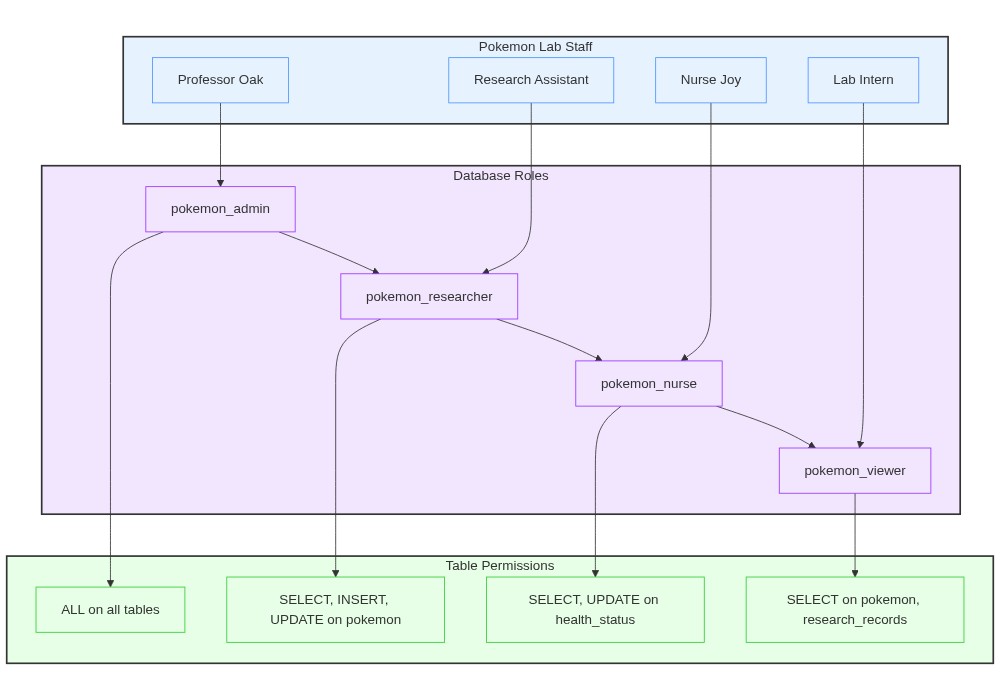
Importance of User Management and Security#
Proper user management is crucial for maintaining the security of your database. By creating separate user accounts and assigning appropriate privileges and roles, you can ensure that users have access only to the necessary data and operations. Some important security considerations include:
Use strong and unique passwords for user accounts.
Grant privileges based on the principle of least privilege, giving users only the permissions they need to perform their tasks.
Regularly review and audit user privileges to ensure they align with the users’ responsibilities.
Revoke unnecessary privileges and remove inactive user accounts to minimize security risks.
By leveraging PostgreSQL’s user management and role-based access control features, you can effectively manage user access, enforce security policies, and protect sensitive data in your database.
Basic Data Analytics in Postgres#
Data analytics is a powerful tool that allows us to extract meaningful insights from our data. PostgreSQL, with its robust SQL capabilities, provides a wide range of features to perform data analytics directly within the database. In this section, we’ll explore some basic data analytics techniques using our Pokemon Research Center database. Much (though not all!) of this will serve as a review of what we learned using SQLite in earlier chapters.
Aggregating Data#
One of the fundamental operations in data analytics is aggregation, which involves summarizing data to provide useful insights. Let’s start with some basic aggregation queries.
We can count the number of Pokemon each researcher is studying.
%%sql
SELECT researcher_id, COUNT(*) AS pokemon_count
FROM pokemon
GROUP BY researcher_id;
 * postgresql+psycopg2://@/postgres
2 rows affected.
| researcher_id | pokemon_count | |
|---|---|---|
| 0 | 1 | 4 |
| 1 | 2 | 2 |
This query groups the data by researcher_id and counts the number of Pokemon associated with each researcher. GROUP BY is a powerful SQL feature supported in both PostgreSQL and SQLite, but PostgreSQL can handle larger datasets more efficiently.
We can calculate the total funding allocated to each Pokemon.
%%sql
SELECT pokemon_id, SUM(funding) AS total_funding
FROM research_records
GROUP BY pokemon_id;
 * postgresql+psycopg2://@/postgres
6 rows affected.
| pokemon_id | total_funding | |
|---|---|---|
| 0 | 3 | 1000.00 |
| 1 | 5 | 1200.00 |
| 2 | 4 | 1500.00 |
| 3 | 6 | 1800.00 |
| 4 | 2 | 2200.00 |
| 5 | 1 | 2000.00 |
We can find the average level of Pokemon being studied by each researcher.
%%sql
SELECT researcher_id, ROUND(AVG(level),2) AS average_level
FROM pokemon
GROUP BY researcher_id;
 * postgresql+psycopg2://@/postgres
2 rows affected.
| researcher_id | average_level | |
|---|---|---|
| 0 | 1 | 38.75 |
| 1 | 2 | 22.50 |
Filtering Data#
Filtering data is essential to focus on specific subsets of data that meet certain criteria. Let’s explore some examples. First, we can retrieve all Pokemon that are currently injured.
%%sql
SELECT *
FROM pokemon
WHERE health_status = 'Injured';
 * postgresql+psycopg2://@/postgres
1 rows affected.
| id | name | species | researcher_id | level | health_status | abilities | |
|---|---|---|---|---|---|---|---|
| 0 | 3 | Aqua | Totodile | 2 | 30 | Injured | [Torrent, Sheer Force] |
We can find all researchers who are studying more than one Pokemon.
%%sql
SELECT
  researcher_id,
  COUNT(*) AS pokemon_count
FROM pokemon
GROUP BY researcher_id
HAVING COUNT(*) > 1;
 * postgresql+psycopg2://@/postgres
2 rows affected.
| researcher_id | pokemon_count | |
|---|---|---|
| 0 | 1 | 4 |
| 1 | 2 | 2 |
Joining Tables#
Joining tables allows us to combine data from multiple tables based on related columns. Let’s explore some examples.
We can retrieve a list of Pokemon along with their researchers’ names.
%%sql
SELECT
  p.name AS pokemon_name,
  r.name AS researcher_name
FROM
  pokemon p
  JOIN researchers r ON p.researcher_id = r.id;
 * postgresql+psycopg2://@/postgres
6 rows affected.
| pokemon_name | researcher_name | |
|---|---|---|
| 0 | Flare | Professor Oak |
| 1 | Aqua | Professor Elm |
| 2 | Bulby | Professor Oak |
| 3 | Scorch | Professor Elm |
| 4 | Wings | Professor Oak |
| 5 | Sparky | Professor Oak |
Now, let’s combine joins with aggregration to find the total funding received by each researcher.
%%sql
SELECT
  r.name AS researcher_name,
  SUM(rr.funding) AS total_funding
FROM
  researchers r
  JOIN pokemon p ON r.id = p.researcher_id
  JOIN research_records rr ON p.id = rr.pokemon_id
GROUP BY r.name;
 * postgresql+psycopg2://@/postgres
2 rows affected.
| researcher_name | total_funding | |
|---|---|---|
| 0 | Professor Oak | 7500.00 |
| 1 | Professor Elm | 2200.00 |
Advanced Analysis with Window Functions#
Window functions perform calculations across a set of table rows related to the current row. They are powerful tools for advanced data analytics.
For example, let’s rank Pokemon by their level within each researcher’s group.
%%sql
SELECT name, researcher_id, level,
       RANK() OVER (PARTITION BY researcher_id ORDER BY level DESC) AS rank
FROM pokemon;
 * postgresql+psycopg2://@/postgres
6 rows affected.
| name | researcher_id | level | rank | |
|---|---|---|---|---|
| 0 | Flare | 1 | 65 | 1 |
| 1 | Wings | 1 | 40 | 2 |
| 2 | Sparky | 1 | 30 | 3 |
| 3 | Bulby | 1 | 20 | 4 |
| 4 | Aqua | 2 | 30 | 1 |
| 5 | Scorch | 2 | 15 | 2 |
The key line here is RANK() OVER (PARTITION BY researcher_id ORDER BY level DESC) AS rank. Here’s what happens in this in line.
RANK(): This is a window ranking function that assigns a rank to each row based on the specified ordering within a window.OVER (PARTITION BY researcher_id ORDER BY level DESC): This clause defines the window for the ranking function.PARTITION BY researcher_id: This partitions the data into groups based on theresearcher_idcolumn. So, the ranking will be calculated independently for each researcher.ORDER BY level DESC: This orders the rows within each partition by thelevelcolumn in descending order (highest level first).
For another example, let’s calculate the moving average level of Pokemon for each researcher.
%%sql
SELECT name, researcher_id, level,
       AVG(level) OVER (PARTITION BY researcher_id ORDER BY level ROWS BETWEEN 1 PRECEDING AND 1 FOLLOWING) AS moving_avg
FROM pokemon;
 * postgresql+psycopg2://@/postgres
6 rows affected.
| name | researcher_id | level | moving_avg | |
|---|---|---|---|---|
| 0 | Bulby | 1 | 20 | 25.0000000000000000 |
| 1 | Sparky | 1 | 30 | 30.0000000000000000 |
| 2 | Wings | 1 | 40 | 45.0000000000000000 |
| 3 | Flare | 1 | 65 | 52.5000000000000000 |
| 4 | Scorch | 2 | 15 | 22.5000000000000000 |
| 5 | Aqua | 2 | 30 | 22.5000000000000000 |
The moving average is a technique used to smooth out data points by creating an average of different subsets of the complete data set. In the context of our Pokemon Research Center database, calculating the moving average of Pokemon levels can help us understand trends or patterns in the levels of Pokemon being studied by each researcher.
The key line here is: AVG(level) OVER (PARTITION BY researcher_id ORDER BY level ROWS BETWEEN 1 PRECEDING AND 1 FOLLOWING) AS moving_avg. Here’s a breakdown:
AVG(level): This specifies that we are calculating the average of thelevelcolumn.OVER: This clause defines the window for the window function.PARTITION BY researcher_id: This divides the result set into partitions based on theresearcher_id. The moving average is calculated within each partition (i.e., for each researcher separately).ORDER BY level: This orders the rows within each partition by thelevelcolumn.ROWS BETWEEN 1 PRECEDING AND 1 FOLLOWING: This defines the window frame, which includes the current row, the row immediately before it, and the row immediately after it. Thus, the moving average is calculated over three rows: the current row, the previous row, and the next row.
The result is “smoothed representation” of the level, which is obtained by taking the mean of three values: the current row, the previous row, and the next row.
JSON Data in PostgreSQL#
PostgreSQL provides robust support for JSON data through two distinct data types: JSON and JSONB. While both can store JSON documents, they have different characteristics and use cases.
JSON Type#
Stores an exact copy of the input text
Slower to process (must be parsed on each operation)
Preserves whitespace, duplicate keys, and key ordering
Best for write-heavy applications where data rarely needs to be processed
JSONB Type#
Stores data in a decomposed binary format
Faster to process (no parsing needed)
Removes whitespace, removes duplicate keys (last value wins), doesn’t preserve key ordering
Supports indexing
Best for read-heavy applications where data needs to be queried and processed
Creating Tables with JSON Columns#
%%sql

-- Using JSON type
DROP TABLE IF EXISTS pokemon_stats;
CREATE TABLE pokemon_stats (
    id SERIAL PRIMARY KEY,
    name VARCHAR(50),
    stats JSON
);

-- Using JSONB type
DROP TABLE IF EXISTS pokemon_abilities;
CREATE TABLE pokemon_abilities (
    id SERIAL PRIMARY KEY,
    name VARCHAR(50),
    abilities JSONB
);

-- Inserting into JSON column
INSERT INTO pokemon_stats (name, stats)
VALUES (
    'Pikachu',
    '{"hp": 35, "attack": 55, "defense": 40, "speed": 90}'
);

-- Inserting into JSONB column
INSERT INTO pokemon_abilities (name, abilities)
VALUES (
    'Charizard',
    '{"primary": "Blaze", "hidden": "Solar Power", "moves": ["Flamethrower", "Dragon Claw"]}'
);
 * postgresql+psycopg2://@/postgres
Done.
Done.
Done.
Done.
1 rows affected.
1 rows affected.
%%sql
-- Get a specific field as JSON
SELECT stats->'hp' FROM pokemon_stats WHERE name = 'Pikachu';
 * postgresql+psycopg2://@/postgres
1 rows affected.
| ?column? | |
|---|---|
| 0 | 35 |
%%sql
-- Get a specific field as text
SELECT stats->>'hp' FROM pokemon_stats WHERE name = 'Pikachu';
 * postgresql+psycopg2://@/postgres
1 rows affected.
| ?column? | |
|---|---|
| 0 | 35 |
%%sql
-- Access nested elements
SELECT abilities#>'{moves,0}' FROM pokemon_abilities WHERE name = 'Charizard';
 * postgresql+psycopg2://@/postgres
1 rows affected.
| ?column? | |
|---|---|
| 0 | Flamethrower |
%%sql
-- Find all Pokemon with HP greater than 30
SELECT name
FROM pokemon_stats
WHERE (stats->>'hp')::integer > 30;
 * postgresql+psycopg2://@/postgres
1 rows affected.
| name | |
|---|---|
| 0 | Pikachu |
%%sql
-- Find Pokemon with specific ability
SELECT name
FROM pokemon_abilities
WHERE abilities->>'primary' = 'Blaze';
 * postgresql+psycopg2://@/postgres
1 rows affected.
| name | |
|---|---|
| 0 | Charizard |
%%sql

-- Find Pokemon with specific move in array
SELECT name
FROM pokemon_abilities
WHERE abilities#>'{moves}' ? 'Flamethrower';
 * postgresql+psycopg2://@/postgres
1 rows affected.
| name | |
|---|---|
| 0 | Charizard |
%%sql
--Create a generalized inverted index using
CREATE INDEX idx_abilities ON pokemon_abilities USING GIN (abilities);
 * postgresql+psycopg2://@/postgres
Done.
Best Practices#
Choose the Right Type
Use JSONB for most cases unless you specifically need the features of JSON
JSON is better when you need to preserve exact formatting or have write-heavy workloads
Indexing Considerations
Create indexes only on frequently queried fields
Use partial indexes for better performance on specific queries
Consider the trade-off between query performance and index maintenance overhead
Schema Design
Don’t use JSON/JSONB just because you can - regular columns are often better for fixed structures
Use JSON/JSONB for:
Semi-structured data
Data with varying schemas
Arrays of complex objects
Rarely queried attributes
Performance Optimization
Use JSONB for better query performance
Create appropriate indexes based on your query patterns
Extract frequently queried fields into regular columns if they become part of your fixed schema
Computed columns#
A computed column (also called a generated column) is a column whose value is derived automatically from an expression involving the other columns in the row. You never write to it directly. The database keeps it in sync.
PostgreSQL supports GENERATED ALWAYS AS (...) STORED. The expression runs whenever the row is inserted or updated, and the result is stored on disk like any other column.
At the Pokemon Research Center, Professor Oak’s team wants a quick display label for each Pokemon — the Pokemon’s nickname combined with its species. A computed column gives them that without changing any application code.
%%sql
ALTER TABLE pokemon
ADD COLUMN display_label TEXT
GENERATED ALWAYS AS (name || ' the ' || species) STORED;
%%sql
SELECT name, species, display_label
FROM pokemon
LIMIT 5;
A few things to keep in mind:
The expression can only reference columns in the same row. It cannot run a subquery.
A
STOREDgenerated column uses disk space and updates with each row change. PostgreSQL also supports virtual generated columns (computed at read time) in newer versions.Computed columns are great for derived display values, score calculations, and concatenations you don’t want to repeat in every query.
PostgreSQL Lab: Pikachu’s Detective Agency#
Welcome, aspiring database detectives! Pikachu has opened a detective agency in Ryme City and needs your help to set up and manage the case database. Follow these steps to assist in cracking the code and solving mysteries!
Using the code cells, below design and create three tables: “detectives”, “cases”, and “evidence”. The detectives table should include fields for detective ID, name, and specialty. The cases table should have fields for case ID, title, status, and lead detective ID (as a foreign key). The evidence table should record evidence ID, description, case ID (as a foreign key), and location found.
Insert at least five detectives into the detectives table. Include Pikachu and some other Pokémon known for their sleuthing skills. Get creative with their specialties!
Add at least eight cases to the cases table. Mix up the statuses between “Open”, “Closed”, and “Cold”. Ensure each detective is assigned to at least one case.
Record at least fifteen pieces of evidence in the evidence table, linking them to various cases. Be imaginative with the descriptions and locations!
Write a query to find out which detective has the most open cases. Display the detective’s name and the count of their open cases.
Create a stored procedure called “update_case_status” that takes the case ID and new status as parameters. The procedure should update the case’s status and print a message confirming the update, including the case title.
Write a query to determine the number of pieces of evidence for each case. Display the case title, status, and evidence count, ordered by evidence count in descending order.
Use a window function to rank the detectives based on the number of cases they’ve solved (closed cases). Display the detective’s name, specialty, number of solved cases, and rank.
Create a view called “case_summary” that shows each case’s title, status, lead detective name, and the number of evidence pieces associated with it.
Finally, write a query using the “case_summary” view to find the “coldest” cold case - the cold case with the most evidence. If there’s a tie, list all cold cases with the highest evidence count.
Remember, junior detectives, in the world of database investigation, every query counts! Your SQL skills are the magnifying glass that brings the clues into focus. Good luck, and may your joins be as strong as Pikachu’s Thunderbolt!
Chapter Summary#
Use this list as a self-check. After working through the chapter, you should be able to do each of the following:
You can name the key differences between PostgreSQL and SQLite.
You can install PostgreSQL, create a database, and define richer tables.
You can hash passwords appropriately when storing them in Postgres.
You can use array columns and perform
ALTER TABLEchanges.You can write and call stored procedures.
You can manage users and role-based access in Postgres.
You can compare on-site and cloud deployment options.
You can carry out basic analytics in Postgres.
You can create a user-defined function and call it from a
SELECT.You can add a computed column and explain when it is useful.
Practice with the Loop of the Recursive Dragon#
Sharpen what you just learned with a chapter-matched review set in the Loop of the Recursive Dragon — an adaptive review game with multiple question types and RPG-style mechanics, built for this book.
Glossary#
Use this list as a quick review sheet for the chapter.
PostgreSQL essentials#
PostgreSQL — An open-source, object-relational database management system known for reliability and rich features.
CREATE EXTENSION— A PostgreSQL command that loads optional features into a database, such as new data types or functions.plpgsql — A procedural language built into PostgreSQL, used to write functions and stored procedures.
pgcrypto — A PostgreSQL extension that provides cryptographic functions for encryption, hashing, and random data generation.
Strict typing — A characteristic of a language or database that enforces rigid type rules to reduce type-related errors.
Scalability — The ability of a system to handle growing amounts of work, data, or users efficiently.
Schema changes#
ADD CONSTRAINT— A SQL command that adds a constraint to an existing table, such as a primary key, foreign key, or check.ALTER COLUMN— A SQL command that modifies the properties of an existing column, such as its data type or default value.
Data types#
BOOLEAN— A data type that can hold TRUE, FALSE, or NULL.DATE— A data type that stores a calendar date without a time.TIME— A data type that stores a time of day.INTERVAL— A data type that stores a length of time, such as days, hours, or minutes.NUMERIC(p,s)— A data type for exact decimal numbers with a fixed precision and scale.INTEGER[]— A PostgreSQL array type that holds multiple integer values in one column.JSONB— A PostgreSQL data type that stores JSON in a binary form, allowing fast querying and indexing.ENUM— A data type made up of a fixed, ordered list of allowed values.CREATE TYPE my_type AS ENUM (v1, v2)— PostgreSQL syntax that creates a custom enumerated type with a defined list of values.Computed column — A column whose value is derived automatically from an expression involving other columns in the same row; also called a generated column.
Generated column — Another name for a computed column.
GENERATED ALWAYS AS (...) STORED— PostgreSQL syntax that defines a stored computed column; the expression is evaluated and saved when the row is inserted or updated.
Stored procedures#
Stored procedure — A named set of SQL and procedural statements stored in the database and called when needed.
User-defined function — A named, reusable expression that returns a value; callable from inside a
SELECTlike any built-in function.PL/pgSQL function — A user-defined function written in PostgreSQL’s procedural language; supports variables, conditionals, and loops.
CREATE FUNCTION name(args) RETURNS type LANGUAGE plpgsql AS $$ ... $$— SQL syntax that defines a new user-defined function in PL/pgSQL.CREATE PROCEDURE my_procedure(parameters) AS $$ ... $$— SQL syntax that defines a new stored procedure with parameters and a body of code enclosed in$$delimiters.
Users and security#
CREATE USER— A SQL command that creates a new user account in the database system.ALTER USER— A SQL command that changes attributes of a database user, such as password or role.DROP USER— A SQL command that removes a user account from the database system.CREATE ROLE— A SQL command that creates a new role for managing permissions and access.GRANT— A SQL command that gives a user or role specific privileges on database objects.GRANT operation ON t TO user— A form ofGRANTthat gives a user a specific operation, such asSELECTorINSERT, on a particular table.GRANT role TO user— A form ofGRANTthat assigns a role and its privileges to a user.REVOKE— A SQL command that removes specific privileges from a user or role.Principle of least privilege — A security idea that says users should get only the minimum access they need to do their work.
Hash function — A one-way function that turns input of any size into a fixed-size output, used for password storage and integrity checks.
Window functions#
Window function — A SQL function that performs a calculation across a set of rows related to the current row.
OVER (PARTITION BY c1 ORDER BY c2)— The clause that defines the window of rows over which a window function operates, partitioned byc1and ordered byc2.RANK()— A window function that assigns a rank to each row within its partition, leaving gaps when rows tie.